JavaScript comparison operators are used to compare two values and determine the relationship between them. They are an important part of JavaScript because programs constantly need to make decisions based on whether values are equal, different, greater, or smaller.
For example, you might want to check whether a user’s age is 18 or above, whether two passwords match, whether a product price is below a certain amount, or whether a score has reached a required value. Comparison operators make these checks possible.
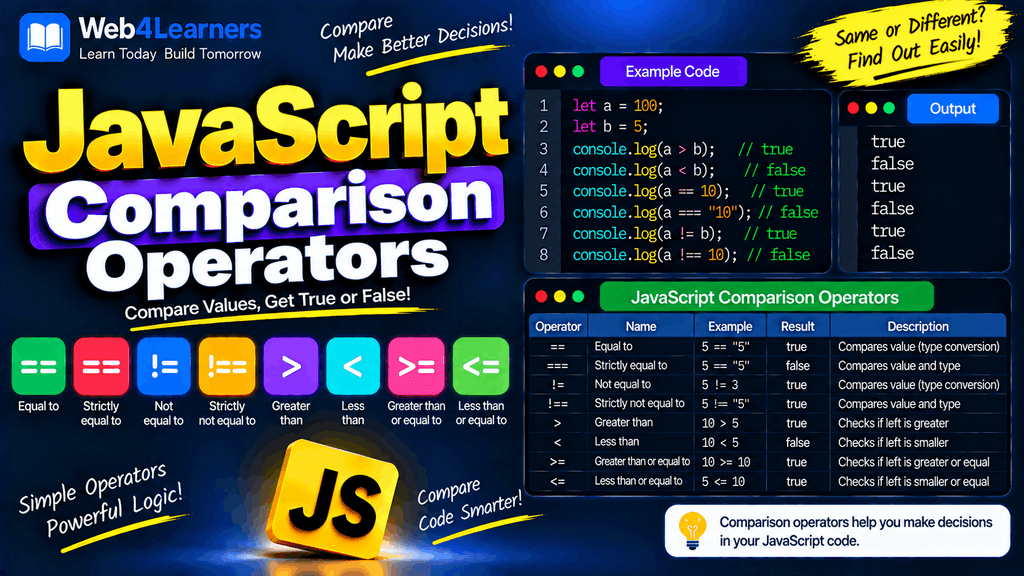
The result of a comparison is always a Boolean value, which means JavaScript returns either true or false.
let age = 20;

console.log(age >= 18);
Output:
true
In this tutorial, you will learn all the commonly used JavaScript comparison operators:
=====!=!==><>=<=
You will also learn the important difference between loose equality (==) and strict equality (===), which is one of the most important concepts for JavaScript beginners.
What Are Comparison Operators in JavaScript?
Comparison operators compare two values and return a Boolean result.
For example:
let a = 10;
let b = 20;

console.log(a < b);
Output:
true
JavaScript checks whether 10 is less than 20. Because the statement is true, the result is true.
If the comparison is not correct:
console.log(a > b);
Output:
false
Comparison operators are commonly used inside:
ifstatementselsestatements- loops
- functions
- validation
- form checking
- filtering
- searching
- application logic
- games
- calculations
JavaScript Comparison Operators List
JavaScript provides several comparison operators for checking equality and relationships between values.
| Operator | Name | Example | Result |
|---|---|---|---|
== | Loose equality | 5 == "5" | true |
=== | Strict equality | 5 === "5" | false |
!= | Loose inequality | 5 != "5" | false |
!== | Strict inequality | 5 !== "5" | true |
> | Greater than | 10 > 5 | true |
< | Less than | 5 < 10 | true |
>= | Greater than or equal to | 10 >= 10 | true |
<= | Less than or equal to | 10 <= 10 | true |
The first four operators are mainly concerned with equality and inequality, while the last four compare the relative size or ordering of values.
The == Loose Equality Operator
The == operator is called the loose equality operator.
It checks whether two values are equal after JavaScript performs certain type conversions when necessary.
For example:
let number = 10;

console.log(number == 10);
Output:
true
The values have the same number and type, so the comparison is true.
However, == can also return true when the two operands have different types.
console.log(10 == "10");
Output:
true
Here, one value is a number and the other is a string. JavaScript performs type coercion as part of the loose equality comparison.
Another Example of ==
console.log(5 == "5");
Output:
true
The string "5" is converted for the comparison, so JavaScript considers the values equal.
Why == Can Be Confusing
Consider:
console.log(0 == false);
Output:
true
And:
console.log("" == false);
Output:
true
These results happen because loose equality allows type coercion.
For beginners, this can sometimes make code harder to predict. That is one reason strict equality with === is commonly preferred when you want the comparison to include both value and type.
The === Strict Equality Operator
The === operator is called the strict equality operator.
It checks both the value and the data type of the operands.
console.log(10 === 10);
Output:
true
Both operands are numbers and have the same value.
Now consider:
console.log(10 === "10");
Output:
false
Although both values represent 10, their data types are different.
The first value is a number:
10
The second value is a string:
"10"
Because strict equality does not perform the same type coercion as ==, the result is false.
Comparing Strings with ===
let username = "John";

console.log(username === "John");
Output:
true
But:
console.log(username === "john");
Output:
false
String comparisons are case-sensitive.
Comparing Booleans with ===
let loggedIn = true;

console.log(loggedIn === true);
Output:
true
But:
console.log(loggedIn === "true");
Output:
false
The first value is a Boolean, while "true" is a string.
== vs ===
The difference between == and === is extremely important in JavaScript.
| Feature | == | === |
|---|---|---|
| Name | Loose equality | Strict equality |
| Compares value | Yes | Yes |
| Checks type | Not in the same strict way | Yes |
| Performs type coercion | Yes, when required | No |
10 == "10" | true | false |
| Common use | When coercion is intentionally desired | When exact equality is required |
For example:
console.log(10 == "10");
Result:
true
But:
console.log(10 === "10");
Result:
false
For most application code, === is often easier to reason about because it does not silently treat different types as equal.
The != Loose Inequality Operator
The != operator checks whether two values are not equal, using the loose equality rules.
For example:
console.log(10 != 20);
Output:
true
Because 10 and 20 are different.
Now consider:
console.log(10 != "10");
Output:
false
The values are treated as equal under loose equality, so the inequality comparison returns false.
The expression:
x != y
is related to:
!(x == y)
in terms of its loose equality semantics.
Example with Variables
let age = 25;

console.log(age != 18);
Output:
true
The value 25 is not equal to 18.
The !== Strict Inequality Operator
The !== operator is called the strict inequality operator.
It checks whether two values are different in value or type.
console.log(10 !== 20);
Output:
true
The values are different.
More importantly:
console.log(10 !== "10");
Output:
true
The values have different types, so strict inequality returns true.
!= vs !==
| Expression | Result |
|---|---|
10 != "10" | false |
10 !== "10" | true |
10 != 20 | true |
10 !== 20 | true |
The difference comes from type coercion.
!= uses loose comparison rules, while !== performs strict comparison.
The > Greater Than Operator
The > operator checks whether the value on the left is greater than the value on the right.
console.log(10 > 5);
Output:
true
Because 10 is greater than 5.
If the left value is smaller:
console.log(5 > 10);
Output:
false
Using > with Variables
let age = 25;

console.log(age > 18);
Output:
true
This type of comparison is useful when checking minimum requirements or limits.
For example:
let marks = 75;

if (marks > 40) {
    console.log("Pass");
}
Output:
Pass
Notice that 75 > 40 is true, so the code inside the if block runs.
The < Less Than Operator
The < operator checks whether the value on the left is less than the value on the right.
console.log(5 < 10);
Output:
true
Because 5 is less than 10.
If the left value is greater:
console.log(10 < 5);
Output:
false
Example with Variables
let price = 50;

console.log(price < 100);
Output:
true
This can be useful for checking whether a price is below a particular limit.
The >= Greater Than or Equal To Operator
The >= operator checks whether the left value is either greater than or equal to the right value.
console.log(10 >= 5);
Output:
true
It also returns true when both values are equal.
console.log(10 >= 10);
Output:
true
But:
console.log(5 >= 10);
Output:
false
Practical Example
Suppose a website requires users to be at least 18 years old.
let age = 18;

if (age >= 18) {
    console.log("Access allowed");
}
Output:
Access allowed
Using >= is appropriate because an age of exactly 18 should also satisfy the condition.
The <= Less Than or Equal To Operator
The <= operator checks whether the left value is less than or equal to the right value.
console.log(5 <= 10);
Output:
true
It also returns true when the values are equal.
console.log(10 <= 10);
Output:
true
But:
console.log(15 <= 10);
Output:
false
Practical Example
Suppose you want to check whether a product is within a budget of ₹1,000.
let price = 950;

if (price <= 1000) {
    console.log("Within budget");
}
Output:
Within budget
Comparison Operators Return Boolean Values
All comparison operators return either true or false.
console.log(10 > 5);
console.log(10 < 5);
console.log(10 === 10);
console.log(10 !== 20);
Output:
true
false
true
true
You can also check the type of the result:
let result = 10 > 5;

console.log(result);
console.log(typeof result);
Output:
true
boolean
This is because comparison expressions produce Boolean values.
Using Comparison Operators with if
Comparison operators are especially useful with conditional statements.
let age = 20;

if (age >= 18) {
    console.log("You are an adult.");
}
Output:
You are an adult.
The expression:
age >= 18
returns true, so JavaScript executes the code inside the if block.
Using else
let age = 16;

if (age >= 18) {
    console.log("You are an adult.");
} else {
    console.log("You are under 18.");
}
Output:
You are under 18.
Comparison operators therefore play an important role in controlling how a program behaves.
Comparing Numbers
Number comparisons are straightforward.
let a = 25;
let b = 10;

console.log(a > b);
console.log(a < b);
console.log(a >= b);
console.log(a <= b);
console.log(a === b);
console.log(a !== b);
Output:
true
false
true
false
false
true
These comparisons can be used for calculations, validation, scores, prices, quantities, and many other situations.
Comparing Strings
JavaScript can also compare strings.
console.log("apple" === "apple");
Output:
true
But:
console.log("apple" === "Apple");
Output:
false
The comparison is case-sensitive.
JavaScript also supports relational comparisons between strings based on their Unicode code unit values.
console.log("apple" < "banana");
Output:
true
For simple alphabetic comparisons this may appear similar to dictionary ordering, but string comparison in JavaScript follows Unicode-based ordering rules rather than a language-aware dictionary comparison.
Comparing Strings and Numbers
This is an area where beginners should be careful.
With loose equality:
console.log(10 == "10");
Output:
true
With strict equality:
console.log(10 === "10");
Output:
false
Relational operators such as < and > can also convert values when appropriate.
console.log("10" > 5);
Output:
true
The string "10" is converted to a numeric value for this relational comparison.
When working with user input, it is often clearer to convert values explicitly before performing calculations or comparisons.
let age = Number("20");

console.log(age >= 18);
Output:
true
Comparing null and undefined
JavaScript has special values called null and undefined, and comparisons involving them can sometimes produce surprising results.
For example:
console.log(null == undefined);
Output:
true
But:
console.log(null === undefined);
Output:
false
This happens because loose equality has special rules for null and undefined, while strict equality requires the same type.
For exact checks, use strict equality:
value === null
or:
value === undefined
Comparing NaN
NaN means Not-a-Number.
An important JavaScript behavior is that NaN is not equal to itself.
console.log(NaN === NaN);
Output:
false
It also does not equal itself with loose equality:
console.log(NaN == NaN);
Output:
false
To check whether a value is specifically NaN, use:
Number.isNaN(value);
For example:
let result = Number("hello");

console.log(Number.isNaN(result));
Output:
true
Comparing Boolean Values
Boolean values can also be compared.
console.log(true === true);
Output:
true
And:
console.log(false === true);
Output:
false
It is important to remember that:
true
is a Boolean, while:
"true"
is a string.
Therefore:
console.log(true === "true");
Output:
false
Comparison Operators in Loops
Comparison operators are commonly used to control loops.
For example:
for (let i = 1; i <= 5; i++) {
    console.log(i);
}
Output:
1
2
3
4
5
The condition:
i <= 5
is checked before each iteration.
As long as the comparison returns true, the loop continues.
Comparison Operators in Form Validation
Comparison operators are frequently used when validating user input.
For example:
let age = 21;

if (age >= 18) {
    console.log("You can continue.");
} else {
    console.log("You must be at least 18.");
}
Another example can check a password length:
let password = "JavaScript123";

if (password.length >= 8) {
    console.log("Password length is valid.");
}
Comparison operators therefore help applications enforce rules and requirements.
Comparison Operators in Games
Games often use comparisons to determine whether a player has achieved a particular score.
let score = 1200;

if (score >= 1000) {
    console.log("New level unlocked!");
}
Another example:
let health = 0;

if (health <= 0) {
    console.log("Game Over");
}
These simple comparisons can control important game events.
Equality Operators vs Relational Operators
JavaScript comparison operators can be grouped into two broad categories.
Equality and Inequality
These operators check whether values are equal or different:
==
===
!=
!==
Relational Operators
These operators check the relationship between values:
>
<
>=
<=
| Category | Operators | Purpose |
|---|---|---|
| Equality | ==, === | Check whether values are equal |
| Inequality | !=, !== | Check whether values are different |
| Greater/Less | >, < | Compare relative size |
| Inclusive comparison | >=, <= | Compare size including equality |
Common Mistakes with Comparison Operators
Confusing = with ==
The = operator assigns a value.
let age = 20;
The == operator compares values.
age == 20;
The === operator performs a strict comparison.
age === 20;
These operators should not be treated as interchangeable.
Using == When You Need an Exact Comparison
Consider:
console.log(10 == "10");
This returns:
true
If you need both the value and type to match, use:
console.log(10 === "10");
which returns:
false
Confusing != with !==
These operators have different comparison behavior.
console.log(10 != "10");
returns:
false
while:
console.log(10 !== "10");
returns:
true
Using the Wrong Inclusive Operator
If a condition should include the boundary value, use >= or <=.
For example, if a person must be at least 18:
age >= 18
is different from:
age > 18
With >, an age of exactly 18 would not satisfy the condition.
Best Practices for JavaScript Comparison Operators
Use === when you want a strict equality comparison.
if (userRole === "admin") {
    console.log("Admin access");
}
Use !== when you want strict inequality.
if (status !== "active") {
    console.log("Account is not active.");
}
Use >= and <= when boundary values should also be accepted.
if (marks >= 40) {
    console.log("Pass");
}
Be careful when comparing values that come from forms or other external sources because they may be strings.
Instead of relying on implicit conversion:
let age = "20";
consider explicitly converting the value:
let age = Number("20");

if (age >= 18) {
    console.log("Eligible");
}
Choose comparison operators based on the exact rule your program needs to implement.
JavaScript Comparison Operators Cheat Sheet
| Operator | Meaning | Example | Result |
|---|---|---|---|
== | Equal after type coercion when applicable | 5 == "5" | true |
=== | Strictly equal | 5 === "5" | false |
!= | Not equal using loose comparison | 5 != "5" | false |
!== | Strictly not equal | 5 !== "5" | true |
> | Greater than | 10 > 5 | true |
< | Less than | 5 < 10 | true |
>= | Greater than or equal to | 10 >= 10 | true |
<= | Less than or equal to | 10 <= 10 | true |
A Practical Example Using Comparison Operators
The following example uses several comparison operators in a simple student result program.
let marks = 75;

if (marks >= 90) {
    console.log("Grade A");
} else if (marks >= 75) {
    console.log("Grade B");
} else if (marks >= 40) {
    console.log("Pass");
} else {
    console.log("Fail");
}
Output:
Grade B
The program checks the student’s marks against different values and executes the appropriate block.
Another example can check a user’s age and account status:
let age = 22;
let accountStatus = "active";

if (age >= 18 && accountStatus === "active") {
    console.log("Access granted");
} else {
    console.log("Access denied");
}
Here, comparison operators are combined with a logical operator to create a more complete condition.
Frequently Asked Questions
What are comparison operators in JavaScript?
Comparison operators are used to compare two values. They return either true or false.
Common comparison operators include ==, ===, !=, !==, >, <, >=, and <=.
What is the difference between == and ===?
== performs loose equality comparison and can perform type coercion.
10 == "10"
returns true.
=== performs strict equality comparison and requires the values to have the same type as well.
10 === "10"
returns false.
What is the difference between != and !==?
!= performs loose inequality comparison, while !== performs strict inequality comparison.
10 != "10";   // false
10 !== "10";  // true
What does > mean in JavaScript?
The > operator checks whether the left value is greater than the right value.
10 > 5
returns true.
What does < mean in JavaScript?
The < operator checks whether the left value is less than the right value.
5 < 10
returns true.
What does >= mean in JavaScript?
The >= operator checks whether the left value is greater than or equal to the right value.
10 >= 10
returns true.
What does <= mean in JavaScript?
The <= operator checks whether the left value is less than or equal to the right value.
10 <= 10
returns true.
Do comparison operators return Boolean values?
Yes. Comparison expressions return either true or false.
let result = 10 > 5;

console.log(result);
Output:
true
Which equality operator is commonly preferred in JavaScript?
When you want an exact equality comparison without type coercion, === is commonly preferred.
if (age === 18) {
    console.log("Age is exactly 18");
}
Can comparison operators compare strings?
Yes. JavaScript can compare strings for equality and relational relationships. String equality is case-sensitive.
console.log("JavaScript" === "JavaScript");
returns true, while:
console.log("JavaScript" === "javascript");
returns false.
1 thought on “JavaScript Comparison Operators”