Boolean is one of the simplest and most important data types in JavaScript. A Boolean value can have only two possible values: true or false. These two values are used throughout JavaScript to represent conditions, decisions, states, results of comparisons, and whether something is considered enabled or disabled.
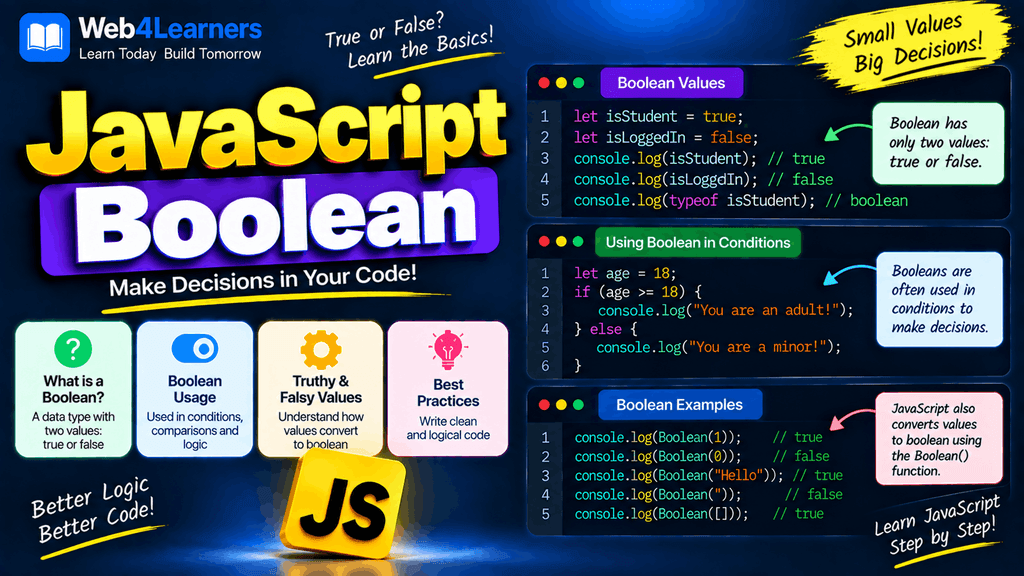
Whenever a JavaScript program needs to answer a question such as whether a user is logged in, whether a password is correct, whether a number is greater than another number, whether a product is available, or whether a checkbox is selected, Boolean values are commonly involved.
For example:
let isLoggedIn = true;
let isAdmin = false;
In this example, isLoggedIn contains true, while isAdmin contains false.
Boolean values become especially useful when combined with conditional statements, comparison operators, logical operators, loops, functions, and form validation. Understanding Booleans is therefore an important step before moving into more advanced JavaScript programming.
In this tutorial, you will learn what Boolean values are, how to create Boolean variables, how comparison operators produce Boolean results, how logical operators work, what truthy and falsy values mean, how to convert values into Booleans, and how Boolean values are used in practical JavaScript applications.
What Is a Boolean in JavaScript?
A Boolean is a JavaScript data type that has only two possible values:
true
false
The value true represents a positive or enabled condition, while false represents a negative or disabled condition.
For example:
let isOnline = true;
let isVerified = false;
You can check the data type using the typeof operator.
let isOnline = true;

console.log(typeof isOnline);
Output:
booleanThe JavaScript Boolean data type is written as boolean when returned by typeof.
Creating Boolean Values
You can directly assign true or false to a variable.
let isLoggedIn = true;
let hasPermission = false;
let isAvailable = true;
Boolean values do not need quotation marks.
Correct:
let isActive = true;Incorrect if you want an actual Boolean:
let isActive = "true";The second example creates a string, not a Boolean.
You can see the difference here:
let value1 = true;
let value2 = "true";

console.log(typeof value1);
console.log(typeof value2);
Output:
boolean
string
The quotation marks make "true" a string.
True and False in JavaScript
JavaScript Boolean values are written using lowercase letters.
let result = true;
let status = false;
You should not write:
let result = True;or:
let result = TRUE;JavaScript is case-sensitive, so true and false are the valid Boolean literals.
Boolean Values From Comparisons
One of the most common ways to get a Boolean value is by comparing two values.
For example:
let age = 25;

console.log(age >= 18);
Output:
trueThe expression asks whether age is greater than or equal to 18. Because 25 satisfies the condition, JavaScript returns true.
Another example:
let score = 30;

console.log(score >= 50);
Output:
falseThe result is false because 30 is not greater than or equal to 50.
Comparison Operators That Return Boolean Values
JavaScript comparison operators return either true or false.
| Operator | Meaning | Example | Result |
|---|---|---|---|
> | Greater than | 10 > 5 | true |
< | Less than | 10 < 5 | false |
>= | Greater than or equal | 10 >= 10 | true |
<= | Less than or equal | 5 <= 10 | true |
=== | Strict equality | 10 === 10 | true |
!== | Strict inequality | 10 !== 5 | true |
== | Loose equality | 10 == "10" | true |
!= | Loose inequality | 10 != 5 | true |
For example:
console.log(10 > 5);
console.log(10 < 5);
console.log(10 === 10);
console.log(10 !== 5);
Output:
true
false
true
true
Boolean With Strict Equality
The strict equality operator === checks both the value and the data type.
console.log(10 === 10);Output:
trueBut:
console.log(10 === "10");Output:
falseThe first value is a Number and the second value is a String, so strict equality returns false.
This distinction is important when working with form input because values retrieved from HTML form fields are commonly strings.
Boolean With Loose Equality
The == operator performs type conversion when comparing values.
console.log(10 == "10");Output:
trueJavaScript considers the values equal after type conversion.
Because implicit type conversion can sometimes make code harder to understand, developers commonly prefer === and !== when they want predictable comparisons.
Boolean Logical Operators
Logical operators allow you to combine multiple Boolean expressions.
JavaScript provides three primary logical operators:
| Operator | Name | Description |
|---|---|---|
&& | AND | Returns true when both conditions are true |
| ` | ` | |
! | NOT | Reverses a Boolean value |
These operators are essential when creating more complex conditions.
The AND Operator
The && operator represents logical AND.
The result is true only when both conditions are true.
let age = 25;
let hasLicense = true;

console.log(age >= 18 && hasLicense);
Output:
trueIf either condition is false, the result becomes false.
let age = 17;
let hasLicense = true;

console.log(age >= 18 && hasLicense);
Output:
falseThe condition fails because the user is not at least 18.
AND truth table
| Condition A | Condition B | A && B |
|---|---|---|
true | true | true |
true | false | false |
false | true | false |
false | false | false |
The OR Operator
The || operator represents logical OR.
It returns true when at least one condition is true.
let isAdmin = false;
let isEditor = true;

console.log(isAdmin || isEditor);
Output:
trueBoth conditions need to be false for the result to be false.
let isAdmin = false;
let isEditor = false;

console.log(isAdmin || isEditor);
Output:
falseOR truth table
| Condition A | Condition B | A || B |
|—|—|—|
| true | true | true |
| true | false | true |
| false | true | true |
| false | false | false |
The NOT Operator
The ! operator reverses a Boolean value.
If the original value is true, ! makes it false.
let isLoggedIn = true;

console.log(!isLoggedIn);
Output:
falseIf the original value is false, ! makes it true.
let isLoggedIn = false;

console.log(!isLoggedIn);
Output:
trueThe NOT operator is frequently used when checking whether something is not enabled, not available, or not completed.
Boolean Expressions
A Boolean expression is an expression that evaluates to either true or false.
For example:
10 > 5returns:
trueAnother example:
20 === 10returns:
falseBoolean expressions are commonly used inside if statements.
let age = 20;

if (age >= 18) {
    console.log("You are eligible.");
}
The expression age >= 18 produces a Boolean value.
Boolean Values in if Statements
Boolean expressions are frequently used to control program execution.
let isLoggedIn = true;

if (isLoggedIn) {
    console.log("Welcome back!");
}
Because isLoggedIn is true, the code inside the if block runs.
If the value is false:
let isLoggedIn = false;

if (isLoggedIn) {
    console.log("Welcome back!");
}
the code inside the block does not execute.
You can also use else.
let isLoggedIn = false;

if (isLoggedIn) {
    console.log("Welcome back!");
} else {
    console.log("Please log in.");
}
Output:
Please log in.Truthy and Falsy Values
JavaScript has a concept called truthy and falsy values.
Not every value in JavaScript is literally true or false, but JavaScript can evaluate many values as either truthy or falsy when they are used in a Boolean context.
Falsy values include:
false0-00n""nullundefinedNaN
Most other JavaScript values are truthy.
For example:
if ("Hello") {
    console.log("This runs.");
}
The string "Hello" is truthy, so the code executes.
An empty string is falsy:
if ("") {
    console.log("This runs.");
} else {
    console.log("This does not run.");
}
Output:
This does not run.Understanding truthy and falsy values is extremely important when working with JavaScript conditions.
Converting Values to Boolean
You can explicitly convert a value into a Boolean using the Boolean() function.
For example:
console.log(Boolean(1));Output:
trueAnd:
console.log(Boolean(0));Output:
falseYou can also convert strings.
console.log(Boolean("Hello"));
console.log(Boolean(""));
Output:
true
false
The important point is that a non-empty string is truthy, while an empty string is falsy.
Boolean Conversion Examples
Here are some common conversions:
| Value | Boolean(value) |
|---|---|
true | true |
false | false |
1 | true |
0 | false |
-1 | true |
"Hello" | true |
"" | false |
null | false |
undefined | false |
NaN | false |
[] | true |
{} | true |
One important beginner concept is that an empty array [] and an empty object {} are truthy in JavaScript.
console.log(Boolean([]));
console.log(Boolean({}));
Output:
true
true
Double NOT for Boolean Conversion
Another common way to convert a value into a Boolean is the double NOT operator !!.
let value = "Hello";

console.log(!!value);
Output:
trueFor a falsy value:
let value = 0;

console.log(!!value);
Output:
falseThe first ! converts the value to a Boolean and reverses it, while the second ! reverses it again.
Although Boolean(value) is often easier for beginners to understand, you will frequently see !!value in existing JavaScript code.
Boolean and User Input
Boolean values are commonly used when processing form data.
For example, suppose a user needs to agree to terms and conditions.
let acceptedTerms = true;

if (acceptedTerms) {
    console.log("Registration can continue.");
} else {
    console.log("Please accept the terms.");
}
The Boolean variable clearly represents the state of the user’s decision.
Checkboxes are another common example.
let newsletterSubscribed = false;

if (newsletterSubscribed) {
    console.log("Newsletter enabled.");
} else {
    console.log("Newsletter disabled.");
}
Boolean for Application States
Boolean values are extremely useful for representing application states.
For example:
let isLoading = true;
let isMenuOpen = false;
let isDarkMode = true;
let isConnected = false;
These variables clearly communicate the current state of different parts of an application.
A web application might use:
if (isLoading) {
    console.log("Loading data...");
}
This type of state management is used extensively in frontend development.
Boolean Functions
A function can return a Boolean value.
For example:
function isAdult(age) {
    return age >= 18;
}

console.log(isAdult(25));
Output:
trueFor a younger age:
console.log(isAdult(16));Output:
falseFunctions that return Boolean values are particularly useful when creating validation and checking conditions.
Practical Boolean Example
Here is a simple login-style example:
let username = "john";
let password = "12345";

let correctUsername = "john";
let correctPassword = "12345";

let isUsernameCorrect = username === correctUsername;
let isPasswordCorrect = password === correctPassword;

if (isUsernameCorrect && isPasswordCorrect) {
    console.log("Login successful.");
} else {
    console.log("Invalid username or password.");
}
Output:
Login successful.This example demonstrates how comparison operators produce Boolean values and how the && operator combines those values to make a decision.
Practical Boolean Example With Age
You can use Boolean expressions to determine whether someone meets a particular condition.
let age = 21;

let isAdult = age >= 18;

console.log(isAdult);
Output:
trueThe result can then be used elsewhere:
if (isAdult) {
    console.log("The user is an adult.");
}
This approach keeps your code readable because the variable name explains what the Boolean represents.
Practical Boolean Example With Multiple Conditions
Suppose an application checks whether a user is eligible to access a feature.
let age = 25;
let isVerified = true;

let canAccess = age >= 18 && isVerified;

if (canAccess) {
    console.log("Access granted.");
} else {
    console.log("Access denied.");
}
Output:
Access granted.The Boolean variable canAccess represents the final result of the conditions.
Common Mistakes With JavaScript Booleans
Using "true" Instead of true
These values are not the same:
let a = true;
let b = "true";
a is a Boolean, while b is a string.
Using Capital Letters
JavaScript uses lowercase Boolean literals.
Correct:
true
false
Incorrect:
True
False
Confusing = With ===
The = operator assigns a value.
let isActive = true;The === operator compares values and types.
console.log(isActive === true);These operators have completely different purposes.
Assuming Empty Arrays Are Falsy
An empty array is actually truthy.
if ([]) {
    console.log("This runs.");
}
The same applies to an empty object:
if ({}) {
    console.log("This also runs.");
}
This is an important JavaScript behavior to understand when working with conditions.
Comparing Boolean Values Unnecessarily
You may see code such as:
if (isLoggedIn === true) {
    console.log("Logged in");
}
This works, but if isLoggedIn is already a Boolean, you can generally write:
if (isLoggedIn) {
    console.log("Logged in");
}
The second version is usually simpler and easier to read.
JavaScript Boolean Cheat Sheet
| Task | Example |
|---|---|
| Boolean true | true |
| Boolean false | false |
| Check type | typeof true |
| Greater than | 10 > 5 |
| Less than | 5 < 10 |
| Strict equality | 10 === 10 |
| Strict inequality | 10 !== 5 |
| AND | true && false |
| OR | `true |
| NOT | !true |
| Convert to Boolean | Boolean(value) |
| Double NOT | !!value |
| Truthy example | "Hello" |
| Falsy example | "" |
| Falsy number | 0 |
| Falsy null | null |
| Falsy undefined | undefined |
Frequently Asked Questions About JavaScript Boolean
What is a Boolean in JavaScript?
A Boolean is a data type that has only two values: true and false. Boolean values are commonly used for conditions, states, comparisons, and decision-making.
How do you create a Boolean in JavaScript?
You can directly assign true or false to a variable.
let isActive = true;
let isDeleted = false;
What is the difference between true and "true"?
true is a Boolean value, while "true" is a string containing the word true.
typeof true;    // "boolean"
typeof "true";  // "string"
What are truthy and falsy values?
Truthy and falsy describe how JavaScript values behave when evaluated in a Boolean context. Values such as false, 0, "", null, undefined, and NaN are falsy, while most other values are truthy.
How do you convert a value into a Boolean?
You can use the Boolean() function.
Boolean("Hello");This returns:
trueWhat does !! mean in JavaScript?
The double NOT operator !! is commonly used to convert a value into its Boolean equivalent.
console.log(!!"Hello");Output:
trueWhat is the difference between && and ||?
&& returns a truthy result only when both conditions are truthy, while || returns a truthy result when at least one condition is truthy.
What does the ! operator do?
The ! operator reverses the Boolean meaning of a value.
!true;  // false
!false; // true
Are empty arrays and objects falsy?
No. Empty arrays [] and empty objects {} are truthy values in JavaScript.
Why are Booleans important in JavaScript?
Booleans are fundamental to decision-making in JavaScript. They are used in conditional statements, loops, form validation, authentication states, UI controls, application states, comparisons, and many other programming tasks.