When working with JavaScript, it is often important to know what type of value a variable contains. For example, you may need to determine whether a value is a string, number, boolean, object, or function before performing an operation.
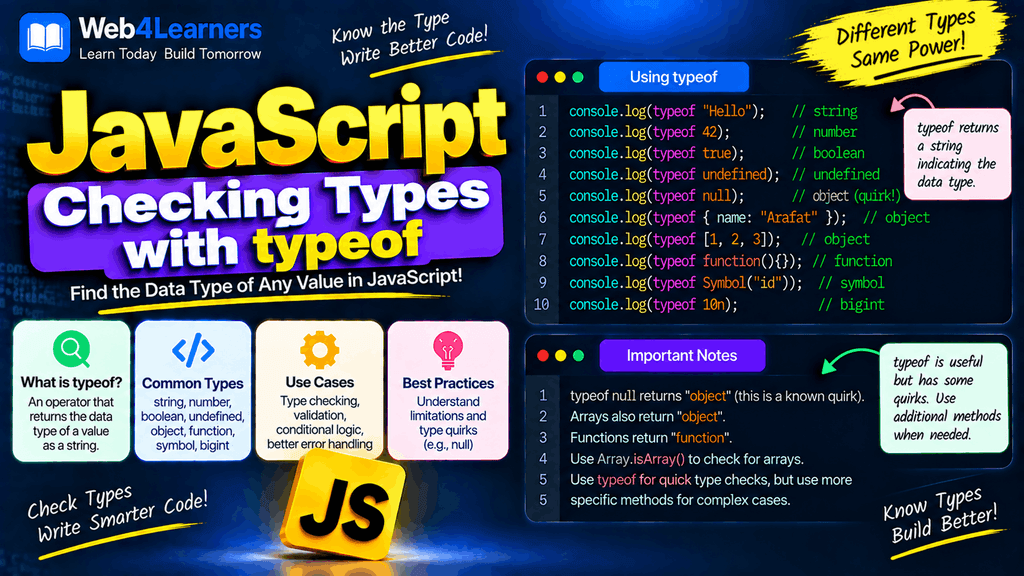
JavaScript provides a simple operator called typeof for checking the type of a value.
The typeof operator is one of the most commonly used tools when learning JavaScript data types. It is especially useful when debugging code, validating values, handling user input, and understanding how JavaScript treats different kinds of data.
In this tutorial, you will learn how the typeof operator works, how to check different JavaScript data types, how to use typeof with variables and expressions, and some important special cases such as typeof null, arrays, functions, and undeclared variables.
What Is the typeof Operator in JavaScript?
The typeof operator returns a string that describes the type of a JavaScript value.
The basic syntax is:
typeof value
For example:
const name = "John";

console.log(typeof name);
Output:
string
Here, typeof name tells us that the value stored in name is a string.
You can also use parentheses:
console.log(typeof(name));
Both forms work, although:
typeof name
is the more common style.
Image placement suggestion: Add a simple diagram here showing typeof value → "type" with examples such as "Hello" → string, 100 → number, and true → boolean.
Why Is typeof Useful?
JavaScript is dynamically typed, which means a variable does not have to be permanently associated with one specific data type.
For example:
let value = "Hello";

console.log(typeof value);

value = 100;

console.log(typeof value);
Output:
string
number
The variable value first contains a string and later contains a number.
Using typeof allows you to determine the type of the value currently stored in the variable.
It can be useful when:
- Debugging JavaScript code
- Checking function arguments
- Validating data
- Working with API responses
- Handling user input
- Checking whether a value exists
- Understanding JavaScript data types
- Writing conditional logic
Checking a String with typeof
A string is a sequence of characters enclosed in quotes.
const message = "Hello World";

console.log(typeof message);
Output:
string
You can use single quotes, double quotes, or template literals.
console.log(typeof "Hello");
console.log(typeof 'Hello');
console.log(typeof `Hello`);
All three return:
string
Checking a Number with typeof
JavaScript uses the number type for both integers and floating-point numbers.
const age = 25;
const price = 99.99;

console.log(typeof age);
console.log(typeof price);
Output:
number
number
Both values have the same JavaScript type.
typeof 100
returns:
number
And:
typeof 10.5
also returns:
number
Checking a Boolean with typeof
Boolean values are either true or false.
const isLoggedIn = true;

console.log(typeof isLoggedIn);
Output:
boolean
You can also check false:
console.log(typeof false);
Output:
boolean
Checking undefined with typeof
The typeof operator returns "undefined" for an undefined value.
let username;

console.log(typeof username);
Output:
undefined
You can also check the literal value:
console.log(typeof undefined);
Output:
undefined
This makes typeof particularly useful when checking whether a value is undefined.
Checking null with typeof
This is one of the most important JavaScript typeof behaviors to remember.
const value = null;

console.log(typeof value);
Output:
object
At first, this may seem incorrect because null is not an object.
The result "object" is a long-standing behavior in JavaScript that is preserved for compatibility with existing code.
So:
typeof null
returns:
object
If you specifically want to check whether a value is null, use:
value === null
For example:
const value = null;

console.log(value === null);
Output:
true
Important: Do not use typeof value === "object" when your goal is specifically to determine whether a value is null.
Checking a BigInt with typeof
BigInt is used for integers that need a range beyond the safe range of JavaScript’s regular number type.
const bigNumber = 12345678901234567890n;

console.log(typeof bigNumber);
Output:
bigint
Notice that the result is lowercase:
bigint
The n at the end of the number indicates a BigInt literal.
Checking a Symbol with typeof
Symbols are unique primitive values.
const id = Symbol("id");

console.log(typeof id);
Output:
symbol
Therefore:
typeof Symbol("id")
returns:
symbol
Checking an Object with typeof
For ordinary objects, typeof returns "object".
const user = {
    name: "John",
    age: 30
};

console.log(typeof user);
Output:
object
This tells you that user is an object.
Checking an Array with typeof
Here is another important behavior.
const numbers = [10, 20, 30];

console.log(typeof numbers);
Output:
object
Although arrays are a special kind of object in JavaScript, typeof does not return "array".
This is a common source of confusion for beginners.
How to Check Whether a Value Is an Array
Use:
Array.isArray()
For example:
const numbers = [10, 20, 30];

console.log(Array.isArray(numbers));
Output:
true
For a normal object:
const user = {
    name: "John"
};

console.log(Array.isArray(user));
Output:
false
Therefore, when checking specifically for an array, prefer:
Array.isArray(value)
rather than:
typeof value === "array"
because "array" is not a result returned by typeof.
Image placement suggestion: Add a comparison graphic here showing typeof [] → "object" and Array.isArray([]) → true.
Checking a Function with typeof
Functions are another special case.
function greet() {
    console.log("Hello");
}

console.log(typeof greet);
Output:
function
So typeof returns:
function
for callable functions.
You can also check a function expression:
const greet = function() {
    console.log("Hello");
};

console.log(typeof greet);
Output:
function
Arrow functions also return "function".
const add = (a, b) => a + b;

console.log(typeof add);
Output:
function
typeof Return Values
The following table summarizes the most common results of the typeof operator.
| Value | typeof Result |
|---|---|
"Hello" | "string" |
100 | "number" |
10.5 | "number" |
true | "boolean" |
undefined | "undefined" |
null | "object" |
123n | "bigint" |
Symbol("id") | "symbol" |
{} | "object" |
[] | "object" |
function() {} | "function" |
This table is worth remembering because several values have special behavior.
Using typeof with Variables
You can use typeof directly with a variable.
const username = "John";
const age = 30;
const active = true;

console.log(typeof username);
console.log(typeof age);
console.log(typeof active);
Output:
string
number
boolean
This can be useful when debugging a program.
Using typeof with Expressions
typeof does not only work with variables. You can use it with expressions too.
console.log(typeof (10 + 20));
Output:
number
Another example:
console.log(typeof ("Hello " + "World"));
Output:
string
You can also check the result of a comparison:
console.log(typeof (10 > 5));
Output:
boolean
The expression 10 > 5 produces true, which is a boolean value.
Using typeof with Mathematical Expressions
Arithmetic expressions normally produce numbers.
const result = 10 + 20;

console.log(result);
console.log(typeof result);
Output:
30
number
You can also check more complex expressions:
console.log(typeof (100 / 4));
Output:
number
Using typeof with Comparison Expressions
Comparison operators return boolean values.
const result = 20 > 10;

console.log(result);
console.log(typeof result);
Output:
true
boolean
The same applies to equality comparisons:
console.log(typeof (10 === 10));
Output:
boolean
Using typeof in an if Statement
You can use typeof to perform conditional checks.
const value = "Hello";

if (typeof value === "string") {
    console.log("The value is a string.");
}
Output:
The value is a string.
This pattern is useful when your code expects a particular type.
Checking Multiple Types
You can check different possible types using conditional statements.
const value = 100;

if (typeof value === "string") {
    console.log("String");
} else if (typeof value === "number") {
    console.log("Number");
} else if (typeof value === "boolean") {
    console.log("Boolean");
} else {
    console.log("Other type");
}
Output:
Number
This can be useful when processing values whose types are not known in advance.
Checking Function Parameters
typeof is sometimes useful for checking function arguments.
function showName(name) {
    if (typeof name !== "string") {
        console.log("Name must be a string.");
        return;
    }

    console.log("Name:", name);
}

showName("John");
Output:
Name: John
If you pass a number:
showName(100);
Output:
Name must be a string.
This technique can help prevent unexpected values from entering a function.
Checking Whether a Variable Is Undefined
One useful feature of typeof is that it can safely check an undeclared identifier without immediately throwing a ReferenceError.
For example:
console.log(typeof someUnknownVariable);
Output:
undefined
This is different from directly accessing the variable:
console.log(someUnknownVariable);
which would cause a ReferenceError.
However, this does not mean you should use undeclared variables in your programs. It is simply a special behavior of the typeof operator.
typeof with Declared but Undefined Variables
Consider:
let username;

console.log(typeof username);
Output:
undefined
Here, the variable exists but has the value undefined.
This is different conceptually from an identifier that has never been declared.
typeof and var
Variables declared with var behave similarly when they have not been assigned a value.
var age;

console.log(typeof age);
Output:
undefined
typeof and let
The same applies to a declared let variable once it has been initialized.
let name;

console.log(typeof name);
Output:
undefined
However, there is an important difference when accessing a let or const variable before its declaration is evaluated.
The Temporal Dead Zone
Consider:
console.log(typeof name);

let name = "John";
This does not behave like an ordinary undeclared variable check. It throws a ReferenceError because name is in the Temporal Dead Zone before its declaration is initialized.
The same concept applies to const.
console.log(typeof age);

const age = 30;
This also results in a ReferenceError.
Therefore, the idea that typeof is always safe for any unknown identifier has an important exception involving lexical declarations such as let and const.
typeof and NaN
NaN means Not-a-Number, although JavaScript treats it as part of the number type.
console.log(typeof NaN);
Output:
number
This can seem strange at first.
You can check whether a value is actually NaN using:
Number.isNaN(value)
For example:
const value = NaN;

console.log(typeof value);
console.log(Number.isNaN(value));
Output:
number
true
typeof and Infinity
Infinity also has the number type.
console.log(typeof Infinity);
Output:
number
For example:
const value = 10 / 0;

console.log(value);
console.log(typeof value);
Output:
Infinity
number
So typeof tells you the broad JavaScript type, not whether the number is finite.
You can use:
Number.isFinite(value)
when you need to check for a finite number.
typeof and Date Objects
A Date is an object.
const today = new Date();

console.log(typeof today);
Output:
object
If you need to determine whether a value is specifically a Date object, typeof alone is not sufficient.
You can use:
value instanceof Date
For example:
const today = new Date();

console.log(today instanceof Date);
Output:
true
typeof and Regular Expressions
Regular expressions are also objects.
const pattern = /hello/;

console.log(typeof pattern);
Output:
object
You can use:
pattern instanceof RegExp
when you need a more specific check.
typeof and Classes
JavaScript classes are functions at the language level.
For example:
class User {
    constructor(name) {
        this.name = name;
    }
}

console.log(typeof User);
Output:
function
This is another example of why typeof provides a broad category rather than a complete description of what a value represents.
typeof and Object Instances
Suppose you create an instance of a class:
class User {
    constructor(name) {
        this.name = name;
    }
}

const user = new User("John");

console.log(typeof user);
Output:
object
You can use instanceof to check whether the object was created from a particular class.
console.log(user instanceof User);
Output:
true
typeof vs instanceof
These operators answer different questions.
typeof is useful for checking broad JavaScript types.
typeof value
instanceof is useful for checking whether an object is an instance of a particular constructor or class.
value instanceof User
For example:
const numbers = [];

console.log(typeof numbers);
console.log(numbers instanceof Array);
Output:
object
true
| Operator | Main Purpose |
|---|---|
typeof | Checks broad JavaScript type |
instanceof | Checks object inheritance/instance relationship |
Array.isArray() | Specifically checks for arrays |
Object.prototype.toString.call() | Can provide more specific built-in type information |
typeof vs Array.isArray()
These should not be confused.
const numbers = [1, 2, 3];

console.log(typeof numbers);
console.log(Array.isArray(numbers));
Output:
object
true
Use typeof when you want to know that the value is an object at the broad type level.
Use Array.isArray() when you specifically need to determine whether the value is an array.
typeof vs null
Because:
typeof null
returns:
object
you should use:
value === null
when checking specifically for null.
For example:
const value = null;

if (value === null) {
    console.log("Value is null.");
}
Output:
Value is null.
Combining typeof with Other Checks
Sometimes you need more than one check.
For example, suppose you want to check whether a value is a non-null object:
function isObject(value) {
    return typeof value === "object" && value !== null;
}

console.log(isObject({}));
console.log(isObject(null));
console.log(isObject("Hello"));
Output:
true
false
false
This is a common pattern because typeof null returns "object".
However, remember that arrays also satisfy this broad object check.
Checking for a String
A simple type check looks like this:
const value = "JavaScript";

if (typeof value === "string") {
    console.log("This is a string.");
}
Checking for a Number
const value = 100;

if (typeof value === "number") {
    console.log("This is a number.");
}
If you need a valid finite number rather than just anything with the number type, use an additional check such as Number.isFinite().
Checking for a Boolean
const value = true;

if (typeof value === "boolean") {
    console.log("This is a boolean.");
}
Checking for a Function
const greet = () => {
    console.log("Hello");
};

if (typeof greet === "function") {
    console.log("This is a function.");
}
Output:
This is a function.
Checking for an Object
A basic object check can be written as:
const user = {
    name: "John"
};

if (typeof user === "object" && user !== null) {
    console.log("This is an object.");
}
The value !== null condition is necessary if you want to exclude null.
Practical Example: Type Checking User Input
Suppose a function expects a number:
function calculatePrice(price) {
    if (typeof price !== "number") {
        console.log("Please provide a number.");
        return;
    }

    console.log(price * 2);
}

calculatePrice(50);
Output:
100
If a string is passed:
calculatePrice("50");
Output:
Please provide a number.
This illustrates how typeof can be used to validate function arguments.
Practical Example: Handling Different Values
You can create a function that handles values differently depending on their type.
function showType(value) {
    if (typeof value === "string") {
        console.log("You provided a string.");
    } else if (typeof value === "number") {
        console.log("You provided a number.");
    } else if (typeof value === "boolean") {
        console.log("You provided a boolean.");
    } else {
        console.log("You provided another type.");
    }
}

showType("Hello");
showType(100);
showType(true);
Output:
You provided a string.
You provided a number.
You provided a boolean.
Practical Example: API Data
When working with APIs, you may receive data whose structure is not guaranteed.
For example:
const response = {
    username: "John",
    age: 30
};

if (typeof response.username === "string") {
    console.log("Username is valid.");
}

if (typeof response.age === "number") {
    console.log("Age is a number.");
}
Output:
Username is valid.
Age is a number.
In real applications, more comprehensive validation is often necessary, but typeof can be one part of that process.
Common Mistakes with typeof
Expecting typeof null to Return "null"
This is incorrect:
typeof null === "null"
The result is:
false
JavaScript returns:
object
Use:
value === null
to check for null.
Expecting Arrays to Return "array"
This is incorrect:
typeof [] === "array"
The result is:
false
Use:
Array.isArray([])
instead.
Forgetting That NaN Is a Number Type
typeof NaN
returns:
number
If you need to check for NaN, use:
Number.isNaN(value)
Assuming typeof Identifies the Exact Object Type
For example:
typeof new Date()
returns:
object
It does not return "date".
Similarly, arrays, regular expressions, and many other built-in objects return "object".
Assuming typeof Always Safely Handles Unknown Names
This works for an undeclared identifier:
typeof unknownVariable
But a let or const declaration in its Temporal Dead Zone can produce a ReferenceError.
console.log(typeof value);

let value = 10;
Therefore, understand the declaration context before relying on this behavior.
Best Practices for Using typeof
Use typeof when you need a broad type check.
typeof value === "string"
For arrays, use:
Array.isArray(value)
For null, use:
value === null
For specific class instances, consider:
value instanceof MyClass
For numbers where validity matters, combine type checking with appropriate number checks:
typeof value === "number" && Number.isFinite(value)
Do not assume that "object" means the value is an ordinary object. Arrays, dates, regular expressions, and other built-in objects also produce "object".
JavaScript typeof Cheat Sheet
| Value | Result |
|---|---|
"JavaScript" | "string" |
100 | "number" |
10.5 | "number" |
true | "boolean" |
undefined | "undefined" |
null | "object" |
123n | "bigint" |
Symbol("id") | "symbol" |
{} | "object" |
[] | "object" |
new Date() | "object" |
/hello/ | "object" |
function() {} | "function" |
NaN | "number" |
Infinity | "number" |
Frequently Asked Questions About JavaScript typeof
What does typeof do in JavaScript?
The typeof operator returns a string indicating the JavaScript type of a value.
console.log(typeof "Hello");
Output:
string
What does typeof null return?
It returns:
object
This is a historical behavior of JavaScript. To specifically check for null, use:
value === null
What does typeof [] return?
It returns:
object
To determine whether a value is an array, use:
Array.isArray(value)
What does typeof function return?
It returns:
function
For example:
function greet() {}

console.log(typeof greet);
What does typeof undefined return?
It returns:
undefined
What does typeof NaN return?
It returns:
number
Although NaN means “Not-a-Number”, JavaScript represents it using the number data type.
What does typeof BigInt return?
A BigInt value returns:
bigint
For example:
console.log(typeof 100n);
What does typeof Symbol() return?
A Symbol returns:
symbol
For example:
console.log(typeof Symbol("id"));
Is typeof a function?
No. typeof is an operator, not a function.
You normally write:
typeof value
rather than:
typeof(value)
Parentheses can be used for grouping, but typeof itself is not being called as a function.
Can typeof check an undeclared variable?
Yes, in many cases:
console.log(typeof unknownVariable);
returns:
undefined
However, typeof does not bypass the Temporal Dead Zone for let and const declarations.
Is typeof case-sensitive?
The returned strings are lowercase.
For example:
typeof "Hello"
returns:
string
Therefore, a comparison should use:
typeof value === "string"
not:
typeof value === "String"