JavaScript provides several built-in data types for working with different kinds of values. One of the more specialized primitive data types is the Symbol. A Symbol is mainly used when you need a value that is guaranteed to be unique.
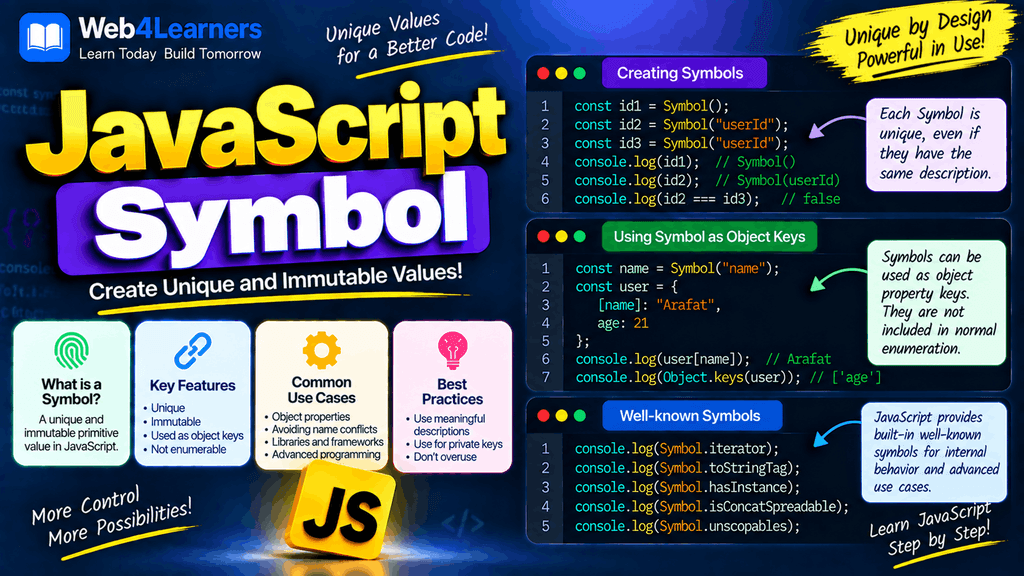
Unlike strings, numbers, or booleans, Symbols are not usually used to store ordinary application data. Instead, they are particularly useful when you need unique property keys in objects, want to avoid naming conflicts, or are working with certain advanced JavaScript features.
In this tutorial, you will learn what a JavaScript Symbol is, how to create Symbols, why every Symbol is unique, how Symbols work as object properties, how to use the global Symbol registry, and what limitations you should know when working with them.
What Is a Symbol in JavaScript?
A Symbol is a primitive data type introduced in ECMAScript 2015, also known as ES6.
A Symbol represents a unique value. Even if you create two Symbols using exactly the same description, the two Symbols are still different from each other.
const symbol1 = Symbol("user");
const symbol2 = Symbol("user");

console.log(symbol1 === symbol2);
Output:
false
Both Symbols have the description "user", but they are not equal because each call to Symbol() creates a new unique Symbol.
This makes Symbols useful when you need an object property key that should not accidentally conflict with another property.
Image placement suggestion: Add a simple diagram here showing Symbol("user") and Symbol("user") as two separate unique values.
Symbol Is a Primitive Data Type
JavaScript has several primitive data types, including:
| Data Type | Example |
|---|---|
| String | "Hello" |
| Number | 100 |
| BigInt | 100n |
| Boolean | true |
| Undefined | undefined |
| Null | null |
| Symbol | Symbol("id") |
Symbol is therefore a primitive value, not an object.
You can verify this using the typeof operator.
const id = Symbol("id");

console.log(typeof id);
Output:
symbol
The typeof operator returns "symbol" when it receives a Symbol value.
How to Create a Symbol
You create a Symbol by calling the built-in Symbol() function.
const mySymbol = Symbol();

console.log(mySymbol);
You can also provide an optional description.
const mySymbol = Symbol("my symbol");

console.log(mySymbol);
The description helps you understand what the Symbol represents while debugging your code.
The description does not determine the identity of the Symbol.
Symbol Descriptions
A Symbol can have a description that explains its purpose.
const userId = Symbol("userId");

console.log(userId.description);
Output:
userId
The .description property returns the description of the Symbol.
Another example:
const password = Symbol("password");

console.log(password.description);
Output:
password
Descriptions are mainly useful for readability and debugging.
Every Symbol Is Unique
One of the most important characteristics of a Symbol is that every Symbol created with Symbol() is unique.
Consider this example:
const first = Symbol("id");
const second = Symbol("id");

console.log(first === second);
Output:
false
Although both Symbols have the same description, they represent different values.
You can think of the description as a label rather than the identity of the Symbol.
const first = Symbol("id");
const second = Symbol("id");
The following comparison is false:
first === second
This behavior is what makes Symbols useful for creating unique property keys.
Symbol Descriptions Do Not Make Symbols Equal
It is important to understand that the description is not used to compare Symbols.
const symbol1 = Symbol("apple");
const symbol2 = Symbol("apple");

console.log(symbol1 === symbol2);
Output:
false
Changing the descriptions also does not change the fundamental behavior.
const symbol1 = Symbol("apple");
const symbol2 = Symbol("orange");

console.log(symbol1 === symbol2);
Output:
false
Every normal Symbol() call creates a unique Symbol.
Using Symbol as an Object Property Key
One of the most common uses of Symbols is creating unique property keys for objects.
Normally, object properties use strings as keys.
const user = {
    name: "Karim",
    age: 25
};

console.log(user.name);
You can also use a Symbol as a property key.
const userId = Symbol("userId");

const user = {
    name: "Karim",
    age: 25,
    [userId]: 101
};

console.log(user[userId]);
Output:
101
Notice the square brackets:
[userId]
They tell JavaScript to use the value stored in userId as the property key.
Why Use Symbols as Object Keys?
Suppose you have an object:
const user = {
    name: "Karim",
    age: 25
};
Another part of your application might add a property:
user.id = 101;
If different parts of a large application use common property names, there is a possibility of accidentally overwriting an existing property.
Symbols can help avoid this type of naming conflict.
const id = Symbol("id");

user[id] = 101;
The Symbol property is unique and does not conflict with an ordinary string property named "id".
Symbol Property and String Property Can Have the Same Name
A Symbol property and a string property can exist separately on the same object.
const id = Symbol("id");

const user = {
    id: 100,
    [id]: 200
};

console.log(user.id);
console.log(user[id]);
Output:
100
200
Even though the Symbol has the description "id", it is not the same property key as the string "id".
This is an important difference.
"id"
and
Symbol("id")
are completely different property keys.
Accessing Symbol Properties
You access a Symbol property using the Symbol itself.
const secret = Symbol("secret");

const user = {};

user[secret] = "Hidden information";

console.log(user[secret]);
Output:
Hidden information
You cannot access the same property using its description.
console.log(user["secret"]);
Output:
undefined
The string "secret" is not the same key as Symbol("secret").
Symbol Properties Are Not Shown in Object.keys()
Symbol properties behave differently from ordinary string properties.
Consider:
const id = Symbol("id");

const user = {
    name: "Karim",
    age: 25,
    [id]: 101
};

console.log(Object.keys(user));
Output:
["name", "age"]
The Symbol property does not appear in Object.keys().
This is because Object.keys() returns enumerable string-keyed properties.
Finding Symbol Properties with Object.getOwnPropertySymbols()
If you want to retrieve an object’s Symbol properties, you can use:
Object.getOwnPropertySymbols()
Example:
const id = Symbol("id");
const role = Symbol("role");

const user = {
    name: "Karim",
    [id]: 101,
    [role]: "admin"
};

console.log(Object.getOwnPropertySymbols(user));
This returns an array containing the Symbol keys.
You can then use those Symbols to access their values.
const symbols = Object.getOwnPropertySymbols(user);

console.log(user[symbols[0]]);
console.log(user[symbols[1]]);
Reflect.ownKeys() and Symbols
Another way to retrieve both string and Symbol property keys is Reflect.ownKeys().
const id = Symbol("id");

const user = {
    name: "Karim",
    [id]: 101
};

console.log(Reflect.ownKeys(user));
The result contains both kinds of keys.
Conceptually, it will look like:
["name", Symbol(id)]
This makes Reflect.ownKeys() useful when you need to inspect all own property keys of an object.
Symbols Are Not Automatically Converted to Strings
JavaScript does not allow a Symbol to be automatically converted into a string using ordinary string conversion.
For example:
const id = Symbol("id");

console.log("User ID: " + id);
This throws a TypeError.
If you need a string representation, use String().
const id = Symbol("id");

console.log(String(id));
Output:
Symbol(id)
You can also use the .toString() method.
const id = Symbol("id");

console.log(id.toString());
Output:
Symbol(id)
Symbol and Template Literals
You should also be careful when placing a Symbol directly inside a template literal.
For example:
const id = Symbol("id");

console.log(`User ID: ${id}`);
This causes a TypeError because JavaScript does not implicitly convert a Symbol into a string in this situation.
Instead, explicitly convert it:
console.log(`User ID: ${String(id)}`);
Output:
User ID: Symbol(id)
Symbol Cannot Be Converted to a Number
A Symbol cannot be converted into a number.
const value = Symbol("number");

console.log(Number(value));
This results in a TypeError.
Symbols are not intended to represent numeric values.
Comparing Symbols
Symbols can be compared with other Symbols.
const first = Symbol("test");
const second = first;

console.log(first === second);
Output:
true
Both variables refer to the exact same Symbol.
However:
const first = Symbol("test");
const second = Symbol("test");

console.log(first === second);
Output:
false
The important distinction is whether the variables reference the same Symbol.
Symbol and Equality Operators
Strict equality works with Symbols like other primitive values.
const symbol1 = Symbol("id");
const symbol2 = symbol1;

console.log(symbol1 === symbol2);
Output:
true
With two separately created Symbols:
const symbol1 = Symbol("id");
const symbol2 = Symbol("id");

console.log(symbol1 === symbol2);
Output:
false
Using === is generally the clearest way to check whether two variables refer to the same Symbol.
The Global Symbol Registry
JavaScript also provides a global Symbol registry through:
Symbol.for()
Unlike Symbol(), Symbol.for() can return the same Symbol when the same key is used.
Example:
const first = Symbol.for("user");
const second = Symbol.for("user");

console.log(first === second);
Output:
true
This is different from:
const first = Symbol("user");
const second = Symbol("user");
where the result is:
false
Symbol() vs Symbol.for()
| Feature | Symbol() | Symbol.for() |
|---|---|---|
| Creates a Symbol | Yes | Yes, or retrieves an existing registered Symbol |
| Same key returns same Symbol | No | Yes |
| Uses global Symbol registry | No | Yes |
| Suitable for unique local keys | Yes | Not necessarily |
| Example | Symbol("id") | Symbol.for("id") |
Understanding this difference is important when deciding how Symbols should be created in an application.
Getting the Global Symbol Key
If you create a Symbol using Symbol.for(), you can retrieve its registry key using:
Symbol.keyFor()
Example:
const userSymbol = Symbol.for("user");

console.log(Symbol.keyFor(userSymbol));
Output:
user
For a Symbol created normally with Symbol(), Symbol.keyFor() returns undefined.
const userSymbol = Symbol("user");

console.log(Symbol.keyFor(userSymbol));
Output:
undefined
Well-Known Symbols
JavaScript has several built-in Symbols called well-known Symbols.
These Symbols allow developers to customize how certain built-in JavaScript operations behave.
Some examples include:
| Well-Known Symbol | Purpose |
|---|---|
Symbol.iterator | Defines how an object can be iterated |
Symbol.toStringTag | Customizes the result of certain string descriptions |
Symbol.toPrimitive | Controls object-to-primitive conversion |
Symbol.hasInstance | Customizes behavior of the instanceof operator |
Symbol.asyncIterator | Defines asynchronous iteration |
These are more advanced uses of Symbols, but they are important when learning modern JavaScript.
Symbol.iterator
Symbol.iterator is one of the most commonly encountered well-known Symbols.
It is used to define how an object should be iterated.
For example:
const numbers = {
    values: [10, 20, 30],

    [Symbol.iterator]() {
        return this.values[Symbol.iterator]();
    }
};

for (const number of numbers) {
    console.log(number);
}
Output:
10
20
30
The for...of loop uses the object’s iterator.
You do not need to use Symbol.iterator in everyday beginner-level JavaScript, but understanding its purpose helps when you start working with iterators and custom data structures.
Symbol.toPrimitive
Symbol.toPrimitive can control how an object is converted into a primitive value.
For example:
const user = {
    value: 100,

    [Symbol.toPrimitive]() {
        return this.value;
    }
};

console.log(user + 50);
Output:
150
This is an advanced feature and is generally introduced after learning JavaScript objects and type conversion.
Symbol.toStringTag
Symbol.toStringTag can customize the tag used by Object.prototype.toString().
Example:
const user = {
    [Symbol.toStringTag]: "User"
};

console.log(Object.prototype.toString.call(user));
Output:
[object User]
This feature can be useful when building custom objects or libraries.
Using Symbols to Avoid Property Name Conflicts
One practical use of Symbols is preventing accidental property name conflicts.
Imagine a library adds information to an object:
const libraryId = Symbol("libraryId");

function addLibraryData(user) {
    user[libraryId] = 12345;
}

const user = {
    name: "Karim"
};

addLibraryData(user);

console.log(user[libraryId]);
Output:
12345
Another part of the application can have a different Symbol with the same description without accessing the first property.
const anotherId = Symbol("libraryId");

console.log(user[anotherId]);
Output:
undefined
This is because anotherId is a different Symbol.
Symbols and Object Spread
Symbol properties can also be copied by object spread when they are enumerable.
Example:
const id = Symbol("id");

const user = {
    name: "Karim",
    [id]: 101
};

const copy = {
    ...user
};

console.log(copy[id]);
Output:
101
So although Symbols are not returned by Object.keys(), they are not automatically ignored by every object operation.
Symbols and for…in
Symbol properties are not included in a normal for...in loop.
const id = Symbol("id");

const user = {
    name: "Karim",
    [id]: 101
};

for (const key in user) {
    console.log(key);
}
Output:
name
The Symbol property is skipped.
If you need Symbol properties, use methods such as:
Object.getOwnPropertySymbols(user);
or:
Reflect.ownKeys(user);
Symbol and JSON.stringify()
Symbol properties are not included in JSON serialization.
Consider:
const id = Symbol("id");

const user = {
    name: "Karim",
    [id]: 101
};

console.log(JSON.stringify(user));
Output:
{"name":"Karim"}
The Symbol-keyed property is not included.
Symbol values also cannot be represented directly in standard JSON.
const data = {
    id: Symbol("id")
};

console.log(JSON.stringify(data));
The Symbol-valued property is omitted during JSON serialization.
This is important when working with APIs, local storage, or other systems that depend on JSON.
Symbols in Arrays
You can store Symbols inside arrays just like other primitive values.
const first = Symbol("first");
const second = Symbol("second");

const symbols = [first, second];

console.log(symbols[0] === first);
Output:
true
However, Symbols are not normally used as array indexes.
For example, an array index should generally be a numeric property such as:
numbers[0]
rather than a Symbol.
Symbols as Object Values
Symbols can also simply be stored as values.
const id = Symbol("id");

const user = {
    name: "Karim",
    identifier: id
};

console.log(user.identifier);
Output:
Symbol(id)
Here, the Symbol is not being used as a property key. It is simply the value stored in the identifier property.
Common Mistakes with JavaScript Symbols
Assuming Two Symbols with the Same Description Are Equal
This is one of the most common mistakes.
const a = Symbol("id");
const b = Symbol("id");

console.log(a === b);
The result is:
false
The descriptions are the same, but the Symbols are different.
Trying to Access a Symbol Property Using Its Description
This does not work:
const id = Symbol("id");

const user = {
    [id]: 100
};

console.log(user["id"]);
The result is:
undefined
You must use the actual Symbol:
console.log(user[id]);
Trying to Concatenate a Symbol with a String
Avoid:
const id = Symbol("id");

console.log("ID: " + id);
Instead, explicitly convert it:
console.log("ID: " + String(id));
Expecting Object.keys() to Return Symbol Properties
This will not return Symbol properties:
Object.keys(user);
Use:
Object.getOwnPropertySymbols(user);
when you specifically need Symbol keys.
Confusing Symbol() with Symbol.for()
These two APIs have different behavior.
Symbol("user") !== Symbol("user");
But:
Symbol.for("user") === Symbol.for("user");
Use the API that matches your intended behavior.
When Should You Use Symbols?
Symbols are useful when you need unique identifiers or special object behavior.
Common use cases include:
- Creating unique object property keys
- Avoiding property name conflicts
- Working with JavaScript iterators
- Customizing built-in JavaScript behavior
- Building libraries and frameworks
- Using advanced JavaScript protocols
- Creating internal metadata on objects
For ordinary application data, however, strings and numbers are usually easier to understand and work with.
When Should You Avoid Symbols?
You generally do not need Symbols simply because they are a modern JavaScript feature.
For example, if you are storing a user’s name:
const userName = "Karim";
there is no reason to use:
const userName = Symbol("Karim");
Symbols are designed for specific situations where uniqueness or special JavaScript behavior is useful.
JavaScript Symbol vs String
| Feature | Symbol | String |
|---|---|---|
| Primitive type | Yes | Yes |
| Unique by default | Yes | No |
| Can be used as object key | Yes | Yes |
| Easy to display | No | Yes |
| JSON-friendly | No | Yes |
| Common for normal data | No | Yes |
| Useful for unique property keys | Yes | Sometimes |
JavaScript Symbol vs Object
A Symbol is a primitive value, while an object is a separate JavaScript data type.
const symbol = Symbol("id");

const object = {
    id: 100
};

console.log(typeof symbol);
console.log(typeof object);
Output:
symbol
object
Symbols are immutable primitive values and are mainly used for uniqueness and special object behavior.
Practical Example: Unique User Identifier
Here is a simple example where a Symbol is used as a unique property key.
const userId = Symbol("userId");

const user = {
    name: "Karim",
    email: "karim@example.com",
    [userId]: 101
};

console.log(user.name);
console.log(user.email);
console.log(user[userId]);
Output:
Karim
karim@example.com
101
The Symbol property is separate from normal string properties.
Practical Example: Preventing Property Conflicts
Suppose two different pieces of code want to store metadata on the same object.
const moduleA = Symbol("data");
const moduleB = Symbol("data");

const product = {
    name: "Laptop",
    [moduleA]: "Module A Data",
    [moduleB]: "Module B Data"
};

console.log(product[moduleA]);
console.log(product[moduleB]);
Output:
Module A Data
Module B Data
Even though both Symbols have the same description, their properties remain separate.
Practical Example: Symbol.for()
When you want to share a Symbol through the global registry, you can use Symbol.for().
const appId1 = Symbol.for("appId");
const appId2 = Symbol.for("appId");

console.log(appId1 === appId2);
Output:
true
You can retrieve its key using:
console.log(Symbol.keyFor(appId1));
Output:
appId
JavaScript Symbol Cheat Sheet
| Task | Code |
|---|---|
| Create Symbol | Symbol("id") |
| Create without description | Symbol() |
| Check type | typeof value |
| Get description | symbol.description |
| Convert Symbol to string | String(symbol) |
| Get string representation | symbol.toString() |
| Create registry Symbol | Symbol.for("id") |
| Get registry key | Symbol.keyFor(symbol) |
| Get Symbol object keys | Object.getOwnPropertySymbols(object) |
| Get all own keys | Reflect.ownKeys(object) |
| Iterator Symbol | Symbol.iterator |
| Primitive conversion Symbol | Symbol.toPrimitive |
| String tag Symbol | Symbol.toStringTag |
Frequently Asked Questions About JavaScript Symbol
What is a Symbol in JavaScript?
A Symbol is a primitive JavaScript data type that represents a unique value. It is commonly used for unique object property keys and advanced JavaScript features.
Why are Symbols unique?
Each call to Symbol() creates a new unique Symbol. The optional description does not affect the Symbol’s identity.
Symbol("id") === Symbol("id");
The result is:
false
Can a Symbol be used as an object property?
Yes. Symbols can be used as object property keys.
const id = Symbol("id");

const user = {
    [id]: 101
};

console.log(user[id]);
What is the difference between Symbol() and Symbol.for()?
Symbol() always creates a new Symbol, while Symbol.for() uses the global Symbol registry and returns the same Symbol for the same key.
Can Symbols be converted to strings?
Yes, but you should explicitly convert them.
const id = Symbol("id");

console.log(String(id));
Output:
Symbol(id)
Can Symbols be converted to numbers?
No. Attempting to convert a Symbol to a number results in a TypeError.
Do Symbols appear in Object.keys()?
No. Object.keys() returns string-keyed enumerable properties, not Symbol-keyed properties.
Use:
Object.getOwnPropertySymbols(object);
to retrieve Symbol keys.
Are Symbols included in JSON.stringify()?
Symbol-keyed properties are omitted by JSON.stringify(), and Symbol values are not represented as normal JSON values.
Is Symbol commonly used by beginners?
Symbols are less common in basic JavaScript applications. They become more useful when learning objects, iterators, libraries, frameworks, and advanced JavaScript features.