
JavaScript loops are used when a program needs to execute the same block of code repeatedly. The for, while, and do...while loops allow JavaScript to continue running code as long as their conditions are satisfied. However, there are situations where you do not want a loop to continue normally.
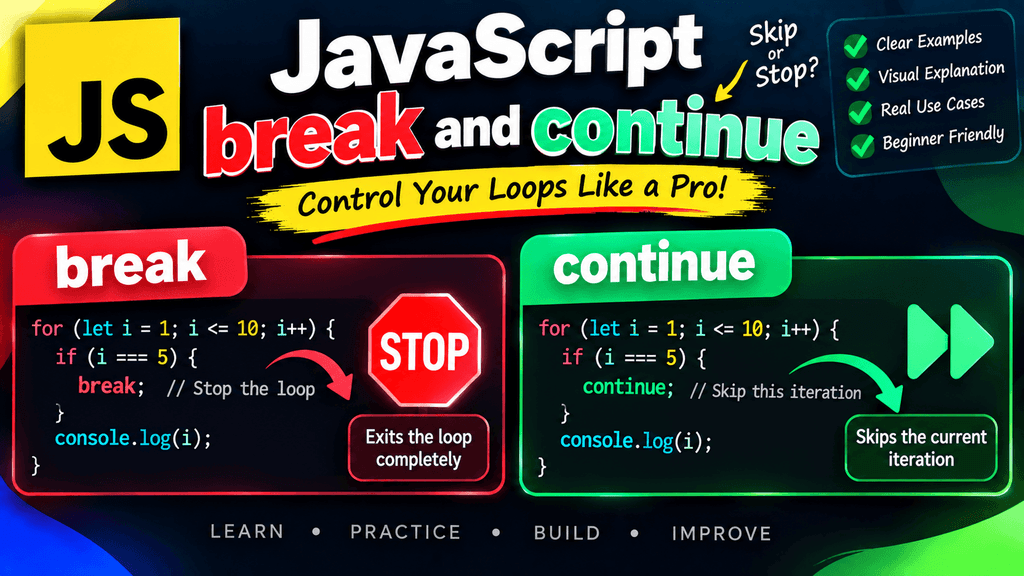
For example, you may want to stop a loop immediately after finding a particular value, or you may want to skip one iteration because the current value does not need to be processed. JavaScript provides two important loop control statements for these situations: break and continue.
The break statement completely stops the current loop, while the continue statement skips the current iteration and allows the loop to continue with the next iteration.
Understanding these statements is important because they give you more control over how loops behave and can make your programs more efficient and easier to understand.
JavaScript Comparison Operators
What Is Loop Control in JavaScript?
Loop control refers to statements that change the normal execution of a loop.
Normally, a loop continues according to its condition:
for (let i = 1; i <= 10; i++) {
    console.log(i);
}
This loop prints every number from 1 through 10.
However, you may not always want every iteration to run.
You might want to stop when a specific condition is reached:
for (let i = 1; i <= 10; i++) {
    if (i === 5) {
        break;
    }

    console.log(i);
}
Or you might want to skip a particular value:
for (let i = 1; i <= 5; i++) {
    if (i === 3) {
        continue;
    }

    console.log(i);
}
These are examples of loop control.
JavaScript provides two important statements for this purpose:
| Statement | Purpose |
|---|---|
break | Stops the loop completely |
continue | Skips the current iteration |
The break Statement
The break statement immediately terminates the loop in which it appears.
When JavaScript encounters break, it stops executing the current loop and moves to the statement that comes after the loop.
The basic syntax is:
break;
For example:
for (let i = 1; i <= 10; i++) {
    if (i === 5) {
        break;
    }

    console.log(i);
}
Output:
1
2
3
4
When i becomes 5, the break statement executes and the loop ends.
The numbers 6, 7, 8, 9, and 10 are never processed by this loop.
How break Works
Consider this loop:
for (let i = 1; i <= 10; i++) {
    if (i === 5) {
        break;
    }

    console.log(i);
}
The execution can be understood like this:
i = 1 → print 1
i = 2 → print 2
i = 3 → print 3
i = 4 → print 4
i = 5 → break
         ↓
       Stop
The loop does not continue after the break statement.
This makes break especially useful when you have found what you were looking for and there is no reason to continue checking the remaining values.
Using break With a while Loop
The break statement can also be used inside a while loop.
let i = 1;

while (i <= 10) {
    if (i === 5) {
        break;
    }

    console.log(i);
    i++;
}
Output:
1
2
3
4
When i reaches 5, the loop terminates immediately.
Using break With a do...while Loop
You can also use break inside a do...while loop.
let i = 1;

do {
    if (i === 4) {
        break;
    }

    console.log(i);
    i++;
} while (i <= 10);
Output:
1
2
3
The loop stops when i becomes 4.
Using break to Search for a Value
One of the most practical uses of break is searching for a particular value.
Suppose you have an array of numbers:
let numbers = [10, 25, 30, 45, 50];
You want to find the number 30.
for (let i = 0; i < numbers.length; i++) {
    if (numbers[i] === 30) {
        console.log("Number found");
        break;
    }
}
Once 30 is found, there is no need for the loop to continue searching.
This can be useful when processing large collections of data, although JavaScript also provides array methods such as find() for many search tasks.
Using break With User Input
Suppose a program repeatedly processes values until the user enters "exit".
The basic idea can be represented as:
let command;

while (true) {
    command = "exit";

    if (command === "exit") {
        break;
    }
}
The condition true creates a loop that would otherwise continue indefinitely, but break provides a controlled way to terminate it.
In real browser applications, user interactions are usually handled through events rather than blocking loops, but the loop-control concept remains useful.
The continue Statement
The continue statement skips the remaining code in the current iteration and moves to the next iteration of the loop.
The basic syntax is:
continue;
For example:
for (let i = 1; i <= 5; i++) {
    if (i === 3) {
        continue;
    }

    console.log(i);
}
Output:
1
2
4
5
When i equals 3, JavaScript encounters continue.
The remaining statements in that iteration are skipped, and the loop moves to its next iteration.
How continue Works
Consider:
for (let i = 1; i <= 5; i++) {
    if (i === 3) {
        continue;
    }

    console.log(i);
}
The execution looks like this:
i = 1 → print 1
i = 2 → print 2
i = 3 → continue
         ↓
       Skip
         ↓
i = 4 → print 4
i = 5 → print 5
The loop itself does not stop.
Only the current iteration is skipped.
Using continue With a while Loop
The continue statement can also be used inside a while loop.
let i = 0;

while (i < 5) {
    i++;

    if (i === 3) {
        continue;
    }

    console.log(i);
}
Output:
1
2
4
5
The value 3 is skipped, but the loop continues processing the remaining values.
When using continue in a while loop, you need to be particularly careful about updating the loop variable. If the update is skipped accidentally, the loop can become infinite.
For example, this pattern is dangerous:
let i = 0;

while (i < 5) {
    if (i === 3) {
        continue;
    }

    i++;
}
When i becomes 3, continue executes before i++, so i remains 3 forever.
A safer structure is:
let i = 0;

while (i < 5) {
    i++;

    if (i === 3) {
        continue;
    }

    console.log(i);
}
Now the counter is updated before the continue statement can skip the rest of the iteration.
Using continue to Skip Even Numbers
The continue statement is useful when you want to ignore specific values.
For example, you can print only odd numbers:
for (let i = 1; i <= 10; i++) {
    if (i % 2 === 0) {
        continue;
    }

    console.log(i);
}
Output:
1
3
5
7
9
When a number is even, the continue statement skips that iteration.
Using continue to Skip Invalid Data
Imagine that you have a list of scores and want to ignore values that are not valid.
let scores = [85, 90, -1, 78, -1, 95];

for (let score of scores) {
    if (score === -1) {
        continue;
    }

    console.log(score);
}
Output:
85
90
78
95
The -1 values are skipped.
In a real application, the definition of invalid data would depend on the application’s requirements, but the example demonstrates how continue can prevent unwanted values from being processed.
break vs continue
The biggest difference between break and continue is what happens to the loop after the statement executes.
With break, the entire loop stops:
for (let i = 1; i <= 5; i++) {
    if (i === 3) {
        break;
    }

    console.log(i);
}
Output:
1
2
With continue, only the current iteration is skipped:
for (let i = 1; i <= 5; i++) {
    if (i === 3) {
        continue;
    }

    console.log(i);
}
Output:
1
2
4
5
The easiest way to remember the difference is:
break
↓
Stop the loop completely

continue
↓
Skip this iteration
↓
Continue the loop
break and continue Comparison
| Feature | break | continue |
|---|---|---|
| Stops the loop | Yes | No |
| Skips current iteration | Yes, because the loop ends | Yes |
| Processes later iterations | No | Yes |
| Useful for early termination | Yes | No |
| Useful for skipping unwanted values | Sometimes | Yes |
Using break With Conditional Statements
The break statement is often combined with if conditions.
for (let i = 1; i <= 100; i++) {
    if (i === 20) {
        break;
    }

    console.log(i);
}
The if statement determines when the loop should stop.
This pattern is useful because the loop can continue normally until a specific condition becomes true.
Using continue With Conditional Statements
The same approach works with continue.
for (let i = 1; i <= 10; i++) {
    if (i === 5) {
        continue;
    }

    console.log(i);
}
The condition determines which iteration should be skipped.
This combination of if and continue is common when processing data and filtering values during a loop.
Using break With Nested Loops
When you have nested loops, break applies to the loop in which the break statement is located.
For example:
for (let i = 1; i <= 3; i++) {
    for (let j = 1; j <= 3; j++) {
        if (j === 2) {
            break;
        }

        console.log(i, j);
    }
}
Here, break stops the inner loop when j becomes 2.
The outer loop continues.
The output is:
1 1
2 1
3 1
This is important when working with nested loops because break does not automatically terminate every surrounding loop.
Using continue With Nested Loops
Similarly, continue affects the loop in which it appears.
for (let i = 1; i <= 3; i++) {
    for (let j = 1; j <= 3; j++) {
        if (j === 2) {
            continue;
        }

        console.log(i, j);
    }
}
The inner loop skips the iteration where j is 2, while the outer loop continues normally.
The output is:
1 1
1 3
2 1
2 3
3 1
3 3
Using break With for...of
break and continue are not limited to traditional for, while, and do...while loops. They can also be used with loop constructs such as for...of.
For example:
let fruits = ["Apple", "Banana", "Mango", "Orange"];

for (let fruit of fruits) {
    if (fruit === "Mango") {
        break;
    }

    console.log(fruit);
}
Output:
Apple
Banana
When "Mango" is reached, the loop stops.
Using continue With for...of
You can also skip specific values:
let fruits = ["Apple", "Banana", "Mango", "Orange"];

for (let fruit of fruits) {
    if (fruit === "Mango") {
        continue;
    }

    console.log(fruit);
}
Output:
Apple
Banana
Orange
This can make iteration logic easy to understand when you need to ignore particular values.
Common Mistakes With break
One common mistake is expecting break to skip only the current iteration.
It does not.
for (let i = 1; i <= 5; i++) {
    if (i === 3) {
        break;
    }

    console.log(i);
}
The loop stops completely at 3.
If you want to skip only 3, use continue:
for (let i = 1; i <= 5; i++) {
    if (i === 3) {
        continue;
    }

    console.log(i);
}
Common Mistakes With continue
A common mistake is placing continue before an important loop update in a while loop.
For example:
let i = 1;

while (i <= 5) {
    if (i === 3) {
        continue;
    }

    i++;
}
When i reaches 3, the update never happens, so the loop never reaches a stopping condition.
When using continue, make sure the loop still has a clear path toward termination.
Common Mistakes With Nested Loops
Another common misunderstanding is expecting break to stop every nested loop.
For example:
for (let i = 1; i <= 3; i++) {
    for (let j = 1; j <= 3; j++) {
        if (j === 2) {
            break;
        }
    }

    console.log(i);
}
The break only terminates the inner loop. The outer loop continues.
If you need to terminate multiple levels of nested processing, it is usually better to redesign the logic or use a clearly named function and return from that function rather than making deeply nested control flow difficult to understand.
Best Practices for break and continue
Use break when you have a clear reason to terminate the loop before its normal condition would stop it.
Use continue when the current value should be ignored but the remaining values still need to be processed.
Keep the conditions controlling break and continue easy to understand because complicated control flow can make loops difficult to debug.
Be especially careful when using continue inside while loops because skipping a counter update can accidentally create an infinite loop.
Avoid excessive use of break and continue when a simpler loop condition or array method would make the code easier to read.
When working with nested loops, remember that break and continue apply to the nearest enclosing loop.
Practical Example: Searching for a Product
Suppose you have a list of products and want to stop searching as soon as you find a particular product.
let products = [
    "Laptop",
    "Keyboard",
    "Mouse",
    "Monitor",
    "Printer"
];

for (let product of products) {
    if (product === "Monitor") {
        console.log("Monitor found");
        break;
    }

    console.log("Checking:", product);
}
Output:
Checking: Laptop
Checking: Keyboard
Checking: Mouse
Monitor found
There is no reason to continue searching after the desired product has been found.
Practical Example: Skipping Out-of-Stock Products
Suppose an online store contains products with availability information.
let products = [
    { name: "Laptop", available: true },
    { name: "Mouse", available: false },
    { name: "Keyboard", available: true },
    { name: "Monitor", available: false }
];

for (let product of products) {
    if (!product.available) {
        continue;
    }

    console.log("Available:", product.name);
}
Output:
Available: Laptop
Available: Keyboard
The continue statement allows the program to ignore unavailable products while continuing to process the rest.
Practical Example: Finding a Passing Score
Suppose you want to find the first score that is above a certain threshold.
let scores = [45, 52, 61, 78, 90];

for (let score of scores) {
    if (score >= 60) {
        console.log("First passing score:", score);
        break;
    }
}
Output:
First passing score: 61
The loop stops as soon as it finds the first qualifying score.
Practical Example: Skipping Invalid Scores
You can use continue when invalid values should not be processed.
let scores = [80, 90, null, 75, undefined, 88];

for (let score of scores) {
    if (score == null) {
        continue;
    }

    console.log("Score:", score);
}
Output:
Score: 80
Score: 90
Score: 75
Score: 88
Here, the condition skips null and undefined.
Quick Reference
break
for (let i = 1; i <= 10; i++) {
    if (i === 5) {
        break;
    }

    console.log(i);
}
Purpose: Stop the loop completely.
continue
for (let i = 1; i <= 5; i++) {
    if (i === 3) {
        continue;
    }

    console.log(i);
}
Purpose: Skip the current iteration and continue with the next iteration.
Frequently Asked Questions
What is break in JavaScript?
break is a loop control statement that immediately terminates the nearest enclosing loop or switch statement.
What is continue in JavaScript?
continue skips the remaining statements in the current loop iteration and proceeds to the next iteration.
What is the difference between break and continue?
break stops the entire loop, while continue skips only the current iteration and allows the loop to continue.
Can break be used with a while loop?
Yes. break can be used inside for, while, do...while, for...of, and for...in loops.
Can continue be used with a while loop?
Yes. However, you should ensure that the loop’s condition can eventually become false, especially when the loop depends on a counter.
Does break stop all nested loops?
No. An ordinary break stops only the nearest enclosing loop.
Does continue stop a loop?
No. continue only skips the current iteration. The loop proceeds to its next iteration.
Can break and continue be used inside if statements?
Yes. They are commonly placed inside if statements to conditionally stop or skip loop iterations.
Can break be used outside a loop?
A normal break statement cannot be used arbitrarily outside a loop or switch statement. Doing so results in a syntax error.
Can continue be used outside a loop?
No. continue must be used within an appropriate loop.