
JavaScript comments are notes written inside JavaScript code that are ignored by the JavaScript engine when the program runs. Developers use comments to explain what a particular section of code does, provide helpful information for other developers, temporarily disable code, and make larger programs easier to understand and maintain.
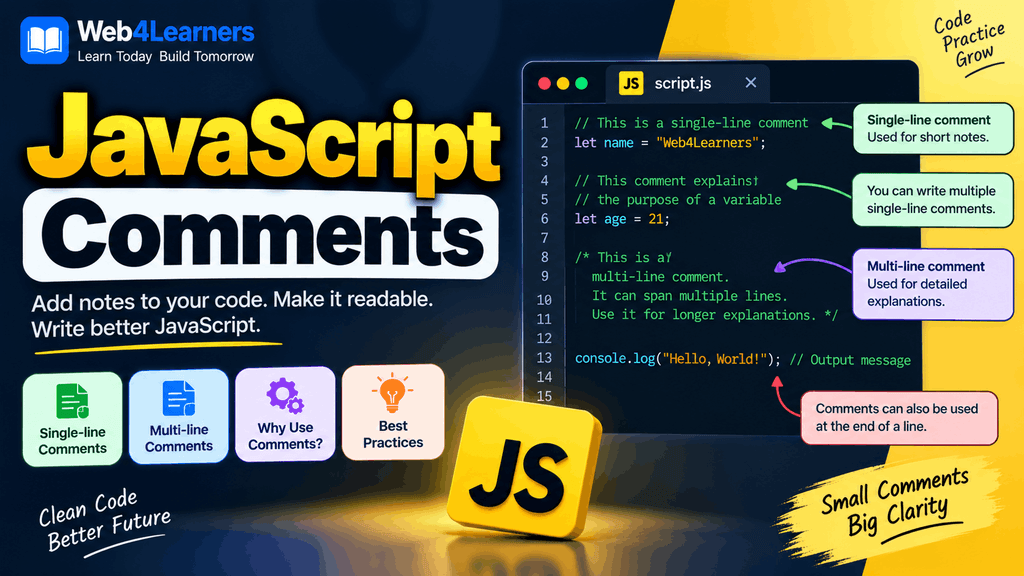
Comments do not normally affect the output of a JavaScript program because they are not executed as instructions. Instead, they provide context for the people who read and maintain the source code.
For beginners, learning how to write comments is a small but important part of learning JavaScript because well-written comments can make unfamiliar code much easier to understand. As JavaScript projects become larger, comments can also help developers understand why particular pieces of code were written and how different parts of an application work together.
In this tutorial, you will learn what JavaScript comments are, how to create single-line and multi-line comments, how comments can be used to temporarily disable code, where comments should be placed, common mistakes to avoid, and best practices for writing useful comments.
What Are JavaScript Comments?
A JavaScript comment is text inside the source code that JavaScript does not execute.
For example:
// This is a JavaScript comment

console.log("Hello, World!");
JavaScript ignores the comment and executes the console.log() statement.
The output is:
Hello, World!The comment is visible when you view the source code, but it does not appear as text on the webpage and does not become part of the program’s normal output.
Comments are mainly written for developers rather than for the JavaScript engine.
Image Placement
Add an image here showing a JavaScript code editor with a comment highlighted and an arrow explaining that the JavaScript engine ignores the comment during execution.
Alt text: JavaScript comment example showing code ignored during execution
Why Are Comments Used in JavaScript?
Comments can serve several purposes in a JavaScript program. The most common reason is to explain code that might not be immediately obvious to another developer.
For example:
// Calculate the total price before applying the discount
let total = price * quantity;
The comment explains what the following code is intended to do.
Comments can also be used to organize sections of a large JavaScript file:
// User Authentication
// Shopping Cart
// Payment Processing
// Product Filtering
Another common use is temporarily disabling code while testing or debugging:
// console.log("Temporary debugging message");Because the line is commented out, JavaScript does not execute it.
Types of JavaScript Comments
JavaScript provides two primary ways to create comments:
- Single-line comments
- Multi-line comments
Both types are useful, but they are designed for slightly different situations.
| Comment Type | Syntax | Common Use |
|---|---|---|
| Single-line comment | // comment | Short explanations |
| Multi-line comment | /* comment */ | Longer explanations |
| Inline comment | code; // comment | Explaining a specific line |
Let’s look at each type in detail.
Single-Line Comments in JavaScript
A single-line comment begins with two forward slashes:
//Everything after // on that line is treated as a comment.
For example:
// Store the user's name
let name = "John";

console.log(name);
JavaScript ignores:
// Store the user's nameand executes:
let name = "John";
console.log(name);
Single-line comments are useful when you need to explain a particular statement or add a short note.
Single-Line Comment Example
Consider the following example:
// Store the product price
let price = 500;

// Store the quantity
let quantity = 2;

// Calculate the total price
let total = price * quantity;

console.log(total);
The comments make the purpose of each statement clear.
The output is:
1000The comments themselves do not produce any output.
Inline Comments
A comment can also be placed on the same line as JavaScript code.
For example:
let age = 25; // Store the user's ageThe JavaScript engine executes:
let age = 25;and ignores:
// Store the user's ageInline comments can be useful when a short explanation is directly related to a particular line.
Another example is:
let discount = 10; // Discount percentageHowever, inline comments should not make the code difficult to read. If the explanation is long, it is usually better to place the comment on a separate line.
Multi-Line Comments in JavaScript
Multi-line comments begin with:
/*and end with:
*/Everything between these markers is treated as a comment.
For example:
/*
    This program calculates
    the total price of a product.
*/

let price = 500;
let quantity = 2;

let total = price * quantity;

console.log(total);
JavaScript ignores everything between /* and */.
Multi-line comments are useful when you need to write a longer explanation or temporarily disable multiple lines of code.
Multi-Line Comment Example
Here is another practical example:
/*
    Product calculation

    This section calculates the subtotal
    using the product price and quantity.
*/

let productPrice = 1000;
let quantity = 3;

let subtotal = productPrice * quantity;

console.log(subtotal);
The output is:
3000The comment provides additional information about what the code is doing without affecting the program.
Using Comments to Disable JavaScript Code
One useful feature of comments is that they can temporarily prevent code from executing.
Suppose you have:
console.log("Hello");
console.log("Welcome");
console.log("Goodbye");
If you want to temporarily disable the second line, you can comment it:
console.log("Hello");
// console.log("Welcome");
console.log("Goodbye");
The output becomes:
Hello
Goodbye
The commented-out statement remains in the source code, but JavaScript does not execute it.
This technique can be useful during debugging and testing.
Disabling Multiple Lines of Code
You can use a multi-line comment to temporarily disable several statements.
/*
console.log("First message");
console.log("Second message");
console.log("Third message");
*/

console.log("This message will run.");
Only the final console.log() statement is executed.
The output is:
This message will run.This can be helpful when testing different sections of a program.
However, developers should avoid leaving large amounts of commented-out old code in production files because it can make the source code unnecessarily difficult to maintain.
Comments in JavaScript Functions
Comments can be used to explain what a function does.
// Calculate the total price
function calculateTotal(price, quantity) {
    return price * quantity;
}

let total = calculateTotal(500, 3);

console.log(total);
The comment explains the purpose of the function without changing how the function works.
For a more complicated function, a longer explanation might be appropriate:
/*
    Calculates the final price by multiplying
    the product price by the quantity and then
    subtracting the available discount.
*/

function calculateFinalPrice(price, quantity, discount) {
    let subtotal = price * quantity;
    return subtotal - discount;
}
Comments like this can be useful when the purpose or reasoning behind a function is not obvious from the code itself.
Comments in JavaScript Objects
Comments can also be used to organize properties inside objects.
const user = {

    // Basic user information
    name: "John",
    age: 25,

    // Account information
    role: "Developer",
    active: true
};
This can make larger objects easier to understand.
However, property names should usually be descriptive enough that extensive comments are not required for every individual property.
Comments in JavaScript Arrays
Comments can also explain groups of data inside arrays.
const products = [

    // Electronic products
    "Laptop",
    "Keyboard",
    "Mouse",

    // Mobile products
    "Smartphone",
    "Tablet"
];
Comments can provide useful context when the data is organized into meaningful groups.
Comments in HTML JavaScript
When JavaScript is written inside an HTML document, JavaScript comments use normal JavaScript comment syntax.
<!DOCTYPE html>
<html>
<head>
    <title>JavaScript Comments</title>
</head>
<body>

    <h1>JavaScript Comments</h1>

    <script>
        // Display a message in the console
        console.log("Hello, Web4Learners!");
    </script>

</body>
</html>
The comment is part of the JavaScript code inside the <script> element.
Comments in External JavaScript Files
Comments are especially common in external JavaScript files.
For example, suppose you have a file called:
script.jsIt might contain:
// Website navigation

function openMenu() {
    console.log("Menu opened");
}

// User authentication

function loginUser() {
    console.log("User logged in");
}
Comments can help developers quickly identify different sections of a large JavaScript file.
External JavaScript files are commonly used in real-world websites because they allow JavaScript code to be separated from HTML structure.
JavaScript Comments and Browser Output
Comments do not normally appear as visible content on a webpage.
For example:
// This message is a comment

console.log("Hello");
The comment does not appear on the page.
The console.log() statement writes to the browser’s developer console instead.
If you want users to see text on a webpage, you need to add that text to the HTML or modify the DOM using JavaScript.
For example:
document.getElementById("message").textContent = "Hello!";This is executable JavaScript, unlike a comment.
Comments and JavaScript Performance
Comments are generally not a concern for JavaScript performance in normal development because production build systems can remove comments during optimization and minification.
For example, source code might contain:
// Calculate the total
let total = price * quantity;
A production build process may remove the comment when creating a minified JavaScript file.
The important point for beginners is that comments are primarily intended to improve the readability and maintainability of source code.
Comments for Debugging JavaScript
Comments can be useful during debugging because they allow you to temporarily disable a section of code.
For example:
let username = "John";

// console.log(username);

console.log("Program continues...");
You can uncomment the debugging statement when you need to inspect the value:
let username = "John";

console.log(username);

console.log("Program continues...");
Developers often use comments alongside tools such as console.log(), browser Developer Tools, breakpoints, and debugging features to understand how a program is behaving.
Keyboard Shortcuts for JavaScript Comments
Most modern code editors provide keyboard shortcuts for quickly commenting and uncommenting JavaScript code.
For example, in Visual Studio Code, you can usually use:
Windows/Linux:
Ctrl + /macOS:
Cmd + /Selecting one or more lines and using the shortcut can automatically add or remove single-line comment markers.
For multiple selected lines, the editor can add comments to all selected lines at once.
This is much faster than manually typing // on every line.
JavaScript Comments Best Practices
Comments are most useful when they provide information that is not immediately obvious from the code itself.
A good comment explains why something is being done when the reason cannot be easily understood from the code.
For example:
// Use a 5-minute cache to reduce repeated API requests
const cacheDuration = 5 * 60 * 1000;
This is more useful than:
// Set cache duration
const cacheDuration = 5 * 60 * 1000;
The second comment simply repeats what the code already makes clear.
Write Clear and Meaningful Comments
Good:
// Calculate the discounted price before adding tax
let discountedPrice = price - discount;
Less useful:
// Calculate price
let discountedPrice = price - discount;
The best comments provide additional context rather than simply repeating the code.
Keep Comments Updated
If you change the code, make sure related comments still describe what the code actually does.
For example, if a comment says:
// Allow users to upload images up to 5 MBbut the application later changes the limit to 10 MB, the comment should be updated.
Outdated comments can be more confusing than having no comment at all.
Avoid Over-Commenting
Not every JavaScript statement requires a comment.
For example:
let name = "John";does not normally need:
// Create a variable called name and store John
let name = "John";
The code is already clear.
Instead, comments should be used where they provide useful context.
Explain Why, Not Just What
One of the most useful comment-writing principles is to explain why something is necessary when the reason is not obvious.
For example:
// Delay the search request to avoid sending an API request for every keystroke
setTimeout(searchProducts, 300);
The comment gives information that cannot be immediately determined from the code itself.
Common Mistakes With JavaScript Comments
There are several simple mistakes beginners can make when writing JavaScript comments.
Forgetting the Double Slash
This is a valid comment:
// This is a commentBut this is not:
This is a commentJavaScript will attempt to interpret the second line as code and may produce a syntax error.
Forgetting to Close a Multi-Line Comment
This is correct:
/*
    This is a multi-line comment.
*/
But if you forget the closing */:
/*
    This is a multi-line comment.
JavaScript may treat the rest of the file as part of the comment, which can result in unexpected behavior.
Using the Wrong Comment Syntax
JavaScript uses:
// Single-line commentand:
/*
Multi-line comment
*/
Do not confuse JavaScript comment syntax with comment syntax from other programming languages.
Leaving Debugging Comments Everywhere
During development, it is normal to comment out code temporarily. However, leaving large amounts of unused commented-out code in a production project can make the codebase harder to read.
Version control systems such as Git are generally a better way to preserve previous versions of code.
JavaScript Comments vs HTML Comments
JavaScript and HTML have different comment syntax.
HTML comments use:
<!-- This is an HTML comment -->JavaScript comments use:
// This is a JavaScript commentor:
/*
This is a JavaScript comment
*/
For example:
<!-- HTML comment -->

<script>
    // JavaScript comment

    console.log("Hello");
</script>
It is important to use the appropriate syntax for the language in which you are writing.
| Language | Comment Syntax |
|---|---|
| JavaScript | // comment |
| JavaScript | /* comment */ |
| HTML | <!-- comment --> |
| CSS | /* comment */ |
| Python | # comment |
| Java | // comment |
JavaScript Comments in Professional Projects
In professional JavaScript projects, comments are generally used to explain important decisions, complex algorithms, unusual behavior, browser-specific workarounds, public APIs, or sections of code that may otherwise be difficult to understand.
For example:
// Keep the previous value because the API may return an empty response
const previousValue = currentValue;
A comment like this can be valuable because the reason behind the operation may not be obvious from the code alone.
Large projects may also use documentation comments for functions, classes, modules, and APIs.
One common documentation style is JSDoc.
For example:
/**
 * Calculates the total price.
 * @param {number} price - Product price
 * @param {number} quantity - Number of products
 * @returns {number} Total price
 */
function calculateTotal(price, quantity) {
    return price * quantity;
}
JSDoc is more structured than an ordinary comment and can be used by development tools to provide documentation and type-related information.
JavaScript Comments Quick Reference
| Type | Syntax | Purpose |
|---|---|---|
| Single-line | // Comment | Short explanation |
| Inline | code; // Comment | Explain a specific statement |
| Multi-line | /* Comment */ | Longer explanation |
| Disabled code | // code | Temporarily prevent execution |
| Documentation | /** Comment */ | Document functions and APIs |
JavaScript Comments Example
Here is a complete example combining different types of comments:
// Store product information
const productName = "Laptop";
const price = 50000;
const quantity = 2;

/*
    Calculate the subtotal by multiplying
    the product price by the quantity.
*/

const subtotal = price * quantity;

// Display the calculated subtotal
console.log(subtotal);
The comments explain the purpose of different sections without changing the behavior of the program.
The output is:
100000Image Placement
Add a complete tutorial visual here showing the code above with each type of comment highlighted and labeled.
Alt text: Complete JavaScript comments example with single line and multi line comments
Practice Exercise
Try writing a JavaScript program that calculates the total cost of three products.
Start with:
// Product prices
let laptop = 50000;
let mouse = 1000;
let keyboard = 2000;

let total = laptop + mouse + keyboard;

console.log(total);
Now add a multi-line comment explaining how the total is calculated.
You can also add an inline comment:
let total = laptop + mouse + keyboard; // Calculate total product costFinally, try commenting out one of the products and observe how the result changes.
This exercise will help you understand how comments are written while also giving you practice with variables and expressions.
Image Placement
Add an exercise image here showing the three product values, the JavaScript calculation, and the resulting total in the browser console.
Alt text: JavaScript comments practice exercise with product price calculation
Frequently Asked Questions About JavaScript Comments
What are comments in JavaScript?
Comments are notes inside JavaScript source code that are ignored by the JavaScript engine. They are primarily used to explain code, organize files, document functionality, or temporarily disable code.
How do you write a single-line comment in JavaScript?
Use two forward slashes before the comment:
// This is a single-line commentEverything after // on that line is treated as a comment.
How do you write a multi-line comment in JavaScript?
Use /* to start the comment and */ to end it:
/*
This is a
multi-line comment.
*/
Do JavaScript comments affect program execution?
Comments are ignored during normal JavaScript execution, so they do not directly perform operations or produce program output.
Can JavaScript comments be used to disable code?
Yes. You can place // before a line or surround multiple lines with /* and */ to temporarily prevent JavaScript from executing that code.
Can comments be placed after JavaScript code?
Yes. You can write an inline comment after a statement:
let age = 25; // User's ageAre JavaScript comments visible to website visitors?
Comments are not displayed as normal webpage content, but comments written in client-side JavaScript source may be available to users who inspect or download the site’s JavaScript files. Therefore, comments should never be used to store passwords, API secrets, private keys, or other sensitive information.
Should every JavaScript line have a comment?
No. Adding comments to every line can make code harder to read. Comments should generally be used when they provide meaningful context or explain something that is not obvious from the code itself.