When writing JavaScript programs, you will often need to perform the same task multiple times. For example, you may need to display the numbers from 1 to 10, process every item in an array, repeat an action until a condition becomes false, or create a countdown for a game. Writing the same code separately for every repetition would make a program unnecessarily long and difficult to maintain.
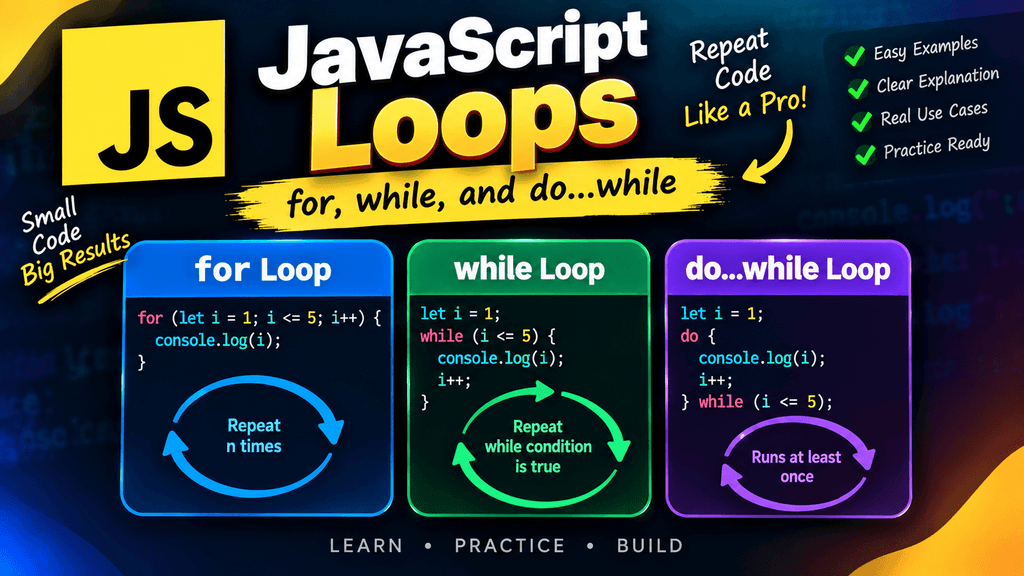
JavaScript provides loops to solve this problem. A loop allows you to execute a block of code repeatedly while a particular condition is satisfied.
The three fundamental loops covered in this tutorial are the for loop, the while loop, and the do...while loop.
Understanding these loops gives you an important foundation for working with arrays, objects, user input, games, calculations, data processing, and many other JavaScript applications.
What Is a Loop in JavaScript?
A loop is a programming structure that repeatedly executes a block of code.
For example, suppose you want to print the numbers from 1 to 5. Without a loop, you could write:
console.log(1);
console.log(2);
console.log(3);
console.log(4);
console.log(5);
Although this works, it becomes impractical when you need to print hundreds or thousands of values.
A loop allows you to write the logic once:
for (let i = 1; i <= 5; i++) {
    console.log(i);
}
Output:
1
2
3
4
5
The loop automatically repeats the code while its condition remains true.
Why Are Loops Important?
Loops are one of the most commonly used concepts in programming because applications frequently need to repeat operations.
You might use a loop to:
- Display a list of products
- Process array elements
- Generate numbers
- Calculate totals
- Create tables
- Validate multiple values
- Process user data
- Build countdown timers
- Create game logic
- Search through data
- Generate dynamic HTML
- Repeat an operation until a condition changes
Instead of writing repetitive code manually, loops allow JavaScript to perform repetitive tasks efficiently.
The for Loop
The for loop is one of the most commonly used loops in JavaScript.
It is particularly useful when you know how many times you want to repeat an operation or when you have a clear counter.
The basic syntax is:
for (initialization; condition; update) {
    // Code to execute
}
For example:
for (let i = 1; i <= 5; i++) {
    console.log(i);
}
Output:
1
2
3
4
5
The for loop contains three important parts:
for (let i = 1; i <= 5; i++)
These are:
- Initialization
- Condition
- Update
Initialization in a for Loop
The initialization runs once when the loop starts.
In this example:
let i = 1;
The variable i is created and assigned the initial value 1.
for (let i = 1; i <= 5; i++) {
    console.log(i);
}
The variable i is commonly called a loop counter.
You can use other variable names as well:
for (let count = 1; count <= 5; count++) {
    console.log(count);
}
The name does not matter as long as the code is written correctly.
The Condition in a for Loop
The condition determines whether the loop should continue.
i <= 5
As long as this condition evaluates to true, the loop executes.
When the condition becomes false, the loop stops.
For example:
for (let i = 1; i <= 3; i++) {
    console.log(i);
}
The loop works approximately like this:
i = 1 → condition true → execute
i = 2 → condition true → execute
i = 3 → condition true → execute
i = 4 → condition false → stop
The Update in a for Loop
The update changes the loop variable after each iteration.
In this example:
i++
increases i by one.
for (let i = 1; i <= 5; i++) {
    console.log(i);
}
You can also use other update expressions.
For example:
i += 2
This increases the value by two:
for (let i = 0; i <= 10; i += 2) {
    console.log(i);
}
Output:
0
2
4
6
8
10
You can also decrease the value:
for (let i = 5; i >= 1; i--) {
    console.log(i);
}
Output:
5
4
3
2
1
How a for Loop Executes
Consider this example:
for (let i = 1; i <= 3; i++) {
    console.log(i);
}
JavaScript follows this general sequence:
Initialization
     ↓
Condition
     ↓
Execute loop body
     ↓
Update
     ↓
Condition
     ↓
Execute loop body
     ↓
Update
     ↓
Condition becomes false
     ↓
Loop ends
Understanding this execution order makes it much easier to identify mistakes in loop logic.
Using a for Loop to Calculate a Sum
Loops can be used to perform calculations repeatedly.
For example:
let total = 0;

for (let i = 1; i <= 5; i++) {
    total += i;
}

console.log(total);
Output:
15
The loop calculates:
1 + 2 + 3 + 4 + 5 = 15
Using a for Loop With an Array
You can use a for loop to access elements in an array.
let fruits = ["Apple", "Banana", "Mango", "Orange"];

for (let i = 0; i < fruits.length; i++) {
    console.log(fruits[i]);
}
Output:
Apple
Banana
Mango
Orange
The loop begins at index 0 because JavaScript arrays use zero-based indexing.
The condition:
i < fruits.length
ensures that the loop stops before reaching an invalid index.
Nested for Loops
A loop can contain another loop. This is called a nested loop.
For example:
for (let i = 1; i <= 3; i++) {
    for (let j = 1; j <= 3; j++) {
        console.log(i, j);
    }
}
The inner loop runs completely for each iteration of the outer loop.
Nested loops are useful for working with grids, tables, matrices, game boards, and other multi-dimensional data structures.
However, they should be used carefully because multiple nested loops can result in a large number of operations.
The while Loop
The while loop repeatedly executes code as long as a condition is true.
Its basic syntax is:
while (condition) {
    // Code to execute
}
For example:
let i = 1;

while (i <= 5) {
    console.log(i);
    i++;
}
Output:
1
2
3
4
5
Unlike a for loop, the initialization and update are normally written separately.
How the while Loop Works
A while loop checks its condition before executing its body.
Consider:
let count = 1;

while (count <= 3) {
    console.log(count);
    count++;
}
The process is:
count = 1
↓
1 <= 3 → true
↓
print 1
↓
count becomes 2
↓
2 <= 3 → true
↓
print 2
↓
count becomes 3
↓
3 <= 3 → true
↓
print 3
↓
count becomes 4
↓
4 <= 3 → false
↓
stop
This makes the while loop useful when the number of iterations is not necessarily known in advance.
A while Loop With User Input
A while loop can be useful when an operation needs to continue until a particular condition changes.
For example:
let password = "";
You could conceptually continue asking for a password until a valid value is provided.
In browser applications, this kind of logic is often handled with forms and event-driven code rather than repeatedly blocking the browser with prompt(), but the loop concept remains the same.
The while Loop With a Counter
A counter is often used with a while loop.
let count = 5;

while (count > 0) {
    console.log(count);
    count--;
}
Output:
5
4
3
2
1
Once count reaches 0, the condition becomes false and the loop ends.
The Importance of Updating a while Loop
When using a while loop, you must make sure that something eventually causes the condition to become false.
For example:
let i = 1;

while (i <= 5) {
    console.log(i);
}
This loop has a serious problem.
The value of i never changes, so the condition:
i <= 5
remains true forever.
This creates an infinite loop.
The correct version is:
let i = 1;

while (i <= 5) {
    console.log(i);
    i++;
}
Always make sure your loop has a valid path toward termination unless an intentionally infinite loop is required.
The do...while Loop
The do...while loop is similar to the while loop, but there is one important difference.
A do...while loop executes its code at least once because the condition is checked after the loop body.
The syntax is:
do {
    // Code to execute
} while (condition);
For example:
let i = 1;

do {
    console.log(i);
    i++;
} while (i <= 5);
Output:
1
2
3
4
5
How do...while Works
Consider:
let count = 1;

do {
    console.log(count);
    count++;
} while (count <= 3);
The execution order is:
Execute loop body
      ↓
Update value
      ↓
Check condition
      ↓
If true, repeat
      ↓
If false, stop
This is different from a while loop because the while loop checks its condition before running the body.
The Important Difference Between while and do...while
Consider a condition that is already false.
With while:
let i = 10;

while (i < 5) {
    console.log(i);
}
Nothing is printed because 10 < 5 is false before the loop begins.
Now consider do...while:
let i = 10;

do {
    console.log(i);
} while (i < 5);
Output:
10
The code executes once before JavaScript checks the condition.
This is the key difference between these two loops.
for vs while vs do...while
| Feature | for | while | do...while |
|---|---|---|---|
| Condition checked | Before each iteration | Before each iteration | After each iteration |
| Guaranteed to execute once | No | No | Yes |
| Initialization commonly included | Yes | Usually outside | Usually outside |
| Update commonly included | Yes | Usually inside | Usually inside |
| Best suited for | Known/reasonable iteration structure | Condition-based repetition | At-least-once execution |
When Should You Use a for Loop?
A for loop is often a good choice when you have a counter or a clear iteration structure.
For example:
for (let i = 0; i < 10; i++) {
    console.log(i);
}
This is especially common when working with arrays by index or repeating an operation a known number of times.
When Should You Use a while Loop?
A while loop is useful when the condition is more important than a specific number of iterations.
For example:
while (gameRunning) {
    // Game logic
}
The loop can continue as long as gameRunning remains truthy.
Another example could be processing data until a particular condition changes.
When Should You Use a do...while Loop?
A do...while loop is useful when the code must execute at least once before the condition is evaluated.
For example, a menu-based application may display a menu first and then decide whether it should continue.
let choice;

do {
    console.log("Display menu");
    // Get or process choice
} while (choice !== "exit");
The menu needs to appear before the program can determine what the user wants to do next.
Using break With Loops
The break statement immediately stops a loop.
For example:
for (let i = 1; i <= 10; i++) {
    if (i === 5) {
        break;
    }

    console.log(i);
}
Output:
1
2
3
4
When i becomes 5, break terminates the loop.
This is useful when you have found the value you were searching for or when continuing the loop is no longer necessary.
Using continue With Loops
The continue statement skips the current iteration and moves to the next iteration.
For example:
for (let i = 1; i <= 5; i++) {
    if (i === 3) {
        continue;
    }

    console.log(i);
}
Output:
1
2
4
5
The iteration where i equals 3 is skipped.
Looping Through Even Numbers
You can combine conditions and loop updates to generate specific sequences.
for (let i = 2; i <= 10; i += 2) {
    console.log(i);
}
Output:
2
4
6
8
10
This approach is often cleaner than checking every number individually.
Creating a Multiplication Table
Loops are particularly useful for calculations such as multiplication tables.
let number = 5;

for (let i = 1; i <= 10; i++) {
    console.log(`${number} × ${i} = ${number * i}`);
}
Output:
5 × 1 = 5
5 × 2 = 10
5 × 3 = 15
5 × 4 = 20
5 × 5 = 25
5 × 6 = 30
5 × 7 = 35
5 × 8 = 40
5 × 9 = 45
5 × 10 = 50
This is a simple example of how loops can eliminate repetitive code.
Creating a Countdown
A countdown can be created with a decreasing for loop:
for (let i = 10; i >= 1; i--) {
    console.log(i);
}

console.log("Go!");
The same basic concept can be used in games, timers, quizzes, and other applications.
Common Loop Mistakes
Forgetting to Update the Counter
This can create an infinite loop:
let i = 1;

while (i <= 5) {
    console.log(i);
}
The solution is to update i:
let i = 1;

while (i <= 5) {
    console.log(i);
    i++;
}
Using the Wrong Condition
A small mistake in the condition can cause a loop to execute too many or too few times.
For example:
for (let i = 1; i < 5; i++) {
    console.log(i);
}
prints:
1
2
3
4
It does not print 5 because the condition is i < 5.
If you want to include 5, use:
for (let i = 1; i <= 5; i++) {
    console.log(i);
}
Creating an Infinite Loop Accidentally
Always check whether your loop can eventually reach a false condition.
while (true) {
    console.log("Running");
}
This intentionally creates an infinite loop, but an infinite loop can also happen accidentally when the loop variable never changes or moves in the wrong direction.
Changing the Counter in the Wrong Direction
Consider:
for (let i = 1; i <= 5; i--) {
    console.log(i);
}
The condition expects i to eventually become greater than 5, but i-- makes it smaller instead.
This can create an infinite loop.
The correct update is:
i++
Best Practices for JavaScript Loops
Choose the loop structure based on the problem rather than simply using the loop you are most familiar with.
Use a for loop when initialization, condition, and update naturally belong together.
Use a while loop when the continuation condition is the primary part of the logic.
Use do...while when the operation needs to execute at least once before checking whether it should continue.
Keep loop conditions easy to understand because complicated conditions can make debugging unnecessarily difficult.
Avoid unnecessary nested loops when processing large amounts of data because the number of operations can increase rapidly.
Always make sure that loops have a clear termination condition unless an intentionally continuous loop is required.
JavaScript Loop Cheat Sheet
for
for (let i = 0; i < 5; i++) {
    console.log(i);
}
Use it when the loop has a clear initialization, condition, and update.
while
let i = 0;

while (i < 5) {
    console.log(i);
    i++;
}
Use it when the loop should continue while a condition remains true.
do...while
let i = 0;

do {
    console.log(i);
    i++;
} while (i < 5);
Use it when the code needs to execute at least once.
break
break;
Stops the current loop immediately.
continue
continue;
Skips the current iteration and continues with the next one.
Frequently Asked Questions
What is a loop in JavaScript?
A loop is a programming structure that repeatedly executes a block of code while a particular condition is satisfied.
What are the main JavaScript loops?
The fundamental loops covered here are for, while, and do...while. JavaScript also provides specialized iteration mechanisms such as for...of and for...in, which are useful for iterating over iterable values and object properties.
What is the difference between for and while?
A for loop places the initialization, condition, and update in one loop structure, making it convenient when you have a clear counter. A while loop normally keeps these parts separate and is useful when repetition depends primarily on a condition.
What is the difference between while and do...while?
A while loop checks its condition before executing its body, so it may execute zero times. A do...while loop checks its condition after executing its body, so it always executes at least once.
Which loop should beginners learn first?
The for loop is often a useful starting point because its initialization, condition, and update structure clearly demonstrates how repetition works. However, understanding while and do...while is also important because they solve different types of problems.
Can a for loop run zero times?
Yes. If its condition is false before the first iteration, the body does not execute.
for (let i = 10; i < 5; i++) {
    console.log(i);
}
Nothing is printed.
Can a do...while loop run zero times?
No. The body of a do...while loop executes at least once because its condition is checked afterward.
What does break do in JavaScript loops?
break immediately terminates the loop and continues execution with the code following the loop.
What does continue do in JavaScript loops?
continue skips the remaining statements in the current iteration and proceeds to the next iteration.