
HTML is the foundation of the web. Almost every webpage you visit uses HTML to organize and describe its content. Whether it is a simple personal webpage, a blog, an online store, or a large web application, HTML provides the basic structure that allows a browser to understand and display the page.
HTML is one of the first technologies beginners usually learn when starting web development. It is relatively easy to understand because it uses elements and tags to describe different types of content. Once you understand how HTML works, you can combine it with CSS for design and JavaScript for functionality to create complete interactive websites.
What Is HTML?
HTML stands for HyperText Markup Language. It is a markup language used to structure content on the web.
HTML can define different parts of a webpage, including headings, paragraphs, links, images, lists, tables, forms, videos, and other content.
For example:
<h1>Welcome to Web4Learners</h1>
<p>Learn web development step by step.</p>
Here, the <h1> element represents a heading, while the <p> element represents a paragraph.
HTML does not perform programming logic like a programming language. Instead, it describes what different pieces of content are and how they are organized.
What Does HTML Stand For?
HTML means HyperText Markup Language.
HyperText refers to text that can contain links connecting one webpage or resource to another. These HTML links connect webpages and resources across the web, making it possible for users to navigate between different documents.
Markup means that special tags are used to identify and structure content.
Language means that HTML follows a defined set of rules and syntax that browsers understand.
Why Is HTML Used?
HTML is used to create the structure of webpages. It tells the browser what type of content exists on a page and how that content is organized.
For example, you can use HTML to create:
- Headings
- Paragraphs
- Links
- Images
- Lists
- Tables
- Forms
- Buttons
- Audio
- Video
- Sections
- Articles
A webpage without a proper structure can be difficult for both users and browsers to understand. HTML elements provide meaningful structure to webpage content, making it easier to organize information.
How HTML Works
HTML works by using elements and tags. A typical HTML element consists of an opening tag, content, and a closing tag.
<p>This is an HTML paragraph.</p>
The <p> tag tells the browser that the content is a paragraph.
HTML elements can also contain attributes that provide additional information.
<a href="https://example.com">Visit Example</a>
Here, the href attribute specifies the destination of the link. HTML attributes provide additional information about elements, such as links, images, forms, and other webpage content.
HTML and Web Pages
A web page is a document that a browser can display. HTML provides the structure of that document.
For example, a simple webpage could contain a heading followed by some text and an image:
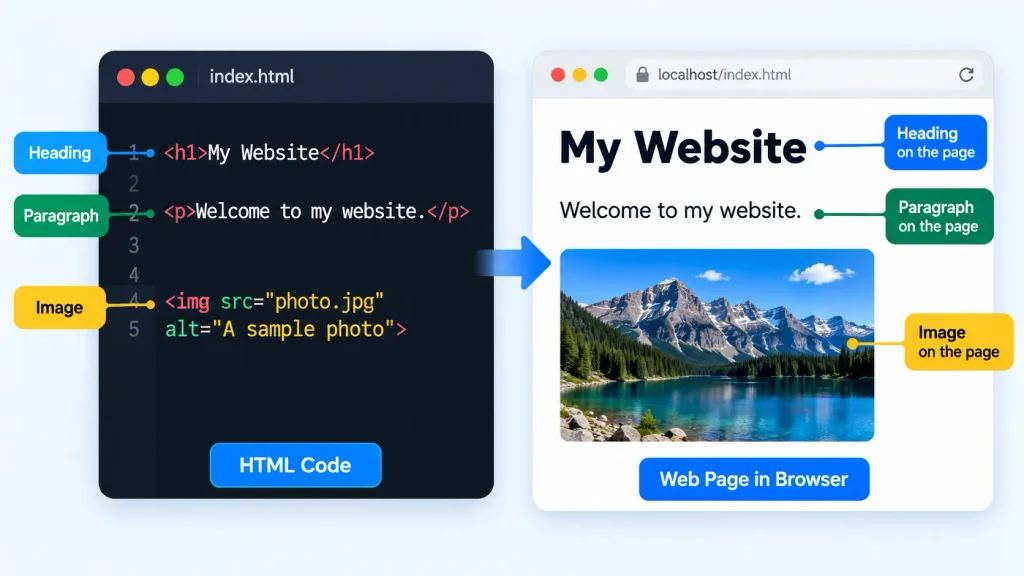
The browser reads the HTML and displays the corresponding content.
As you progress, you will work with HTML headings that organize page content into meaningful sections and HTML paragraphs that are used to present blocks of text.
HTML and Web Browsers
Web browsers such as Google Chrome, Microsoft Edge, Mozilla Firefox, and Safari are designed to interpret HTML.
When you open an HTML document, the browser reads the markup, builds the structure of the document, and displays the result on the screen.
The browser does not normally show the HTML tags themselves. Instead, it uses them to determine how the content should be represented.
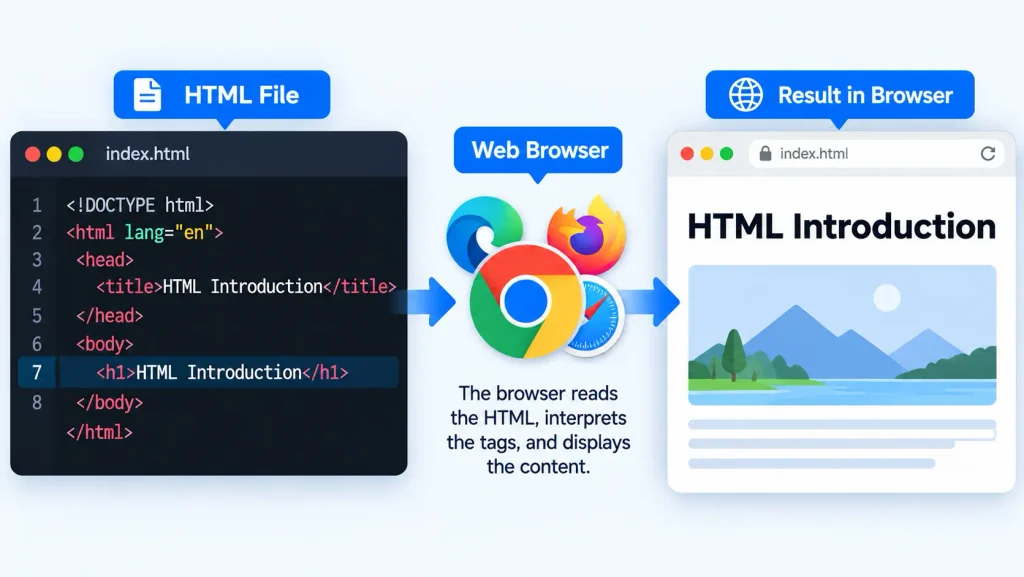
For example:
<h1>HTML Introduction</h1>
The browser displays the text as a heading rather than displaying the <h1> tags to the user.
HTML Documents
An HTML document is a text file containing HTML markup. HTML documents normally use the .html file extension.
For example:
index.html
about.html
contact.html
The index.html file is commonly used as the main page of a website.
A complete HTML document contains a standard structure that helps browsers correctly interpret the webpage.
Basic Structure of an HTML Document
A basic HTML document looks like this:
<!DOCTYPE html>
<html>
<head>
    <title>My First Webpage</title>
</head>
<body>

    <h1>Hello World</h1>
    <p>This is my first webpage.</p>

</body>
</html>
This structure contains several important parts.
The <!DOCTYPE html> declaration identifies the document as HTML. The <html> element contains the entire document. The <head> contains information about the page, while the <body> contains the content displayed to visitors.
Understanding the HTML document structure is important because almost every HTML webpage follows this basic organization.
HTML Doctype
The <!DOCTYPE html> declaration appears at the beginning of an HTML document.
<!DOCTYPE html>
It tells the browser that the document should be interpreted using the modern HTML standard.
The doctype is not an HTML element. It is a declaration that helps the browser determine how to process the document.
The <html> Element
The <html> element is the root element of an HTML document.
<html>
    ...
</html>
All other HTML elements in a standard webpage are placed inside the <html> element.
It usually contains two major sections: the <head> and the <body>.
The <head> Element
The <head> element contains information about the webpage that is generally not displayed as the main page content.
head>
    <title>HTML Introduction</title>
</head>
The <head> can contain the page title, metadata, links to CSS files, and other information.
The HTML head section contains important metadata and resources that help browsers and search engines understand a webpage.
The <body> Element
The <body> element contains the visible content of the webpage.
<body>
    <h1>Welcome</h1>
    <p>This content appears on the webpage.</p>
</body>
Headings, paragraphs, images, links, lists, forms, tables, and many other visible elements are normally placed inside the <body>.
HTML Tags
HTML tags are keywords surrounded by angle brackets.
<p>
An opening tag starts an element, while a closing tag normally contains a forward slash.
</p>
For example:
<p>HTML is easy to learn.</p>
Learning the purpose of common HTML tags helps you understand how different types of content are represented in a webpage.
HTML Elements
An HTML element generally includes the opening tag, content, and closing tag.
<h1>HTML Introduction</h1>
Here, the complete <h1>HTML Introduction</h1> is an HTML element.
Different elements have different purposes. For example, headings represent headings, paragraphs represent paragraphs, and links create navigation between resources.
HTML Attributes
Attributes provide additional information about HTML elements.
For example:
<img src="image.jpg" alt="HTML example">
The src attribute specifies the image location, while the alt attribute describes the image.
Attributes are written inside the opening tag and usually follow the format:
attribute="value"
HTML Content and Structure
HTML separates content into meaningful structures. A webpage can contain headings, paragraphs, sections, articles, navigation areas, images, forms, and other elements.
Using the appropriate element for each type of content makes a webpage easier to understand and maintain.
For example, semantic HTML elements describe the meaning and purpose of webpage sections, rather than simply creating containers without meaning.
How HTML Creates a Web Page
When a browser receives an HTML document, it processes the markup and creates a representation of the webpage.
Consider this example:
<h1>My Website</h1>
<p>Welcome to my homepage.</p>
<a href="about.html">About Me</a>
The browser recognizes the heading, paragraph, and link and displays them accordingly.
The link allows visitors to move to another page. HTML links make navigation between pages possible, which is one of the fundamental features of the web.
HTML vs CSS vs JavaScript
HTML, CSS, and JavaScript have different roles in web development.
| Technology | Main Purpose |
|---|---|
| HTML | Structure and content |
| CSS | Appearance and layout |
| JavaScript | Functionality and interaction |
HTML creates the structure, CSS controls how that structure looks, and JavaScript adds behavior.
For example, HTML can create a button, CSS controls the button’s appearance and layout, and JavaScript can make the button respond when a user interacts with it.
HTML Versions and HTML5
HTML has developed through several versions over the years. Modern websites primarily use HTML5, which introduced many useful elements and features for modern web development.
HTML5 provides elements for semantic structure, audio, video, graphics, forms, and other web capabilities.
The modern doctype is simple:
<!DOCTYPE html>
Why Learn HTML?
Learning HTML gives you a foundation for understanding how websites are built.
HTML is useful for beginners because its basic syntax is straightforward. It also provides knowledge that remains useful when moving into CSS, JavaScript, frontend frameworks, and other web technologies.
Where HTML Is Used
HTML is used across the web. It can be found in:
- Personal websites
- Blogs
- Business websites
- Online stores
- Documentation websites
- Educational platforms
- Web applications
- Portfolio websites
- Landing pages
- News websites
What You Can Build With HTML
HTML allows you to create the basic structure for many types of webpages.
- You can create a personal profile, portfolio, resume, registration form, product page, blog, landing page, or multi-page website.
- For example, HTML forms provide the structure needed to collect information from users, while tables can organize information into rows and columns.
You can also use HTML images to display visual content and links to connect different pages.
Advantages of HTML
HTML has several advantages:
- Easy to understand and learn
- Supported by modern web browsers
- Free to use
- Works with CSS and JavaScript
- Suitable for creating webpage structures
- Supports multimedia and forms
- Provides semantic elements
- Useful for accessible web development
Limitations of HTML
HTML mainly handles structure and content. It does not provide advanced visual styling by itself, and it does not provide the programming logic needed for complex interactions.
For visual design, developers use CSS. For dynamic behavior and functionality, JavaScript is used to add interaction and functionality to webpages.
Therefore, HTML is usually the starting point rather than the only technology used to create a complete modern website.
What You Need to Write HTML
You do not need expensive software to start learning HTML. A computer, a text editor or code editor, and a web browser are enough.
Popular code editors provide features such as syntax highlighting, autocomplete, and code formatting, which can make writing HTML easier.
Creating Your First HTML File
Create a new file and save it with the .html extension.
For example:
index.html
Then add the following code:
<!DOCTYPE html>
<html>
<head>
    <title>My First Page</title>
</head>
<body>

    <h1>Hello World</h1>
    <p>My first HTML webpage.</p>

</body>
</html>
Save the file and open it with your web browser.
Your First HTML Program
Although HTML is a markup language rather than a programming language, beginners often refer to their first HTML document as their first HTML program.
<!DOCTYPE html>
<html>
<body>

    <h1>Welcome to HTML</h1>
    <p>I am learning HTML with Web4Learners.</p>

</body>
</html>
This small document already contains the basic structure required to create a simple webpage.
How to Open an HTML File in a Browser
After saving your HTML file, locate it on your computer and open it with a web browser.
You can also right-click the file and choose a browser such as Chrome, Edge, or Firefox.
When you make changes to the HTML file, save it and refresh the browser to see the updated webpage.
HTML Learning Path
Learning HTML becomes easier when you follow a logical order. Start with the basics of document structure, tags, elements, and attributes. Then move into text, links, images, lists, tables, forms, semantic elements, multimedia, and more advanced HTML features.
This approach helps you understand each concept before moving to the next one.
1 thought on “HTML Introduction”
Comments are closed.