
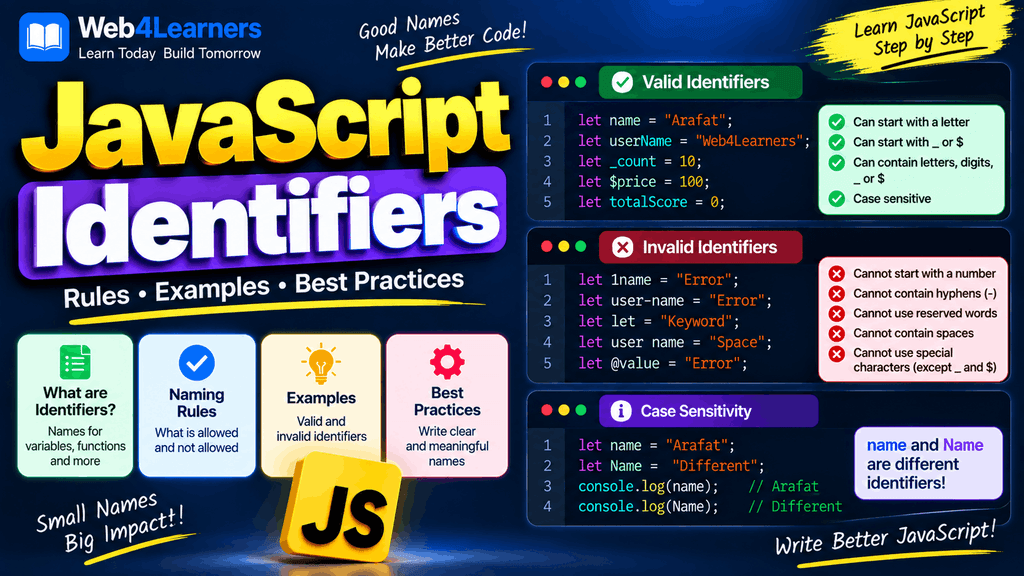
JavaScript identifiers are the names used to identify variables, functions, classes, objects, and other elements in a JavaScript program. Whenever you create a variable, define a function, declare a class, or create certain other named elements, you give that element an identifier.
For example:
let firstName = "John";In this example, firstName is an identifier. It gives the variable a name that JavaScript can use later in the program.
Identifiers may look simple, but understanding the rules for creating them is essential when learning JavaScript. A small mistake in an identifier, such as using an invalid character or accidentally using a reserved keyword, can cause a syntax error. JavaScript is also case sensitive, so userName, username, and UserName are treated as different identifiers.
Good identifier names also make your code easier to understand. Compare these two examples:
let x = 500;
let y = 2;
let z = x * y;
with:
let productPrice = 500;
let quantity = 2;
let totalPrice = productPrice * quantity;
Both examples can perform the same calculation, but the second version communicates the purpose of each value much more clearly.
In this tutorial, you will learn what JavaScript identifiers are, the rules for creating identifiers, valid and invalid examples, case sensitivity, naming conventions, reserved words, identifiers in variables and functions, and best practices for choosing meaningful names.
What Is a JavaScript Identifier?
An identifier is a name that you give to a JavaScript entity so that you can refer to it in your code.
For example:
let username = "John";Here, username is an identifier.
Another example:
function calculateTotal() {
    return 100;
}
Here, calculateTotal is an identifier for the function.
A class can also have an identifier:
class UserAccount {
}
Here, UserAccount is the class identifier.
Identifiers are therefore an important part of JavaScript syntax because they allow different parts of your program to be given meaningful names.
Examples of JavaScript Identifiers
Here are some common examples:
let name = "John";
let age = 25;
const country = "India";

function greetUser() {
    console.log("Hello");
}

class ShoppingCart {
}
The identifiers in this example include:
name
age
country
greetUser
ShoppingCart
Each identifier serves a different purpose.
| Identifier | Used For |
|---|---|
name | Variable |
age | Variable |
country | Constant |
greetUser | Function |
ShoppingCart | Class |
Rules for JavaScript Identifiers
JavaScript has specific rules that determine which names can be used as identifiers.
An identifier can contain:
- Letters
- Digits
- Underscores
_ - Dollar signs
$ - Certain Unicode characters
However, there are important restrictions.
An identifier cannot start with a digit.
For example, this is invalid:
let 123name = "John";But this is valid:
let name123 = "John";An identifier can contain numbers, but the number cannot be the first character.
Valid Identifier Examples
let name = "John";
let userName = "Alex";
let user123 = "David";
let _username = "Mike";
let $price = 500;
let accountBalance2 = 1000;
These names follow the basic syntax rules for JavaScript identifiers.
Invalid Identifier Examples
let 123name = "John";let user-name = "John";let user name = "John";let @username = "John";These contain syntax that is not valid for an ordinary JavaScript identifier.
JavaScript Identifiers Cannot Start With a Number
One of the most important identifier rules is that an identifier cannot begin with a digit.
This is invalid:
let 1name = "John";This is also invalid:
let 2026year = 2026;However, numbers can appear after the first character:
let name1 = "John";
let year2026 = 2026;
let product123 = "Laptop";
The basic pattern is:
letter + optional numbersor:
_ + nameor:
$ + nameFor normal application code, however, meaningful names such as product2026 are generally more useful than arbitrary combinations of characters.
Underscores in JavaScript Identifiers
An underscore _ is allowed in JavaScript identifiers.
For example:
let _username = "John";You can also use underscores between words:
let user_name = "John";
let product_price = 500;
These are valid identifiers.
However, JavaScript developers commonly use camelCase for variables and functions instead of snake_case.
For example:
let userName = "John";
let productPrice = 500;
Both naming styles are valid, but consistent naming conventions make a codebase easier to read.
Dollar Signs in JavaScript Identifiers
The dollar sign $ is also allowed in JavaScript identifiers.
For example:
let $price = 500;This is valid JavaScript.
You may also see:
let $element = document.getElementById("heading");The $ character has no special requirement that makes it necessary for ordinary JavaScript identifiers. It is simply one of the characters permitted in identifier names.
Some JavaScript libraries and projects use $ as part of their naming conventions, but you should not assume that a dollar sign automatically gives a variable a special meaning.
JavaScript Identifiers Are Case Sensitive
JavaScript identifiers are case sensitive.
This means these identifiers are different:
let name = "John";
let Name = "David";
let NAME = "Alex";
JavaScript treats all three as separate identifiers.
You can access them individually:
console.log(name);
console.log(Name);
console.log(NAME);
The output is:
John
David
Alex
The same rule applies to functions:
function calculateTotal() {
    return 100;
}
This is not the same as:
calculatetotal();The capitalization of T matters.
This is why it is important to use exactly the same spelling and capitalization when referring to an identifier.
JavaScript Identifiers and Reserved Words
Some words have a special meaning in JavaScript and cannot normally be used as ordinary identifiers in certain contexts. These are known as reserved words or keywords.
Examples include:
let
const
var
if
else
for
while
function
return
class
new
switch
try
catch
throw
For example, this is invalid:
let let = 10;This is also invalid:
let function = "test";Instead, choose another identifier:
let value = 10;Reserved words are part of JavaScript’s syntax, so you need to avoid using them as ordinary variable or function names where the language does not permit them.
JavaScript Identifier Naming Conventions
JavaScript has common naming conventions that developers use to make code easier to read.
For variables and functions, camelCase is widely used.
For example:
let firstName = "John";
let lastName = "Smith";
let accountBalance = 5000;
Functions commonly follow the same pattern:
function getUserDetails() {
}

function calculateTotalPrice() {
}

function updateProfile() {
}
For classes, PascalCase is commonly used:
class UserAccount {
}

class ShoppingCart {
}

class ProductManager {
}
Constants representing fixed configuration values are sometimes written using uppercase letters with underscores:
const MAX_USERS = 100;
const API_URL = "https://example.com";
These are conventions rather than strict JavaScript requirements.
CamelCase Identifiers
CamelCase is one of the most common naming styles for JavaScript variables and functions.
For example:
let firstName = "John";
let phoneNumber = "1234567890";
let accountBalance = 5000;
When multiple words are combined, the first word begins with lowercase letters and subsequent words begin with uppercase letters.
Functions can follow the same pattern:
function getUserName() {
}

function calculateFinalPrice() {
}

function displayProductDetails() {
}
CamelCase makes multi-word identifiers easier to read without requiring spaces.
PascalCase Identifiers
PascalCase is commonly used for class names.
For example:
class User {
}

class UserAccount {
}

class ShoppingCart {
}
Each word begins with an uppercase letter.
You may also encounter PascalCase in some frameworks and libraries for components and other constructs.
For example:
function UserProfile() {
}
The appropriate convention depends on the type of identifier and the conventions used by the project.
Descriptive JavaScript Identifiers
A good identifier should communicate what it represents.
Compare:
let x = 50000;
let y = 3;
let z = x * y;
with:
let productPrice = 50000;
let quantity = 3;
let totalPrice = productPrice * quantity;
The second example is easier to understand because the identifiers describe the data.
Descriptive identifiers are particularly useful when working on larger projects where you may return to the code weeks or months later.
Avoid Single-Letter Identifiers When They Are Unclear
Single-letter identifiers are sometimes appropriate in small contexts, particularly for loop counters.
For example:
for (let i = 0; i < 10; i++) {
    console.log(i);
}
Here, i is commonly understood as a loop counter.
However, using single-letter identifiers for important application data can make code difficult to understand.
Instead of:
let a = 5000;
let b = 10;
let c = a * b;
use:
let monthlySalary = 5000;
let months = 10;
let totalSalary = monthlySalary * months;
The second version makes the purpose of the values much clearer.
JavaScript Identifiers Should Not Be Overly Long
Although JavaScript allows reasonably long identifiers, excessively long names can make code unnecessarily difficult to read.
For example:
let totalPriceOfTheProductIncludingTheDiscountAndTax = 1500;This identifier communicates a lot of information, but it is unnecessarily long.
A clearer approach could be:
let finalPrice = 1500;The best identifier is usually descriptive without containing unnecessary words.
Identifiers for Boolean Values
Boolean variables often benefit from names that clearly communicate whether something is true or false.
For example:
let isLoggedIn = true;
let isActive = false;
let hasPermission = true;
let canEdit = false;
Prefixes such as:
is
has
can
should
can make Boolean identifiers easier to understand.
For example:
if (isLoggedIn) {
    console.log("Welcome!");
}
is immediately understandable.
Compare that with:
let status = true;The second example does not communicate exactly what the Boolean value represents.
Identifiers for Functions
Function identifiers should generally describe the action performed by the function.
For example:
function calculateTotal() {
}

function getUserData() {
}

function displayMessage() {
}

function updateProfile() {
}
Action-oriented names make functions easier to understand.
Avoid vague function names such as:
function doSomething() {
}
unless the function genuinely has a broad purpose that cannot be expressed more clearly.
Identifiers for Constants
Constants can use descriptive names that communicate what the value represents.
For example:
const MAX_LOGIN_ATTEMPTS = 5;
const DEFAULT_LANGUAGE = "en";
const TAX_RATE = 0.18;
In many projects, uppercase names with underscores are used for constants whose values represent fixed configuration or application-wide settings.
However, the naming style may vary depending on the project’s coding standards.
Identifiers in Objects
Object properties also have names, and those names can look similar to identifiers.
For example:
const user = {
    firstName: "John",
    lastName: "Smith",
    age: 25
};
Here, firstName, lastName, and age are property names.
You can access them using:
console.log(user.firstName);
console.log(user.lastName);
console.log(user.age);
Property names are also case sensitive.
user.firstNameis different from:
user.FirstNameWhen working with objects and APIs, matching property names exactly is important.
Identifiers in Functions
Identifiers can be used for function parameters as well.
For example:
function calculateTotal(price, quantity) {
    return price * quantity;
}
Here, calculateTotal, price, and quantity are identifiers.
The function name identifies the function, while the parameter names identify the values passed into the function.
When the function is called:
let total = calculateTotal(500, 3);the values 500 and 3 are passed to the parameters price and quantity.
Identifiers in Classes
A class declaration can also have an identifier.
class Product {
    constructor(name, price) {
        this.name = name;
        this.price = price;
    }
}
Here, Product is the class identifier.
The constructor parameters name and price are also identifiers.
You can create an object from the class:
const laptop = new Product("Laptop", 50000);The identifier Product refers to the class.
Unicode Characters in JavaScript Identifiers
JavaScript supports many Unicode characters in identifiers.
For example:
let café = "Coffee";This can be valid JavaScript.
However, using standard English letters for identifiers is generally more common in JavaScript projects because it makes source code easier to share across teams and environments.
Unicode support can be useful when developing software for different languages, but consistency and readability should still be considered.
Private Class Fields
Modern JavaScript also supports private class fields using the # prefix.
For example:
class User {
    #password = "secret";

    getPassword() {
        return this.#password;
    }
}
Here, #password is a private class field.
It is important to distinguish this from an ordinary identifier such as:
passwordThe # syntax has a special meaning within class definitions and is part of JavaScript’s private class field syntax.
JavaScript Identifier Scope
An identifier does not necessarily exist throughout an entire JavaScript program. Its accessibility depends on the scope in which it is declared.
For example:
let name = "John";

function greet() {
    let message = "Hello";

    console.log(name);
    console.log(message);
}
The identifier name is available inside the function because it was declared in an outer scope.
The identifier message exists only within the function.
Trying to access message outside the function would result in an error.
Understanding identifier scope becomes increasingly important when learning functions, blocks, modules, and modern JavaScript application development.
Common JavaScript Identifier Mistakes
Starting an Identifier With a Number
Incorrect:
let 123user = "John";Correct:
let user123 = "John";Using Spaces
Incorrect:
let user name = "John";Correct:
let userName = "John";JavaScript identifiers cannot contain ordinary spaces.
Using a Hyphen
Incorrect:
let user-name = "John";The hyphen is interpreted as the subtraction operator rather than as part of an identifier.
Use:
let userName = "John";instead.
Using Reserved Words
Incorrect:
let class = "Developer";Use a different identifier:
let userClass = "Developer";Incorrect Capitalization
let userName = "John";

console.log(username);
The identifier is userName, not username.
Because JavaScript is case sensitive, the second name does not refer to the first variable.
JavaScript Identifiers vs Variables
The terms identifier and variable are related but are not exactly the same thing.
Consider:
let userName = "John";userName is the identifier used to refer to the variable.
The variable is the binding that associates the identifier with a value.
Another example:
function greetUser(name) {
    return `Hello ${name}`;
}
Here, greetUser and name are identifiers, while the function itself is a function and name is a parameter binding.
Understanding this distinction becomes more useful as you move into advanced JavaScript topics such as scope, closures, modules, and destructuring.
JavaScript Identifier Quick Reference
| Rule | Example | Valid? |
|---|---|---|
| Start with a letter | username | Yes |
Start with _ | _username | Yes |
Start with $ | $price | Yes |
| Start with a number | 123user | No |
| Contain numbers | user123 | Yes |
| Contain spaces | user name | No |
| Use hyphen | user-name | No |
| Use camelCase | userName | Yes |
| Use PascalCase | UserAccount | Yes |
| Use reserved keyword | let class = 10 | No |
| Use uppercase/lowercase variations | name, Name | Both valid but different |
JavaScript Identifier Best Practices
Use identifiers that clearly communicate what a variable, function, class, or value represents.
Prefer:
let customerName = "John";
let orderTotal = 1500;
over:
let x = "John";
let y = 1500;
Follow a consistent naming convention throughout your project. A common approach is camelCase for variables and functions and PascalCase for classes.
Use Boolean prefixes when appropriate:
let isActive = true;
let hasAccess = false;
let canEdit = true;
Avoid creating identifiers that differ only by capitalization:
let user = "John";
let User = "David";
Although valid, this can easily cause confusion.
Avoid unnecessary abbreviations:
let usrNm = "John";is less clear than:
let userName = "John";Finally, remember that identifier names should describe the purpose of the data rather than simply describing its type.
Frequently Asked Questions About JavaScript Identifiers
What is an identifier in JavaScript?
An identifier is a name used to identify a variable, function, class, parameter, or other named element in JavaScript code.
What characters can be used in JavaScript identifiers?
JavaScript identifiers can contain letters, digits, underscores, dollar signs, and certain Unicode characters. An ordinary identifier cannot begin with a digit.
Can a JavaScript identifier start with a number?
No. An ordinary JavaScript identifier cannot start with a number.
This is invalid:
let 123name = "John";But this is valid:
let name123 = "John";Can JavaScript identifiers contain spaces?
No. Ordinary JavaScript identifiers cannot contain spaces.
Instead of:
let first name = "John";use:
let firstName = "John";Are JavaScript identifiers case sensitive?
Yes. name, Name, and NAME are different identifiers.
Can an identifier contain an underscore?
Yes.
let _userName = "John";is valid JavaScript.
Can an identifier contain a dollar sign?
Yes.
let $price = 500;is valid JavaScript.
Can JavaScript keywords be used as identifiers?
Reserved JavaScript keywords generally cannot be used as ordinary identifiers in contexts where they have their language-defined meaning.
For example:
let class = "Developer";is invalid.
What naming convention is commonly used for JavaScript variables?
camelCase is commonly used:
let firstName = "John";
let accountBalance = 5000;
What naming convention is commonly used for JavaScript classes?
PascalCase is commonly used:
class UserAccount {
}
Why are meaningful identifiers important?
Meaningful identifiers make code easier to read, understand, debug, and maintain. They allow developers to understand what a value or function represents without having to inspect every line of code.
Practice Exercise
Try identifying the identifiers in this JavaScript program:
const productName = "Laptop";
const productPrice = 50000;
const quantity = 2;

function calculateTotal(price, quantity) {
    return price * quantity;
}

const totalPrice = calculateTotal(productPrice, quantity);

console.log(productName);
console.log(totalPrice);
Some of the identifiers include:
productName
productPrice
quantity
calculateTotal
price
totalPrice
Now modify the program by replacing unclear names with descriptive identifiers.
For example, instead of:
let x = 50000;
let y = 2;
let z = x * y;
write:
let productPrice = 50000;
let quantity = 2;
let totalPrice = productPrice * quantity;
This simple exercise will help you develop the habit of choosing identifiers that communicate the purpose of your code.