
JavaScript has a set of special words that have a predefined meaning in the language. These words are called reserved words or reserved keywords.
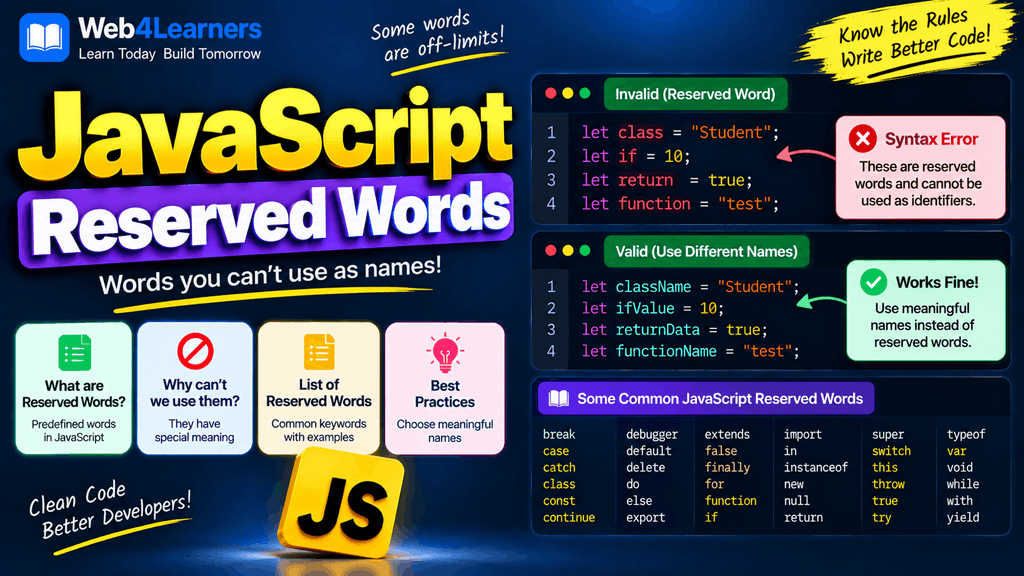
Reserved words are part of JavaScript’s syntax and are used for specific purposes, such as creating variables, defining functions, controlling program flow, handling classes, working with asynchronous code, and managing errors.
Because these words already have a special meaning, you generally cannot use them as variable, function, class, or other identifier names.
For example:
let name = "John";
Here, let is a JavaScript keyword. It tells JavaScript that a variable is being declared.
You cannot normally use let as a variable name:
let let = 10;
This produces a syntax error because let already has a special meaning in JavaScript.
Understanding reserved words is important when writing JavaScript because accidentally using one as an identifier can cause your program to fail before it even runs.
What Are Reserved Words in JavaScript?
Reserved words are words that JavaScript keeps for its own syntax and language features.
Some common JavaScript reserved words include:
| Reserved Word | Purpose |
|---|---|
break | Exits a loop or switch statement |
case | Defines a case in a switch statement |
catch | Handles an exception |
class | Defines a class |
const | Declares a constant |
continue | Skips the current loop iteration |
debugger | Invokes a debugging statement |
default | Defines a default case |
delete | Removes an object property |
do | Starts a do...while loop |
else | Defines an alternative condition |
export | Exports modules |
extends | Creates class inheritance |
finally | Runs code after try and catch |
for | Creates a loop |
function | Defines a function |
if | Creates a condition |
import | Imports modules |
in | Checks properties in an object |
instanceof | Checks an object’s type relationship |
new | Creates an object or class instance |
return | Returns a value from a function |
super | Refers to a parent class |
switch | Creates multiple conditional branches |
this | Refers to the current execution context |
throw | Throws an exception |
try | Starts exception-handling code |
typeof | Returns the type of a value |
var | Declares a variable |
void | Evaluates an expression and returns undefined |
while | Creates a loop |
with | Extends the scope chain |
yield | Pauses and resumes generator functions |
The exact restrictions around some words can depend on where they are used, such as strict mode, modules, classes, or older JavaScript versions.
Reserved Words vs Keywords
The terms reserved words and keywords are often used interchangeably, but there is a small distinction.
A keyword is a word that JavaScript uses as part of its language syntax.
For example:
if (age >= 18) {
    console.log("Adult");
}
The word if is a keyword because it tells JavaScript to create a conditional statement.
A reserved word is a word that JavaScript reserves for a particular language purpose or future language feature and therefore restricts from normal identifier use in certain contexts.
For beginners, the most useful rule is simple:
Do not use JavaScript keywords or reserved words as variable, function, or class names.
Common JavaScript Reserved Words
Let’s look at some of the most important reserved words and how they are used.
let
The let keyword declares a block-scoped variable.
let age = 25;

console.log(age);
Here, let tells JavaScript that age is a variable.
This is invalid:
let let = 25;
The problem is that let is already a JavaScript keyword.
const
The const keyword declares a block-scoped binding that cannot be reassigned.
const country = "USA";

console.log(country);
You cannot do this:
const const = 10;
const already has a predefined meaning in JavaScript.
var
var is the older way of declaring variables in JavaScript.
var username = "Alex";
Using var as an identifier is not valid in this context:
var var = 100;
Modern JavaScript generally uses let and const instead of var.
function
The function keyword is used to define functions.
function greet() {
    console.log("Hello");
}
You should not try to use function as a variable name:
let function = "Hello";
This results in a syntax error.
return
The return keyword sends a value back from a function.
function add(a, b) {
    return a + b;
}

console.log(add(10, 20));
Here, return tells JavaScript to return the result.
Using it as an identifier is not valid:
let return = 10;
if
The if keyword is used to execute code when a condition is true.
let age = 20;

if (age >= 18) {
    console.log("You are an adult.");
}
You cannot use if as a variable name:
let if = 10;
else
The else keyword provides an alternative when an if condition is false.
let age = 15;

if (age >= 18) {
    console.log("Adult");
} else {
    console.log("Minor");
}
Because else has a special meaning, it cannot be used as a normal identifier.
for
The for keyword creates a loop.
for (let i = 0; i < 5; i++) {
    console.log(i);
}
Using for as a variable name is invalid:
let for = 10;
while
The while keyword creates a loop that continues while a condition is true.
let count = 0;

while (count < 5) {
    console.log(count);
    count++;
}
You cannot use while as a normal identifier.
break
The break keyword immediately exits a loop or switch statement.
for (let i = 0; i < 10; i++) {
    if (i === 5) {
        break;
    }

    console.log(i);
}
The loop stops when i reaches 5.
continue
The continue keyword skips the current iteration and moves to the next iteration.
for (let i = 0; i < 5; i++) {
    if (i === 2) {
        continue;
    }

    console.log(i);
}
The number 2 is skipped.
switch
The switch keyword is used when you want to compare a value against multiple possible cases.
let day = 2;

switch (day) {
    case 1:
        console.log("Monday");
        break;

    case 2:
        console.log("Tuesday");
        break;

    default:
        console.log("Unknown day");
}
switch, case, and default are all special JavaScript keywords.
case
The case keyword defines one possible value inside a switch statement.
switch (color) {
    case "red":
        console.log("Red");
        break;
}
case cannot be used as a normal identifier.
default
The default keyword specifies what should happen when no case matches.
switch (day) {
    case 1:
        console.log("Monday");
        break;

    default:
        console.log("Another day");
}
try
The try keyword begins a block of code where JavaScript errors can be handled.
try {
    console.log("Running code");
} catch (error) {
    console.log("An error occurred");
}
catch
The catch keyword handles an exception generated inside a try block.
try {
    throw new Error("Something went wrong");
} catch (error) {
    console.log(error.message);
}
finally
The finally keyword defines code that runs after try and catch.
try {
    console.log("Trying");
} catch (error) {
    console.log("Error");
} finally {
    console.log("Finished");
}
throw
The throw keyword allows you to create and throw an exception.
function checkAge(age) {
    if (age < 18) {
        throw new Error("You must be 18 or older.");
    }
}
class
The class keyword is used to create classes.
class Student {
    constructor(name) {
        this.name = name;
    }
}
Because class is a keyword, this is invalid:
let class = "Student";
extends
The extends keyword allows one class to inherit from another class.
class Animal {
    speak() {
        console.log("Animal sound");
    }
}

class Dog extends Animal {
    bark() {
        console.log("Woof");
    }
}
Here, Dog inherits from Animal.
super
The super keyword is used to access functionality from a parent class.
class Animal {
    constructor(name) {
        this.name = name;
    }
}

class Dog extends Animal {
    constructor(name) {
        super(name);
    }
}
super has a special meaning inside classes.
this
The this keyword refers to a value determined by how a function or method is called.
For example:
const user = {
    name: "Alex",

    greet() {
        console.log(this.name);
    }
};

user.greet();
Here, this.name refers to the name property of the object.
new
The new keyword is commonly used to create instances of classes or objects through constructors.
class Car {
    constructor(brand) {
        this.brand = brand;
    }
}

const car = new Car("Toyota");

console.log(car.brand);
new tells JavaScript to create a new object based on the class.
delete
The delete operator removes a property from an object.
const user = {
    name: "Alex",
    age: 25
};

delete user.age;

console.log(user);
The age property is removed from the object.
typeof
The typeof operator determines the type of a value.
let age = 25;

console.log(typeof age);
Output:
number
Another example:
let name = "Alex";

console.log(typeof name);
Output:
string
instanceof
The instanceof operator checks whether an object is an instance of a particular constructor or class.
class Car {}

const car = new Car();

console.log(car instanceof Car);
Output:
true
in
The in operator checks whether a property exists in an object or its prototype chain.
const user = {
    name: "Alex",
    age: 25
};

console.log("name" in user);
Output:
true
void
The void operator evaluates an expression and returns undefined.
For example:
console.log(void 0);
Output:
undefined
It is not commonly needed in everyday JavaScript development.
debugger
The debugger statement can pause JavaScript execution when developer tools are open.
function calculate() {
    let result = 10 + 20;

    debugger;

    return result;
}
When the debugger is active, the browser can pause at this statement so you can inspect variables and program execution.
import
The import keyword is used to import functionality from another JavaScript module.
For example:
import { add } from "./math.js";
It is commonly used in modern JavaScript applications.
export
The export keyword makes functions, variables, classes, or other declarations available to other modules.
export function add(a, b) {
    return a + b;
}
Another file can then import the function.
yield
The yield keyword is used inside generator functions.
function* numbers() {
    yield 1;
    yield 2;
    yield 3;
}
A generator can pause its execution at each yield.
JavaScript Future Reserved Words
JavaScript also has words that have historically been reserved for possible future language features or are restricted in specific contexts.
Examples include:
enum
implements
interface
package
private
protected
public
Some of these words have special restrictions in strict mode.
For example:
"use strict";

let interface = 10;
This can produce a syntax error because interface is restricted in strict mode.
You do not need to memorize every historical or context-specific reserved word when starting JavaScript. However, you should be aware that JavaScript has more reserved names than the common keywords you use every day.
Reserved Words in Strict Mode
JavaScript has a strict mode that applies additional restrictions to the language.
You can enable strict mode using:
"use strict";
For example:
"use strict";

let package = "JavaScript";
Certain words that may have different behavior in older or non-strict contexts are prohibited as identifiers in strict mode.
Strict mode helps developers avoid certain problematic language behaviors and catches some mistakes earlier.
Reserved Words in JavaScript Modules
JavaScript modules also have special syntax involving words such as:
import
export
For example:
export const username = "Alex";
And:
import { username } from "./user.js";
These words are part of the module system and should not be treated as ordinary variable names in their respective syntactic positions.
Can Reserved Words Be Used as Object Property Names?
This is an important distinction.
A reserved word cannot generally be used as a normal identifier, but reserved words can often appear as object property names.
For example:
const user = {
    class: "Developer",
    name: "Alex"
};

console.log(user.class);
Here, class is being used as a property name.
You can also use bracket notation:
console.log(user["class"]);
This is different from declaring a variable named class.
For example:
let class = "Developer";
That is not valid JavaScript.
Reserved Words as Object Property Names
Consider this example:
const data = {
    default: true,
    delete: false,
    class: "JavaScript"
};

console.log(data.default);
console.log(data.delete);
console.log(data.class);
The words are being used as property names rather than variable identifiers.
This distinction is useful when working with JSON or APIs because external data may contain property names that happen to match JavaScript keywords.
Reserved Words and Variable Names
A variable name must follow JavaScript’s identifier rules.
For example, these are invalid:
let for = 10;
let class = "JavaScript";
let return = 20;
let function = "test";
Instead, use descriptive names:
let total = 10;
let className = "JavaScript";
let returnValue = 20;
let functionName = "test";
Adding a descriptive word is often enough to avoid conflicts.
Reserved Words and Function Names
The same rule applies to function names.
Do not write:
function class() {
    console.log("Hello");
}
Instead:
function className() {
    console.log("Hello");
}
Or:
function createClass() {
    console.log("Hello");
}
Reserved Words and Class Names
Class names must also follow identifier rules.
Avoid:
class function {
}
Use:
class UserProfile {
}
The second example uses UserProfile, which is a valid identifier.
Common Mistake: Using name
It is important to understand that not every JavaScript special-looking word is reserved.
For example:
let name = "Alex";
This is valid.
name is not a JavaScript reserved keyword.
Similarly:
let user = "Alex";
let value = 100;
let data = [];
These are valid identifiers.
The fact that a word has a special meaning somewhere in JavaScript does not automatically mean it is reserved in every context.
Common Mistake: Confusing Keywords With Built-in Objects
Another important distinction is between keywords and built-in objects.
For example:
Array
Object
String
Number
Date
Math
JSON
Promise
These are built-in JavaScript objects or constructors, not all language keywords.
For example:
let Array = "test";
This may be syntactically allowed in some contexts, but it can overwrite the normal Array binding in that scope and cause confusing behavior.
Therefore, even when a name is technically allowed, it is usually better to avoid replacing important built-in names.
Instead of:
let Array = "test";
Use:
let arrayName = "test";
Reserved Words vs Identifiers
An identifier is a name that you give to something in your program.
Examples include:
let firstName = "Alex";

function calculateTotal() {
    return 100;
}
Here:
firstNameis an identifier.calculateTotalis an identifier.letis a keyword.functionis a keyword.returnis a keyword.
JavaScript uses these different types of words for different purposes.
| Type | Example | Purpose |
|---|---|---|
| Identifier | firstName | Programmer-defined name |
| Keyword | let | Language syntax |
| Reserved word | class | Reserved for JavaScript syntax |
| Built-in | Array | Built-in JavaScript functionality |
How to Avoid Reserved Word Errors
The easiest way to avoid reserved-word errors is to use clear and descriptive names.
Instead of:
let class = "Developer";
Use:
let className = "Developer";
Instead of:
let function = "login";
Use:
let functionName = "login";
Instead of:
let return = 100;
Use:
let returnValue = 100;
Good naming makes your code easier to understand as well as preventing naming conflicts.
JavaScript Reserved Words Quick Reference
Here is a useful reference of commonly encountered JavaScript keywords and reserved words:
| Word | Common Purpose |
|---|---|
await | Waits for a Promise inside async contexts |
break | Exits a loop or switch |
case | Defines a switch case |
catch | Handles exceptions |
class | Defines a class |
const | Declares a constant binding |
continue | Skips a loop iteration |
debugger | Pauses execution for debugging |
default | Defines a default switch case |
delete | Removes an object property |
do | Starts a do-while loop |
else | Provides an alternative condition |
export | Exports a module binding |
extends | Creates class inheritance |
finally | Runs cleanup code |
for | Creates a loop |
function | Defines a function |
if | Creates a condition |
import | Imports module bindings |
in | Checks property membership |
instanceof | Checks object/class relationships |
let | Declares a block-scoped variable |
new | Creates an instance |
return | Returns from a function |
super | Accesses the parent class |
switch | Creates multiple branches |
this | Refers to the current context |
throw | Throws an exception |
try | Starts exception handling |
typeof | Checks a value’s type |
var | Declares a variable |
void | Evaluates an expression and returns undefined |
while | Creates a loop |
with | Extends the scope chain |
yield | Controls generator execution |
Best Practices for Working With Reserved Words
Use descriptive names
Choose names that clearly describe what the data represents.
const userName = "Alex";
const totalPrice = 500;
const productCount = 10;
Avoid names that are too close to keywords
Although adding a suffix can make a name valid, clear naming is preferable.
const className = "Developer";
const functionName = "calculate";
const returnValue = 100;
Do not overwrite important built-ins
Avoid names such as:
let Array = [];
let Object = {};
let Promise = "done";
Use clearer names:
let userArray = [];
let userObject = {};
let promiseResult = "done";
Learn keywords as you learn JavaScript
You do not need to memorize the entire list before writing JavaScript.
You will naturally learn common keywords while studying:
- Variables
- Conditions
- Loops
- Functions
- Objects
- Classes
- Modules
- Asynchronous JavaScript
- Error handling
Use an editor or IDE
Modern code editors can highlight JavaScript keywords automatically.
For example:
const userName = "Alex";

if (userName) {
    console.log(userName);
}
The editor can visually distinguish keywords such as const and if from identifiers such as userName.
This makes it easier to recognize JavaScript syntax while learning.
Why Reserved Words Matter
Reserved words are important because JavaScript needs a consistent vocabulary for its syntax.
Consider this:
if (age >= 18) {
    return true;
}
JavaScript knows that:
ifstarts a condition.returnsends a value back.ageis an identifier.18is a numeric literal.trueis a Boolean literal.
If developers could freely redefine words such as if and return, JavaScript would not be able to reliably understand its own syntax.
Reserved words therefore help JavaScript distinguish language instructions from names created by developers.
Practice Example
Try to identify which words are keywords and which are identifiers in this example:
const userName = "Alex";

function greetUser(name) {
    if (name) {
        return `Hello, ${name}`;
    } else {
        return "Hello, Guest";
    }
}

console.log(greetUser(userName));
The keywords include:
const
function
if
return
else
The identifiers include:
userName
greetUser
name
console
The example also contains values such as strings and template literals.
Understanding these differences will make JavaScript syntax much easier to read.
Frequently Asked Questions
What are reserved words in JavaScript?
Reserved words are words that JavaScript reserves for its language syntax or specific language features. They generally cannot be used as ordinary identifiers in the contexts where they are reserved.
Can I use class as a variable name?
No. class is a JavaScript keyword and cannot be used as a normal variable identifier.
Use a name such as:
let className = "Developer";
Is name a reserved word in JavaScript?
No. name is not a JavaScript reserved keyword, so it can be used as an identifier.
let name = "Alex";
Is var a reserved word?
var is a JavaScript keyword used for declaring variables. It therefore cannot be used as a normal identifier in the same syntactic context.
Can reserved words be used as object property names?
Many JavaScript keywords can be used as object property names.
For example:
const user = {
    class: "Developer"
};
The property can be accessed with:
console.log(user.class);
Can I use JavaScript keywords as function names?
Generally, no. Keywords such as function, return, class, and if cannot be used as ordinary function names.
Do I need to memorize all JavaScript reserved words?
No. You should learn the common JavaScript keywords as you progress through the language. Your code editor will also help identify many keywords.
What happens if I use a reserved word as a variable?
JavaScript will generally produce a syntax error when the word is not allowed as an identifier.
For example:
let return = 10;
This is invalid because return is a JavaScript keyword.
Are JavaScript keywords case-sensitive?
Yes. JavaScript is case-sensitive.
For example:
let
is a keyword, while:
Let
is not the same word.
However, using Let simply because it differs in capitalization is usually poor naming practice because it can make code confusing.
Practice Exercise
Try to identify the invalid declarations:
let username = "Alex";
let class = "JavaScript";
let age = 25;
let return = 100;
let courseName = "Web Development";
The invalid declarations are:
let class = "JavaScript";
let return = 100;
A corrected version would be:
let username = "Alex";
let className = "JavaScript";
let age = 25;
let returnValue = 100;
let courseName = "Web Development";
This example demonstrates why choosing meaningful identifiers is important.