
undefined is a special value in JavaScript that indicates that a value has not been assigned or is currently unavailable. It is one of the primitive values in JavaScript and is commonly encountered when working with variables, objects, functions, arrays, and return values.
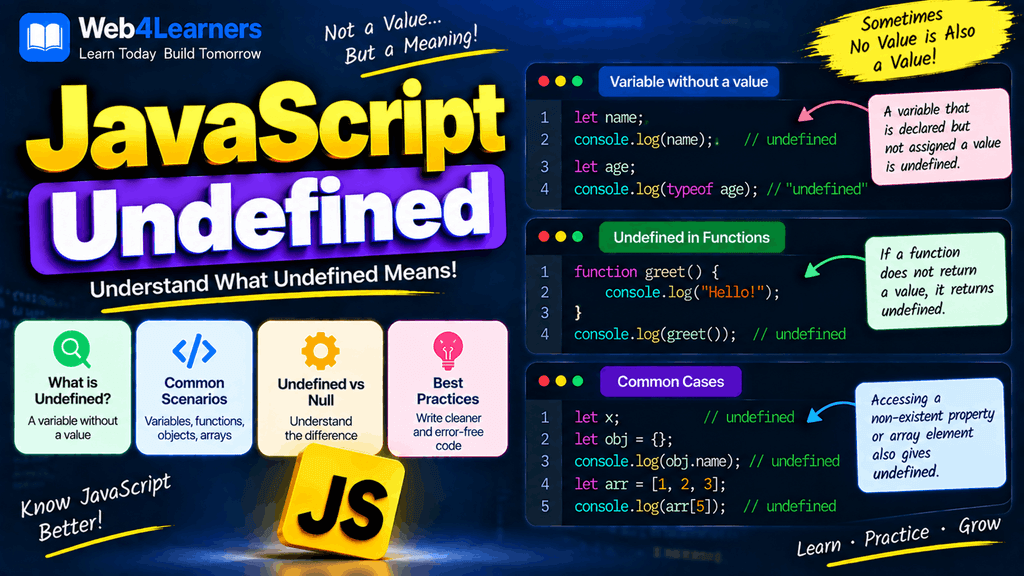
Understanding undefined is important because it appears naturally in JavaScript programs. For example, when you declare a variable without assigning a value, JavaScript automatically gives that variable the value undefined.
let username;

console.log(username);
Output:
undefinedThe variable exists, but no value has been assigned to it yet.
You can also encounter undefined when trying to access a property that does not exist, when a function does not explicitly return a value, or when you try to access an array element that is outside the array’s available indexes.
In this tutorial, you will learn what undefined means, how it occurs, how to check for it, how it differs from null, how functions and arrays can produce undefined, and how to handle undefined values safely in JavaScript applications.
What Is Undefined in JavaScript?
undefined is a primitive value that represents the absence of an assigned value.
Consider this example:
let name;

console.log(name);
Output:
undefinedThe variable name has been declared, but no value has been assigned to it.
JavaScript automatically initializes the variable with undefined.
You can also check its type:
let name;

console.log(typeof name);
Output:
undefinedThe typeof operator returns "undefined" when used with an undefined value.
Declaring a Variable Without a Value
One of the most common ways to get undefined is to declare a variable without assigning a value.
let age;

console.log(age);
Output:
undefinedYou can assign a value later:
let age;

age = 25;

console.log(age);
Output:
25Before the assignment, age contains undefined. After the assignment, it contains 25.
This pattern is common when a value will be determined later in a program.
Undefined With let
Variables declared using let can exist without an assigned value.
let message;

console.log(message);
The result is:
undefinedThe variable can then be assigned a value:
let message;

message = "Hello Web4learners";

console.log(message);
Output:
Hello Web4learnersUndefined With var
The var keyword also produces undefined when a variable has been declared without a value.
var city;

console.log(city);
Output:
undefinedThe main difference between var and let is not the undefined value itself but their scoping and declaration behavior.
Undefined With const
A const variable must be assigned a value when it is declared.
This is invalid:
const age;JavaScript produces a syntax error because a constant declaration requires an initial value.
You must write:
const age = 25;Therefore, unlike let and var, you cannot create an uninitialized const variable that simply contains undefined.
You can, however, explicitly assign undefined:
const value = undefined;

console.log(value);
Output:
undefinedChecking the Type of Undefined
The typeof operator is commonly used to determine whether a value is undefined.
let value;

console.log(typeof value);
Output:
undefinedYou can also use:
console.log(typeof undefined);Output:
undefinedThis makes typeof useful when you need to check whether a variable currently contains an undefined value.
Checking Whether a Value Is Undefined
There are several ways to check for undefined.
One common approach is strict equality:
let value;

if (value === undefined) {
    console.log("Value is undefined.");
}
Output:
Value is undefined.You can also use typeof:
let value;

if (typeof value === "undefined") {
    console.log("Value is undefined.");
}
Both approaches can be useful, although typeof has a particular advantage when dealing with undeclared identifiers because it does not throw a ReferenceError in that situation.
Undefined vs Null
One of the most important concepts for beginners is understanding the difference between undefined and null.
Both can represent an absence of a value, but they generally communicate different ideas.
undefined commonly means that a value has not been assigned or is not available.
null is an intentional assignment that represents the absence of a value.
For example:
let username;

let profilePicture = null;

console.log(username);
console.log(profilePicture);
Output:
undefined
null
The first variable was never assigned a value, while the second was deliberately assigned null.
Undefined vs Null comparison
| Feature | undefined | null |
|---|---|---|
| Meaning | Value has not been assigned or is unavailable | Intentional absence of a value |
Type using typeof | "undefined" | "object" |
| Common source | Uninitialized variables | Explicit assignment |
| Can be assigned manually? | Yes | Yes |
| Commonly returned by missing object properties | Yes | Usually no |
| Commonly used to represent empty state | Sometimes | Often |
The typeof null behavior is a historical JavaScript quirk:
console.log(typeof null);Output:
objectAlthough this can seem confusing, it is an established behavior of JavaScript.
Undefined Object Properties
You can get undefined when trying to access an object property that does not exist.
For example:
let user = {
    name: "John",
    age: 25
};

console.log(user.email);
Output:
undefinedThe email property does not exist in the object, so JavaScript returns undefined.
This behavior is extremely common when working with objects and data received from APIs.
You can check for the property before using it:
if (user.email === undefined) {
    console.log("Email is not available.");
}
Undefined Array Elements
Accessing an array index that does not contain an element produces undefined.
let fruits = ["Apple", "Banana", "Orange"];

console.log(fruits[5]);
Output:
undefinedThe array contains indexes 0, 1, and 2, so index 5 does not contain a value.
You can see the available indexes:
| Index | Value |
|---|---|
0 | "Apple" |
1 | "Banana" |
2 | "Orange" |
5 | undefined |
This is another reason why checking values before using them can be important.
Undefined and Functions
A JavaScript function returns undefined when it does not explicitly return a value.
For example:
function greet() {
    console.log("Hello!");
}

let result = greet();

console.log(result);
Output:
Hello!
undefined
The function prints "Hello!", but it does not contain a return statement.
Therefore, the function’s return value is undefined.
Functions With Return Values
When a function explicitly returns a value, the result is no longer undefined.
function add(a, b) {
    return a + b;
}

let result = add(10, 20);

console.log(result);
Output:
30If you forget the return statement:
function add(a, b) {
    a + b;
}

console.log(add(10, 20));
The output is:
undefinedThis is a very common mistake when beginners start creating functions.
Undefined Function Parameters
If a function expects an argument but you call it without providing that argument, the parameter receives undefined.
function greet(name) {
    console.log(name);
}

greet();
Output:
undefinedThe name parameter does not receive a value because no argument was supplied.
You can handle this situation with a default parameter.
function greet(name = "Guest") {
    console.log(`Hello, ${name}!`);
}

greet();
Output:
Hello, Guest!Default parameters are useful when a function should have a fallback value.
Undefined With Default Parameters
A default parameter is used when the corresponding argument is undefined.
function greet(name = "Guest") {
    console.log(`Hello, ${name}!`);
}

greet(undefined);
Output:
Hello, Guest!However, null is different.
function greet(name = "Guest") {
    console.log(name);
}

greet(null);
Output:
nullThe default value is not used because the argument was explicitly provided as null.
Undefined in Destructuring
Undefined values can also appear when destructuring arrays or objects.
For example:
let numbers = [10, 20];

let [a, b, c] = numbers;

console.log(c);
Output:
undefinedThere is no third element in the array, so c receives undefined.
You can use a default value:
let numbers = [10, 20];

let [a, b, c = 30] = numbers;

console.log(c);
Output:
30Undefined in Object Destructuring
The same concept applies to objects.
let user = {
    name: "John"
};

let { name, age } = user;

console.log(age);
Output:
undefinedYou can provide a fallback value:
let user = {
    name: "John"
};

let { name, age = 25 } = user;

console.log(age);
Output:
25Undefined and Optional Chaining
Optional chaining is another useful feature when working with potentially missing values.
Suppose you have:
let user = {
    profile: {
        name: "John"
    }
};
You can safely access a nested property:
console.log(user.profile?.name);Output:
JohnIf the profile property does not exist:
let user = {};

console.log(user.profile?.name);
The result is:
undefinedOptional chaining helps prevent errors when accessing properties that may not exist.
Nullish Coalescing With Undefined
The nullish coalescing operator ?? allows you to provide a fallback when a value is null or undefined.
let username;

let displayName = username ?? "Guest";

console.log(displayName);
Output:
GuestBecause username is undefined, JavaScript uses "Guest".
The same applies to null:
let username = null;

let displayName = username ?? "Guest";

console.log(displayName);
Output:
GuestThis is particularly useful when working with API responses and optional data.
Undefined and the OR Operator
You may also see the || operator used to provide fallback values.
let username;

let displayName = username || "Guest";

console.log(displayName);
Output:
GuestHowever, || considers all falsy values, while ?? specifically checks for null and undefined.
For example:
let score = 0;

console.log(score || 100);
Output:
100But:
let score = 0;

console.log(score ?? 100);
Output:
0This distinction is important when 0, false, or an empty string can be legitimate values in your application.
Undefined and JSON
When working with JSON, undefined has special behavior.
For example:
let user = {
    name: "John",
    email: undefined
};

console.log(JSON.stringify(user));
The email property is omitted from the resulting JSON.
The result is similar to:
{"name":"John"}This behavior is important when sending JavaScript objects to APIs.
Undefined in Arrays and JSON
Undefined behaves differently in arrays.
let values = [10, undefined, 30];

console.log(JSON.stringify(values));
The undefined array element is serialized as null.
The result is:
[10,null,30]This difference between object properties and array elements is worth remembering when working with JSON.
Practical Example of Handling Undefined
Consider an object containing user information:
let user = {
    name: "John",
    age: 25
};

let email = user.email;

if (email === undefined) {
    console.log("Email address is not available.");
} else {
    console.log(`Email: ${email}`);
}
Output:
Email address is not available.This prevents your application from assuming that a property exists when it does not.
Practical Example With API Data
Suppose an API returns:
let user = {
    name: "John",
    profile: {}
};
You may try to access:
console.log(user.profile.bio);The result is:
undefinedYou can provide a fallback:
let bio = user.profile.bio ?? "No biography available.";

console.log(bio);
Output:
No biography available.This pattern is useful when building websites that consume API data because not every user or record will necessarily contain every optional field.
Common Mistakes With Undefined
Assuming Undefined Means an Error
undefined is not automatically an error.
For example:
let name;

console.log(name);
The program runs normally and outputs undefined.
It simply means that the variable currently has no assigned value.
Confusing Undefined With Null
These values are different:
let a;
let b = null;

console.log(a);
console.log(b);
The first value is undefined, while the second is null.
Forgetting a Return Statement
A function without a return value produces undefined.
function calculate() {
    10 + 20;
}

console.log(calculate());
Output:
undefinedIf you want the function to return the calculation:
function calculate() {
    return 10 + 20;
}

console.log(calculate());
Output:
30Accessing Properties Without Checking
This:
console.log(user.email);may produce undefined if the property is missing.
Use appropriate checks, optional chaining, or fallback values when necessary.
Using || When Zero Is a Valid Value
Consider:
let quantity = 0;

let result = quantity || 10;

console.log(result);
This returns 10, even though 0 may be a legitimate quantity.
Using ?? is often more appropriate when you only want a fallback for null or undefined.
let quantity = 0;

let result = quantity ?? 10;

console.log(result);
Output:
0JavaScript Undefined Cheat Sheet
| Situation | Result |
|---|---|
let value; | undefined |
| Missing object property | undefined |
| Missing array element | undefined |
Function without return | undefined |
| Missing function argument | Parameter becomes undefined |
typeof undefined | "undefined" |
typeof value when value is undefined | "undefined" |
value === undefined | Checks for undefined |
value ?? fallback | Uses fallback for null or undefined |
const value; | Syntax error |
null === undefined | false |
Frequently Asked Questions About JavaScript Undefined
What does undefined mean in JavaScript?
undefined indicates that a value has not been assigned, is unavailable, or is missing in a particular context.
What is the type of undefined?
The typeof operator returns "undefined".
console.log(typeof undefined);Output:
undefinedWhy does an uninitialized variable return undefined?
When a variable declared with let or var has no assigned value, JavaScript initializes it with undefined.
let value;

console.log(value);
What is the difference between undefined and null?
undefined generally indicates that a value has not been assigned or is unavailable, while null is commonly used when a developer intentionally represents the absence of a value.
Can you assign undefined to a variable?
Yes.
let value = undefined;

console.log(value);
However, in many situations, leaving a variable uninitialized naturally produces the same value.
Why does a function return undefined?
A function returns undefined when it does not explicitly return a value.
function greet() {
    console.log("Hello");
}

console.log(greet());
How do you check whether a value is undefined?
You can use strict equality:
value === undefinedor:
typeof value === "undefined"What happens when you access a missing object property?
JavaScript normally returns undefined.
let user = {};

console.log(user.name);
Output:
undefinedWhat happens when a function parameter is missing?
The parameter receives undefined.
function greet(name) {
    console.log(name);
}

greet();
Output:
undefinedCan const have an undefined value?
Yes, but the value must be explicitly assigned.
const value = undefined;You cannot declare a const variable without an initializer.