
JavaScript semicolons are punctuation marks used to indicate the end of a statement in JavaScript code. A semicolon is represented by the ; character and is commonly placed at the end of JavaScript statements.
In this example, each statement ends with a semicolon. The semicolons make it clear where one statement ends and the next statement begins.
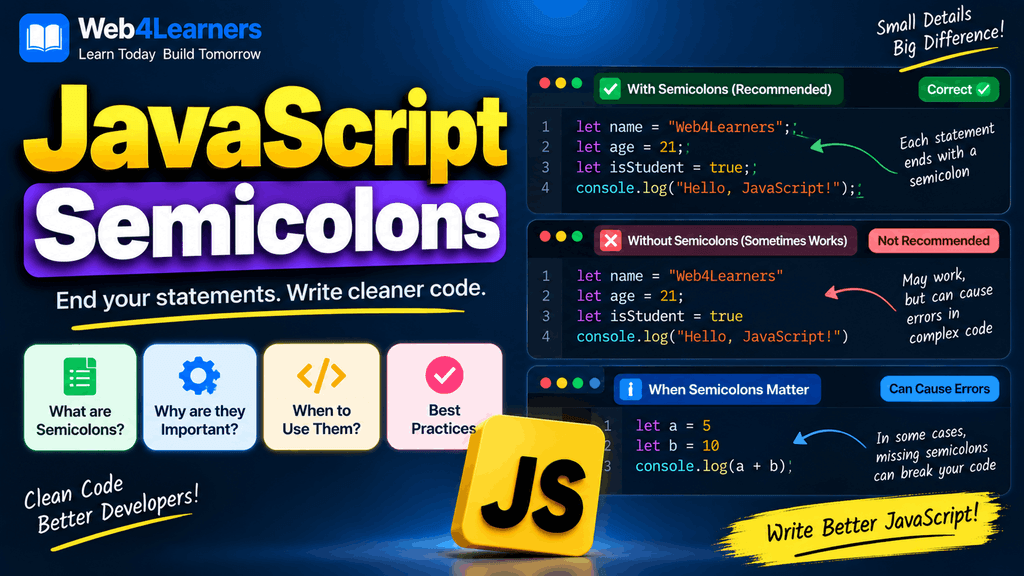
Unlike some programming languages, JavaScript does not always require developers to manually write semicolons because the language has a feature called Automatic Semicolon Insertion, commonly known as ASI. JavaScript can automatically insert semicolons in certain situations when they are omitted.
Even though semicolons can often be omitted, understanding how they work is important because there are situations where leaving them out can change how JavaScript interprets your code.
This tutorial explains JavaScript semicolons from the basics, including when to use them, when they can be omitted, how Automatic Semicolon Insertion works, common mistakes, and recommended coding practices.
What Is a Semicolon in JavaScript?
A semicolon is a character used to mark the end of a JavaScript statement.
The semicolon looks like this:
;For example:
let username = "Alex";Here, the semicolon indicates the end of the variable declaration statement.
Another example is:
console.log("Hello, World!");The semicolon appears at the end of the console.log() statement.
When multiple statements are written together, semicolons help separate them:
let name = "Alex";
let age = 25;
console.log(name);
console.log(age);
Each statement has a clear ending.
Are Semicolons Required in JavaScript?
JavaScript does not require semicolons after every statement in all situations.
This code can work:
let name = "Alex"
let age = 25

console.log(name)
console.log(age)
JavaScript can determine where statements end and automatically insert semicolons in many cases.
The same code can be written with explicit semicolons:
let name = "Alex";
let age = 25;

console.log(name);
console.log(age);
Both styles are valid JavaScript in many ordinary situations.
However, semicolon omission is not simply a matter of JavaScript ignoring punctuation. JavaScript follows specific rules when determining where semicolons may be inserted, and some code patterns can behave differently when semicolons are omitted.
What Is Automatic Semicolon Insertion?
Automatic Semicolon Insertion, or ASI, is a feature of the JavaScript language that allows the JavaScript parser to insert semicolons automatically at certain points.
For example:
let name = "Alex"
console.log(name)
JavaScript can interpret this approximately as:
let name = "Alex";
console.log(name);
The semicolon does not appear in the original source code, but JavaScript can determine that the statements should be separated.
This is why JavaScript programs can often run successfully even when developers do not explicitly write semicolons.
However, ASI follows language rules. It does not simply insert a semicolon after every line break.
JavaScript Semicolon Example
Consider this code:
let price = 500
let quantity = 2

let total = price * quantity

console.log(total)
JavaScript can interpret it as:
let price = 500;
let quantity = 2;

let total = price * quantity;

console.log(total);
The output is:
1000The line breaks provide places where JavaScript can determine that separate statements are intended.
Semicolons After Variable Declarations
Semicolons are commonly used after variable declarations.
For example:
let name = "John";
let age = 25;
const country = "India";
The semicolon indicates the end of each declaration.
You can also write:
let name = "John"
let age = 25
const country = "India"
This can also work because of ASI.
For beginners, consistently using semicolons can make the structure of your code easier to understand.
Semicolons After Expressions
Semicolons can also be placed after expression statements.
For example:
console.log("Hello");Another example is an assignment:
let score = 100;

score = 150;
The assignment:
score = 150;is an expression statement, and the semicolon marks its end.
Other examples include:
x++;total += 50;user.name = "Alex";Semicolons After Function Calls
Function calls commonly end with semicolons when they are used as statements.
For example:
console.log("Welcome to Web4Learners!");Another example:
alert("Hello!");And:
calculateTotal();The semicolon indicates the end of each function-call statement.
Semicolons and Functions
Function declarations do not normally require a semicolon after the closing curly brace.
For example:
function greet() {
    console.log("Hello!");
}
You do not normally write:
function greet() {
    console.log("Hello!");
};
The second version may be syntactically accepted in some contexts, but the semicolon is unnecessary for a normal function declaration.
Function expressions are different.
const greet = function () {
    console.log("Hello!");
};
Here, the semicolon is used because the function expression is assigned to a variable as part of a variable declaration.
Semicolons With Arrow Functions
Arrow functions follow a similar distinction.
For example:
const greet = () => {
    console.log("Hello!");
};
The semicolon belongs to the variable declaration.
Another example is:
const add = (a, b) => a + b;The semicolon terminates the assignment statement.
You can technically omit it:
const add = (a, b) => a + bbut many JavaScript codebases use the semicolon consistently.
Semicolons After Loops
You generally do not place a semicolon after the closing curly brace of a normal loop.
For example:
for (let i = 0; i < 5; i++) {
    console.log(i);
}
The statements inside the loop use semicolons, but the for statement itself does not require a semicolon after its closing }.
Similarly:
while (count < 5) {
    console.log(count);
    count++;
}
The statements inside the block end with semicolons.
Semicolons With Conditional Statements
Conditional statements generally do not require a semicolon after the closing curly brace.
For example:
if (age >= 18) {
    console.log("Adult");
} else {
    console.log("Minor");
}
The console.log() statements have semicolons, but there is no semicolon after the final }.
A semicolon after the if block is unnecessary:
if (age >= 18) {
    console.log("Adult");
};
It is better to understand which construct actually forms the statement rather than adding semicolons everywhere.
Semicolons in switch Statements
A switch statement does not require a semicolon after its closing brace.
let day = "Monday";

switch (day) {
    case "Monday":
        console.log("Start of the week");
        break;

    case "Friday":
        console.log("End of the week");
        break;

    default:
        console.log("Another day");
}
Notice that the console.log() and break statements use semicolons, while the switch structure itself does not end with one after }.
Empty Statements
A semicolon by itself can represent an empty statement.
For example:
;This tells JavaScript that there is a statement that intentionally does nothing.
You might occasionally encounter this in specialized code, but beginners generally do not need to use empty statements.
An accidental semicolon can sometimes create bugs.
For example:
if (age >= 18);
{
    console.log("Access granted");
}
The semicolon immediately after the if condition ends the if statement.
As a result, the block may execute regardless of whether the condition is true.
The intended code is:
if (age >= 18) {
    console.log("Access granted");
}
This is an important example of why semicolons should be used carefully.
When JavaScript Automatically Inserts Semicolons
JavaScript can insert a semicolon when a line terminator is encountered and the parser cannot continue the current statement in a valid way.
For example:
let name = "John"
let age = 25
JavaScript can treat these as two separate statements.
However, JavaScript does not automatically insert semicolons after every line break.
This distinction is extremely important.
Consider:
let total = 10
+ 20;
JavaScript can interpret this as:
let total = 10 + 20;The line break does not necessarily indicate the end of the statement because the expression can continue.
The result is:
30This demonstrates that a newline and a semicolon are not always equivalent.
The Famous Array Problem
One of the most important reasons some developers prefer explicit semicolons is that certain statements beginning with [ can interact unexpectedly with the previous line.
Consider:
const name = "John"

["Alice", "Bob"].forEach(name => {
    console.log(name);
});
Without a semicolon after "John", JavaScript may interpret the next line as part of the previous expression in an unintended way.
Writing:
const name = "John";

["Alice", "Bob"].forEach(name => {
    console.log(name);
});
makes the separation explicit.
This is one reason semicolon usage can matter even though JavaScript has Automatic Semicolon Insertion.
The Parenthesis Problem
A similar issue can occur when the next statement begins with (.
For example:
const value = 10

(function () {
    console.log("Hello");
})();
Without a semicolon, JavaScript can interpret the second line as continuing the previous expression.
Adding a semicolon avoids the ambiguity:
const value = 10;

(function () {
    console.log("Hello");
})();
This is another example of why consistent semicolon usage can make JavaScript source code more predictable.
Semicolons and Return Statements
Semicolon behavior is particularly important with return.
Consider:
function getMessage() {
    return
    "Hello";
}
Many beginners expect the function to return "Hello", but JavaScript’s parsing rules can treat the return as complete at the line break.
The function effectively behaves like:
function getMessage() {
    return;
    "Hello";
}
The result is undefined.
The correct approach is:
function getMessage() {
    return "Hello";
}
This is an important example of why line breaks can have meaning in JavaScript.
If you need to return an expression across multiple lines, you can use parentheses:
function calculateTotal() {
    return (
        price *
        quantity
    );
}
The expression clearly continues inside the parentheses.
Semicolons and Class Definitions
Class declarations do not require a semicolon after the closing curly brace.
For example:
class User {
    constructor(name) {
        this.name = name;
    }

    greet() {
        console.log(`Hello ${this.name}`);
    }
}
However, statements inside methods can use semicolons normally.
Class fields can also involve semicolons:
class User {
    name = "John";
    age = 25;
}
The syntax depends on what kind of class element you are writing.
Semicolons in for Loops
The for loop has a special semicolon structure.
For example:
for (let i = 0; i < 5; i++) {
    console.log(i);
}
There are two semicolons inside the parentheses:
for (initialization; condition; update)The first semicolon separates the initialization from the condition.
The second semicolon separates the condition from the update expression.
These semicolons are required as part of the for loop syntax.
It is important not to confuse these semicolons with the optional semicolons that can terminate ordinary statements.
Semicolons in JavaScript Modules
Modern JavaScript applications often use modules.
For example:
export const username = "John";and:
import { username } from "./user.js";Many JavaScript projects use semicolons at the end of these statements.
You may also see module code written without semicolons:
export const username = "John"

import { username } from "./user.js"
Both styles can be supported by JavaScript tooling, depending on the code and environment.
Should You Use Semicolons in JavaScript?
There are two common approaches to semicolon usage in JavaScript.
Some developers consistently write semicolons:
const name = "John";
const age = 25;

console.log(name);
console.log(age);
Others follow a semicolon-free style:
const name = "John"
const age = 25

console.log(name)
console.log(age)
Both styles are widely used.
For beginners, consistently using semicolons can be helpful because it provides a clear visual indication of where statements end. It can also reduce the chance of certain ASI-related problems when writing code manually.
The most important thing in a project is to follow a consistent style.
Semicolons and Code Formatting Tools
Modern JavaScript projects commonly use formatting and linting tools to maintain a consistent coding style.
Tools such as Prettier can automatically format JavaScript code according to a chosen configuration, while ESLint can identify potential problems and enforce project-specific coding rules.
For example, a project may be configured to require semicolons:
const name = "John";Another project may be configured to omit them:
const name = "John"The important point is that teams should generally agree on one style and apply it consistently.
JavaScript Semicolon Best Practices
When learning JavaScript, there are several practical guidelines that can make your code easier to read and maintain.
Be Consistent
If you decide to use semicolons, use them consistently:
let name = "John";
let age = 25;
console.log(name);
console.log(age);
Avoid randomly mixing styles:
let name = "John"
let age = 25;
console.log(name)
console.log(age);
Mixed formatting makes the code look inconsistent and can make maintenance more difficult.
Understand Automatic Semicolon Insertion
You do not need to memorize every ASI rule immediately, but you should understand that JavaScript can insert semicolons automatically and that a line break does not always mean the same thing as a semicolon.
This becomes especially important when writing:
returnstatements- Immediately invoked function expressions
- Array expressions at the beginning of a line
- Parenthesized expressions
- Complex expressions across multiple lines
Avoid Unnecessary Semicolons
Do not add semicolons randomly after control structures.
For example:
if (age >= 18) {
    console.log("Adult");
}
is cleaner than:
if (age >= 18) {
    console.log("Adult");
};
Use a Formatter
If you are working on a larger project, using a consistent formatter can remove many style-related decisions from your workflow.
A formatter can automatically make semicolon usage consistent throughout your JavaScript files.
Common JavaScript Semicolon Mistakes
Putting a Semicolon After an if Condition
Incorrect:
if (age >= 18);
{
    console.log("Adult");
}
Correct:
if (age >= 18) {
    console.log("Adult");
}
The unnecessary semicolon ends the if statement before the block.
Breaking a return Statement Incorrectly
Incorrect:
function getName() {
    return
    "John";
}
Correct:
function getName() {
    return "John";
}
The line break after return can cause JavaScript to insert a semicolon.
Forgetting About Lines Starting With [ or (
When using a semicolon-free style, be careful when one statement is immediately followed by a line beginning with [ or (.
For example:
const number = 10
[1, 2, 3].forEach(item => {
    console.log(item);
});
This can be interpreted differently from what you intended.
Using:
const number = 10;

[1, 2, 3].forEach(item => {
    console.log(item);
});
makes the statement boundary explicit.
JavaScript Semicolons Quick Reference
| Situation | Semicolon Commonly Used? | Example |
|---|---|---|
| Variable declaration | Yes | let name = "John"; |
| Assignment | Yes | x = 10; |
| Function call | Yes | console.log(x); |
return expression | Yes | return value; |
break | Yes | break; |
continue | Yes | continue; |
| Function declaration | No after } | function test() {} |
if statement | No after } | if (x) {} |
for statement | No after } | for (...) {} |
while statement | No after } | while (...) {} |
switch statement | No after } | switch (x) {} |
| Class declaration | No after } | class User {} |
for loop syntax | Required between sections | for (let i=0; i<5; i++) |
JavaScript Semicolons Example
Here is a complete example showing semicolon usage in a small JavaScript program:
const productName = "Laptop";
const productPrice = 50000;
const quantity = 2;

function calculateTotal(price, quantity) {
    return price * quantity;
}

const total = calculateTotal(productPrice, quantity);

if (total > 50000) {
    console.log("The order value is high.");
} else {
    console.log("The order value is within the limit.");
}

console.log("Product:", productName);
console.log("Total:", total);
This example demonstrates several important patterns.
Variable declarations use semicolons, the function’s return statement uses a semicolon, and the function call is assigned to a variable with a semicolon. The if...else structure itself does not require a semicolon after its closing braces.
Frequently Asked Questions About JavaScript Semicolons
What is a semicolon in JavaScript?
A semicolon is the ; character used to indicate the end of a JavaScript statement.
Are semicolons mandatory in JavaScript?
No. JavaScript has Automatic Semicolon Insertion, which means semicolons can often be omitted. However, certain situations can produce unexpected behavior when semicolons are omitted.
What is Automatic Semicolon Insertion?
Automatic Semicolon Insertion is a JavaScript parsing feature that allows the language to insert semicolons at certain points when they are not explicitly written in the source code.
Should beginners use semicolons in JavaScript?
Using semicolons consistently can be a straightforward approach for beginners because it makes statement boundaries visually clear and reduces exposure to some common ASI-related pitfalls.
Do JavaScript functions need semicolons?
A normal function declaration does not require a semicolon after its closing brace:
function greet() {
    console.log("Hello");
}
A function expression assigned to a variable commonly ends with a semicolon:
const greet = function () {
    console.log("Hello");
};
Do if statements need semicolons?
An if statement does not normally require a semicolon after its closing curly brace:
if (age >= 18) {
    console.log("Adult");
}
Why can semicolons be important in JavaScript?
Semicolons can make statement boundaries explicit and can prevent certain parsing problems that may occur when JavaScript relies on Automatic Semicolon Insertion.
Can I write JavaScript without semicolons?
Yes. JavaScript supports a semicolon-free coding style, and many developers use it. The important thing is to understand how ASI works and maintain a consistent style.
What happens if I put a semicolon after an if statement?
A semicolon immediately after the condition can terminate the if statement before its block:
if (true);
{
    console.log("Hello");
}
This can lead to unexpected behavior because the block is no longer controlled by the if.
Practice Exercise
Create a small JavaScript program that calculates the total price of a product.
Start with:
let price = 1000;
let quantity = 3;

let total = price * quantity;

console.log(total);
Now remove the semicolons:
let price = 1000
let quantity = 3

let total = price * quantity

console.log(total)
Run both versions in your browser’s Developer Tools console and observe that they can produce the same result.
Then experiment with a return statement:
function getMessage() {
    return
    "Hello";
}
Compare it with:
function getMessage() {
    return "Hello";
}
This exercise helps you understand why JavaScript’s handling of line breaks and semicolons matters.