React is an open-source JavaScript library used to build user interfaces (UIs) for web applications.
React allows developers to create interfaces by combining small, reusable pieces called components. Instead of writing an entire application as one large piece of code, developers can divide the interface into independent components and combine them to create complete pages and applications.
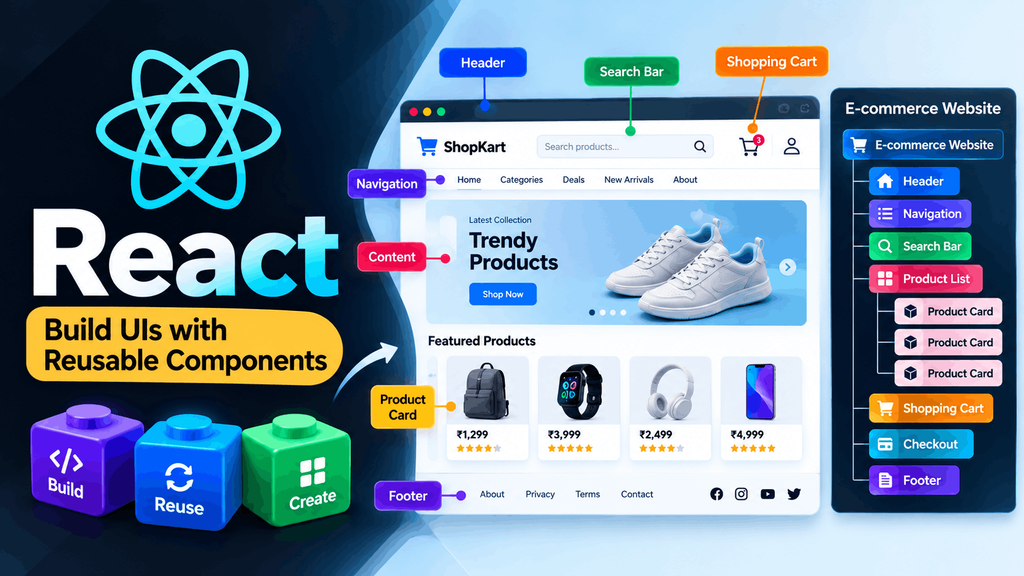
For example, an e-commerce website could be divided into components such as:
E-commerce Website
│
├── Header
├── Navigation
├── Search Bar
├── Product List
│   ├── Product Card
│   ├── Product Card
│   └── Product Card
├── Shopping Cart
├── Checkout
└── Footer
Each part can be developed as a React component.
React is primarily focused on the user interface layer. For complete applications, developers can combine React with frameworks and additional tools for routing, data fetching, authentication, server rendering, databases, and other application requirements.
In this article, you will learn what React is, what problem it solves, how it works at a basic level, what React components are, and why React is important for modern web development.
What Is React?
React is an open-source JavaScript library for building user interfaces. The official React website describes React as a library for web and native user interfaces. React allows developers to create interfaces from reusable components.
In simple terms:
React helps developers build interactive websites and applications using reusable UI components.
Suppose you are building a website with a navigation bar, buttons, cards, forms, menus, and user profiles. Without a component-based approach, you may end up managing a large amount of HTML and JavaScript code. React allows you to organize the interface into smaller pieces:
Application
│
├── Header
├── Navigation
├── Sidebar
├── Main Content
│   ├── Card
│   ├── Card
│   └── Card
└── Footer
Each piece can become a React component.
This makes it easier to:
- organize code
- reuse UI
- manage changing data
- handle user interactions
- maintain large applications
- build complex interfaces
React does not replace HTML, CSS, or JavaScript. Instead, it provides a way to use JavaScript to create and manage modern user interfaces.
React in Simple Words
If you are completely new to React, the easiest way to understand it is to think about building blocks.
Imagine building a house.
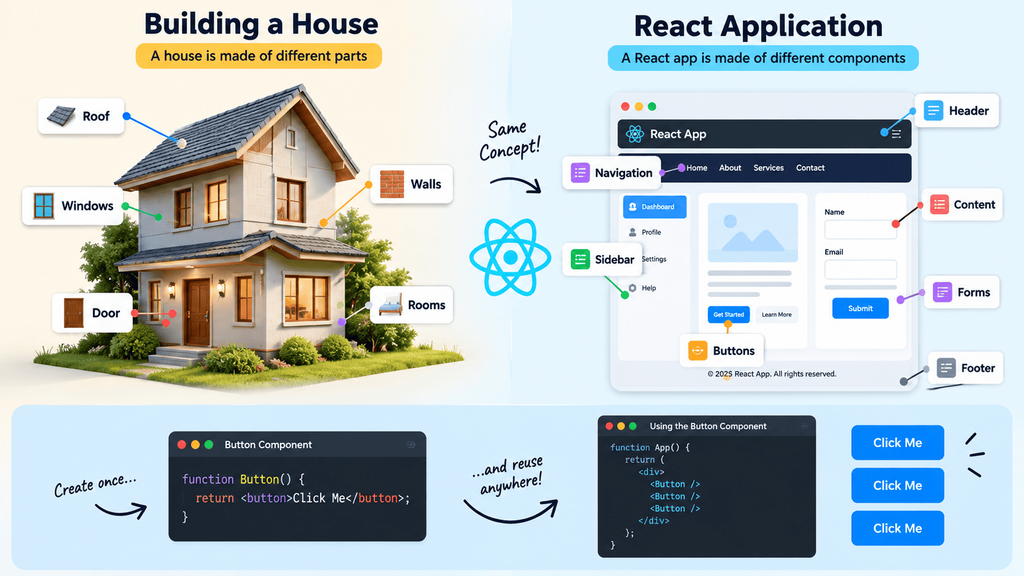
You don’t normally construct the entire house as one giant object. Instead, you use different parts:
House
│
├── Door
├── Windows
├── Walls
├── Roof
└── Rooms
A React application works in a similar way.
React Application
│
├── Header
├── Navigation
├── Sidebar
├── Content
├── Buttons
├── Forms
└── Footer
These individual pieces are components.
You can create a component once and reuse it in different places.
For example:
function Button() {
  return <button>Click Me</button>;
}
You can then use it inside another component:
function App() {
  return (
    <div>
      <Button />
      <Button />
      <Button />
    </div>
  );
}
Instead of creating three completely separate button implementations, you created one reusable component.
This component-based approach is one of the central ideas behind React.
Why Was React Created?
React was originally developed at Facebook to help solve challenges involved in building complex, interactive user interfaces. As web applications became more interactive, interfaces started handling increasingly large amounts of changing information.
A modern application might need to update:
- user profiles
- notifications
- messages
- comments
- likes
- shopping carts
- search results
- menus
- dashboards
- live information
Managing all these changes manually can become difficult as an application grows. React introduced a different way of thinking about UI development. Instead of manually telling the browser every individual change that needs to happen, developers can describe what the interface should look like based on the current application data.
React was created internally at Facebook before being open sourced in 2013. Jordan Walke is credited with creating React. The technology later grew into a large open-source ecosystem used for building many types of web and native user interfaces.
What Problem Does React Solve?
To understand React, it is useful to understand the problem it helps solve.
Consider a simple shopping cart.
Initially:
Shopping Cart

Laptop
₹50,000

Quantity: 1

Total: ₹50,000
The user clicks:
[ + ]
Now the quantity becomes 2:
Shopping Cart

Laptop
₹50,000

Quantity: 2

Total: ₹100,000
The interface needs to respond to the change.
In a traditional JavaScript application, you might manually:
- find the quantity element
- change its text
- calculate the new total
- find the total element
- update the total
- update other affected parts of the interface
As the application becomes more complicated, manually coordinating these updates can become difficult.
React allows you to describe the relationship between data and UI.
Conceptually:
Quantity = 1
      ↓
UI displays quantity 1
Total = ₹50,000

Quantity = 2
      ↓
UI displays quantity 2
Total = ₹100,000
The important idea is that the UI is derived from the application’s current state.
How Does React Work?
At a high level, React works by allowing developers to describe a user interface using components.
Consider this example:
function Welcome() {
  return <h1>Welcome to Web4Learners</h1>;
}
The component describes part of the interface.
You can then use it:
function App() {
  return (
    <main>
      <Welcome />
      <p>Learn React step by step.</p>
    </main>
  );
}
React renders the resulting interface.
When data used by a component changes, React can render the component again and update the browser’s displayed UI as necessary.
A simplified model looks like this:
Application Data
       ↓
React Components
       ↓
React Rendering
       ↓
Browser UI
When relevant data changes:
Data Changes
     ↓
React Re-renders
     ↓
React Determines Necessary UI Updates
     ↓
Browser UI Updates
React and the User Interface
A user interface is the part of an application that users interact with.
Examples include:
- buttons
- menus
- forms
- navigation
- cards
- dialogs
- tables
- dashboards
- search boxes
- profile pages
React is designed specifically to help developers create these interfaces.
For example, a login interface could be represented as:
Login
──────────────

Email
[____________]

Password
[____________]

[ Login ]

Forgot password?
In React, this interface could be divided into components:
LoginPage
│
├── LoginForm
│   ├── EmailInput
│   ├── PasswordInput
│   └── LoginButton
│
└── ForgotPasswordLink
Each component can have its own logic and can communicate with other components through React’s data-flow mechanisms.
React and the DOM
The DOM, or Document Object Model, is the browser’s representation of an HTML document.
For example:
<h1>Hello</h1>
<button>Click Me</button>
The browser represents these elements in the DOM.
Traditional JavaScript can directly interact with the DOM:
document.querySelector("h1").textContent = "Hello React";
React provides a higher-level approach to managing UI updates.
Instead of manually changing individual DOM elements throughout your application, you describe the UI through React components and state.
For example:
function App() {
  const [message, setMessage] = useState("Hello");

  return <h1>{message}</h1>;
}
When the state changes:
message = "Hello"
        ↓
message = "Hello React"
React handles the corresponding rendering and DOM update process.
This does not mean React eliminates the DOM. React ultimately needs to work with the browser’s UI environment when rendering a web application.
React and JavaScript
React is built around JavaScript. JavaScript remains the foundation of a React application.
For example:
const products = [
  { id: 1, name: "Laptop" },
  { id: 2, name: "Phone" },
  { id: 3, name: "Tablet" }
];
You can use normal JavaScript methods with React:
function Products() {
  return (
    <ul>
      {products.map(product => (
        <li key={product.id}>
          {product.name}
        </li>
      ))}
    </ul>
  );
}
Here, .map() is a normal JavaScript array method.
This is why JavaScript knowledge is important before learning React.
JavaScript is the language
JavaScript
    ↓
Programming Language
React is a UI library
React
    ↓
JavaScript Library
    ↓
User Interfaces
React doesn’t replace JavaScript. It builds upon it.
Is React a Programming Language?
No. React is not a programming language.
React is a JavaScript library.
The programming language is JavaScript.
For example:
const name = "React";
This is JavaScript.
When you write:
function App() {
  return <h1>Hello</h1>;
}
you are using JavaScript together with JSX and React.
A simple comparison is:
| Technology | What it is |
|---|---|
| HTML | Markup language |
| CSS | Styling language |
| JavaScript | Programming language |
| React | JavaScript library |
| TypeScript | Programming language / typed superset of JavaScript |
Understanding this distinction is important for beginners.
Is React a Framework or a Library?
React is officially described as a library for user interfaces. A framework generally provides a broader application structure and makes decisions about multiple areas of application development. React itself focuses primarily on the UI.
For example:
React
│
└── User Interface
A complete application may need:
Complete Application
│
├── UI
├── Routing
├── Data Fetching
├── Authentication
├── Server Rendering
├── Database
└── Deployment
React does not prescribe all of these areas by itself. Developers can therefore combine React with frameworks and other libraries depending on the application’s requirements.
The official React documentation recommends using a React framework when building a complete application.
What Can You Build With React?
React can be used to create many types of interactive applications.
Websites
React can power interactive sections of websites such as:
- search interfaces
- navigation systems
- forms
- calculators
- interactive articles
- user accounts
Dashboards
React works well for interfaces containing:
- charts
- tables
- filters
- sidebars
- notifications
- analytics
E-commerce Applications
You can build:
- product catalogs
- product pages
- shopping carts
- checkout interfaces
- customer accounts
- order dashboards
SaaS Applications
React can be used for:
- project management tools
- CRM systems
- analytics platforms
- business applications
- collaboration tools
Social Applications
React can create interfaces for:
- posts
- comments
- profiles
- notifications
- messaging
- feeds
Education Platforms
React can power:
- online courses
- quizzes
- student dashboards
- progress tracking
- interactive learning tools
Mobile Applications
React concepts can also be used with React Native to build native mobile applications.
Important React Concepts
React has many concepts, but beginners should first understand the following.
Components
Components are reusable pieces of UI.
function Header() {
  return <header>My Website</header>;
}
JSX
JSX allows markup-like syntax inside JavaScript.
const element = <h1>Hello</h1>;
Props
Props allow components to receive data.
function User({ name }) {
  return <h2>Hello, {name}</h2>;
}
Usage:
<User name="John" />
State
State stores information that can change over time.
const [count, setCount] = useState(0);
Events
React components can respond to user interactions.
<button onClick={handleClick}>
  Click
</button>
Conditional Rendering
React can display different UI depending on a condition.
{isLoggedIn ? <Dashboard /> : <Login />}
Lists
JavaScript arrays can be used to generate lists of UI elements.
users.map(user => (
  <li key={user.id}>{user.name}</li>
))
Hooks
Hooks allow function components to use React features.
Examples include:
useState
useEffect
useContext
useRef
useReducer
useMemo
useCallback
These concepts form the foundation of React development.
Why Is React Popular?
React became widely adopted for several reasons.
Component-based development
Large interfaces can be divided into manageable components.
Reusability
Components can be reused across different parts of an application.
Declarative UI
Developers describe what the interface should look like rather than manually managing every UI update.
Large ecosystem
React has an extensive ecosystem of libraries, frameworks, development tools, testing tools, UI libraries, and other technologies.
Flexibility
React focuses on UI and can be combined with different tools depending on application requirements.
Gradual adoption
React can also be introduced into existing applications rather than requiring every part of a website to be rewritten.
Large community
A large developer community has produced documentation, open-source projects, tutorials, tools, and libraries around React.
What Should You Know Before Learning React?
Before starting React, you should have a basic understanding of three technologies.
HTML
Learn:
- HTML elements
- attributes
- forms
- semantic HTML
- links
- images
- tables
- accessibility basics
CSS
Learn:
- selectors
- box model
- positioning
- Flexbox
- CSS Grid
- responsive design
- media queries
JavaScript
JavaScript is the most important prerequisite.
You should understand:
- variables
- data types
- functions
- arrow functions
- arrays
- objects
- loops
- conditions
- array methods
- destructuring
- spread syntax
- modules
- import/export
- promises
- async/await
fetch()- basic DOM manipulation
You do not need to master every part of JavaScript before starting React, but you should be comfortable with modern JavaScript fundamentals.
React vs Traditional JavaScript UI Development
React and traditional JavaScript can both be used to build interactive websites.
The difference is primarily in how the UI is organized and updated.
| Traditional JavaScript | React |
|---|---|
| Often manually manipulates DOM elements | UI is described through components |
| UI logic can become spread across files | UI is organized into components |
| Developers manually coordinate many updates | React manages rendering and updates |
| Reuse depends on the application’s design | Components encourage reuse |
| No required component model | Component model is central |
| Can work without additional libraries | React provides a structured UI model |
This does not mean traditional JavaScript is bad.
For a small website, plain JavaScript may be completely appropriate.
React becomes particularly useful as interfaces become more interactive and complex.
React Is Not a Replacement for HTML, CSS, and JavaScript
A beginner may think:
“If I learn React, I don’t need HTML, CSS, or JavaScript anymore.”
That is incorrect.
React development still depends heavily on these technologies.
Think of a modern web application as:
HTML
  +
CSS
  +
JavaScript
  +
React
  +
Additional Tools
React helps structure and manage the UI, but HTML concepts are still present, CSS is still used for styling, and JavaScript provides the programming foundation.
A strong React developer therefore needs a strong foundation in web development.
React’s Component-Based Architecture
One of React’s most important ideas is component composition.
Instead of building an application as one huge component, you can divide it into smaller pieces.
For example:
Online Learning Platform
│
├── Header
│
├── Sidebar
│   ├── CourseMenu
│   └── Progress
│
├── CoursePage
│   ├── VideoPlayer
│   ├── CourseTitle
│   ├── LessonContent
│   └── Quiz
│
└── Footer
The CoursePage does not need to contain every piece of functionality itself.
It can compose smaller components.
function CoursePage() {
  return (
    <>
      <VideoPlayer />
      <CourseTitle />
      <LessonContent />
      <Quiz />
    </>
  );
}
This makes the application’s structure easier to understand.
React and Reusability
Reusability is another major advantage of components.
Suppose your application needs a button in several places.
Instead of creating different implementations for every button, you could create a reusable component:
function Button({ children }) {
  return (
    <button className="button">
      {children}
    </button>
  );
}
Then:
<Button>Login</Button>

<Button>Register</Button>

<Button>Subscribe</Button>
The same component can be reused while the displayed content changes.
Components can also accept more information through props:
function Button({ children, type }) {
  return (
    <button className={`button ${type}`}>
      {children}
    </button>
  );
}
This allows one component to support different use cases.
React and State
Many applications need to remember information that changes over time.
Examples include:
- whether a user is logged in
- what is inside a shopping cart
- which menu is open
- the current search term
- selected filters
- form values
- notification status
React provides state management features for components.
For example:
const [isOpen, setIsOpen] = useState(false);
Initially:
isOpen = false
After an interaction:
isOpen = true
The interface can then change accordingly:
{isOpen && <Menu />}
State is one of the concepts you will use extensively when building React applications.
React and Data Flow
React generally encourages a predictable flow of data through component hierarchies.
For example:
Parent Component
       │
       │ props
       ↓
Child Component
A parent can pass information to a child:
function App() {
  return <User name="John" />;
}
The child receives it:
function User({ name }) {
  return <h2>{name}</h2>;
}
Result:
John
As applications become more complex, developers can use other React features and libraries to manage shared application data.
Understanding props and state first is important before moving into advanced state management.
React and Modern Web Development
React has evolved significantly since its original release.
Modern React development includes concepts such as:
- function components
- Hooks
- Actions
use- Suspense
- transitions
- Server Components
- React Compiler
- framework-based React applications
The current React documentation recommends modern approaches rather than treating older React patterns as the default.
For beginners, however, the best approach is still to learn the fundamentals first:
Components
   ↓
JSX
   ↓
Props
   ↓
State
   ↓
Events
   ↓
Hooks
   ↓
Rendering
   ↓
Advanced React
Do not try to learn every advanced React feature on your first day.
Build a strong foundation first.
What React Does Not Do by Itself
React focuses on UI.
It does not automatically provide every feature required by a complete application.
Depending on the project, you may need additional solutions for:
- routing
- databases
- authentication
- API design
- server-side logic
- data fetching
- deployment
- application state management
- testing
- styling
For example:
React
  │
  ├── UI
  │
  ├── Components
  │
  └── Rendering
        │
        ↓
Additional Application Tools
  │
  ├── Routing
  ├── Data
  ├── Authentication
  ├── Server
  └── Database
This is one reason the React ecosystem is large.
Should You Learn React?
If you want to become a modern frontend developer, React is a useful technology to learn.
It is particularly valuable if you want to build:
- interactive websites
- web applications
- dashboards
- SaaS products
- e-commerce interfaces
- administrative systems
- social applications
- complex frontend interfaces
However, React should not be your first web development technology.
A strong foundation is:
HTML
   ↓
CSS
   ↓
JavaScript
   ↓
React
Then:
React
   ↓
Routing
   ↓
APIs
   ↓
Authentication
   ↓
State Management
   ↓
TypeScript
   ↓
Testing
   ↓
Performance
   ↓
Advanced React
   ↓
Production Projects
Frequently Asked Questions
What is React?
React is an open-source JavaScript library for building user interfaces using reusable components.
Is React JavaScript?
React is not JavaScript itself. React is a library built for use with JavaScript.
Is React.js the same as React?
Yes. React.js is a commonly used name for the React library.
Is React a programming language?
No. JavaScript is the programming language. React is a JavaScript library.
Is React a framework?
React itself is officially a library for user interfaces. Developers can use React together with frameworks to build complete applications.
What is the main purpose of React?
React’s primary purpose is to help developers build interactive and reusable user interfaces.
What are React components?
Components are reusable pieces of UI that can contain their own structure, logic, and appearance.
What is JSX?
JSX is a syntax extension commonly used with React that allows developers to write markup-like syntax within JavaScript.
Does React replace HTML?
No. React works with HTML concepts and ultimately produces UI that is rendered in the browser.
Does React replace JavaScript?
No. React is built around JavaScript and uses JavaScript extensively.
Do I need to learn JavaScript before React?
Yes. You should understand modern JavaScript fundamentals before learning React seriously.
Can React build websites?
Yes. React can be used to build interactive websites and web applications.
Can React build mobile applications?
React itself supports web and native UI development concepts, while React Native is commonly used to build native mobile applications with React.
Can React be used for large applications?
Yes. React’s component model and ecosystem can be used for large and complex applications.
Is React still relevant?
Yes. React continues to be actively developed, and its modern ecosystem includes Hooks, Actions, Server Components, React Compiler, and framework-based application development.