
When you work with JavaScript, you will often need to check whether something is true or false before your program performs an action. JavaScript has a useful feature that allows many different types of values to be evaluated as either truthy or falsy, even when those values are not actually Boolean values.
For example, a string such as "Hello" is not technically a Boolean value, but JavaScript treats it as truthy when it is used in a condition. Similarly, the number 0 is not a Boolean value, but JavaScript treats it as falsy in a Boolean context.
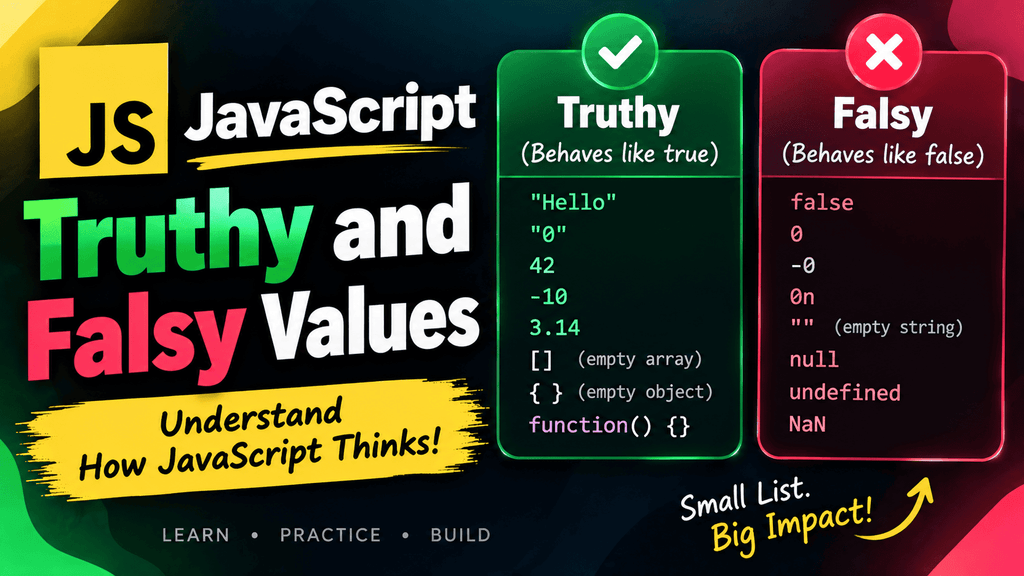
Understanding this behavior is important because truthy and falsy values appear frequently when working with if statements, loops, logical operators, functions, form validation, user input, arrays, objects, and JavaScript applications.
In this tutorial, you will learn what truthy and falsy values are, which JavaScript values are falsy, how other values become truthy, and what Boolean context means in practical JavaScript programming.
What Are Truthy and Falsy Values in JavaScript?
A truthy value is a value that JavaScript treats as true when the value is evaluated in a Boolean context.
A falsy value is a value that JavaScript treats as false when the value is evaluated in a Boolean context.
It is important to understand that truthy and falsy do not mean that the value itself is literally true or false.
For example:
let name = "Karim";

if (name) {
    console.log("Name is available");
}
The value of name is the string "Karim", not the Boolean value true. However, because a non-empty string is truthy, JavaScript allows the condition to execute.
The same concept works with numbers:
let age = 25;

if (age) {
    console.log("Age exists");
}
The number 25 is truthy, so the message is printed.
Now consider 0:
let age = 0;

if (age) {
    console.log("Age exists");
}
Nothing is printed because 0 is a falsy value.
This automatic evaluation is one of the reasons understanding JavaScript truthiness is essential for writing reliable conditions.
Truthy Values
A truthy value is any JavaScript value that is treated as true when JavaScript expects a Boolean value.
There are many more truthy values than falsy values. In fact, almost every JavaScript value is truthy.
Some common truthy values include:
true
1
-1
42
"Hello"
"JavaScript"
"0"
"false"
[]
{}
function() {}
Notice something important here: even the string "0" and the string "false" are truthy.
This happens because they are non-empty strings.
Non-Empty Strings Are Truthy
Any non-empty string is truthy.
if ("Hello") {
    console.log("This is truthy");
}
The message is printed because "Hello" contains characters.
The same applies to strings containing numbers:
if ("100") {
    console.log("The string is truthy");
}
Even though "100" looks like a number, it is a string, and because it is not empty, JavaScript treats it as truthy.
The String "0" Is Truthy
A common beginner mistake is assuming that "0" is falsy because 0 is falsy.
However, these are different values:
0
and:
"0"
The first is a number, while the second is a string.
For example:
if (0) {
    console.log("Number zero");
}

if ("0") {
    console.log("String zero");
}
The first condition does not execute, but the second condition does.
The String "false" Is Truthy
The same behavior occurs with "false".
if ("false") {
    console.log("This will run");
}
Although the text says false, it is still a non-empty string. Therefore, JavaScript treats it as truthy.
This distinction becomes particularly important when handling values received from forms, URLs, APIs, or browser storage.
Positive and Negative Numbers Are Truthy
Most numbers other than 0 and NaN are truthy.
if (10) {
    console.log("10 is truthy");
}

if (-10) {
    console.log("-10 is truthy");
}
Both conditions execute.
Decimal numbers are also truthy:
if (3.14) {
    console.log("3.14 is truthy");
}
Arrays Are Truthy
Arrays are objects in JavaScript, and even an empty array is truthy.
if ([]) {
    console.log("The array is truthy");
}
The message is printed.
This can sometimes surprise beginners because an empty array may seem like it should represent “nothing.”
However:
Boolean([]);
returns:
true
An important consequence is that you should not use an array directly in a condition if your actual goal is to check whether the array contains elements.
For example:
let users = [];

if (users) {
    console.log("Users exist");
}
This condition executes because the array itself is truthy, even though it contains no elements.
To check whether the array has items, use:
if (users.length > 0) {
    console.log("Users exist");
}
Objects Are Truthy
Objects are also truthy, including empty objects.
let user = {};

if (user) {
    console.log("The object is truthy");
}
The condition executes.
This is another important distinction because an empty object is still an existing object.
If you want to check whether an object contains properties, you need to check its keys or another appropriate condition.
let user = {};

if (Object.keys(user).length > 0) {
    console.log("The object contains data");
}
Functions Are Truthy
Functions are also truthy values.
function greet() {
    console.log("Hello");
}

if (greet) {
    console.log("The function exists");
}
The condition executes because the function itself is a truthy value.
Falsy Values
Falsy values are values that JavaScript treats as false when they are evaluated in a Boolean context.
JavaScript has a relatively small set of falsy values. Learning these values is important because they commonly appear in conditions.
The main falsy values are:
false
0
-0
0n
""
null
undefined
NaN
These values behave as false when JavaScript needs to evaluate them as Boolean values.
false
The Boolean value false is naturally falsy.
if (false) {
    console.log("This will not execute");
}
The condition does not run.
0
The number 0 is falsy.
if (0) {
    console.log("This will not execute");
}
JavaScript treats numeric zero as false in a Boolean context.
-0
JavaScript also treats negative zero as falsy.
if (-0) {
    console.log("This will not execute");
}
Although -0 and 0 can have some technical differences in JavaScript, both are falsy.
0n
The BigInt value 0n is also falsy.
if (0n) {
    console.log("This will not execute");
}
This is worth remembering when working with BigInt values.
Empty String ""
An empty string is falsy.
if ("") {
    console.log("This will not execute");
}
There are no characters inside the string, so JavaScript treats it as falsy.
However, a string containing even one character is truthy.
if (" ") {
    console.log("This will execute");
}
The string contains a space character, so it is not empty.
null
The value null is falsy.
let username = null;

if (username) {
    console.log("Username exists");
}
The condition does not execute.
null is commonly used to represent an intentional absence of a value.
undefined
The value undefined is also falsy.
let username;

if (username) {
    console.log("Username exists");
}
Since username has not been assigned a value, it contains undefined, which is falsy.
NaN
NaN means Not-a-Number, and it is falsy.
let result = NaN;

if (result) {
    console.log("This will not execute");
}
You should remember that NaN is a special numeric value representing an invalid or unrepresentable numerical result.
Falsy Values Cheat Sheet
The following table summarizes the primary falsy values in JavaScript:
| Value | Type | Falsy? |
|---|---|---|
false | Boolean | Yes |
0 | Number | Yes |
-0 | Number | Yes |
0n | BigInt | Yes |
"" | String | Yes |
null | Null | Yes |
undefined | Undefined | Yes |
NaN | Number | Yes |
Everything else is generally truthy, including empty arrays and empty objects.
Truthy and Falsy Values Compared
| Value | Result in Boolean Context |
|---|---|
true | Truthy |
false | Falsy |
1 | Truthy |
0 | Falsy |
-1 | Truthy |
"" | Falsy |
"Hello" | Truthy |
"0" | Truthy |
"false" | Truthy |
null | Falsy |
undefined | Falsy |
NaN | Falsy |
[] | Truthy |
{} | Truthy |
function() {} | Truthy |
Boolean Context
A Boolean context is a situation where JavaScript expects a value to be interpreted as either true or false.
JavaScript automatically converts the value to its Boolean equivalent when necessary.
For example:
let username = "Karim";

if (username) {
    console.log("Welcome!");
}
The if statement creates a Boolean context.
JavaScript evaluates:
username
as a Boolean value.
Because "Karim" is truthy, the condition becomes effectively:
if (true) {
    console.log("Welcome!");
}
You do not have to manually write Boolean(username) for the if statement.
Boolean Context With if
The if statement is one of the most common places where Boolean context appears.
let age = 25;

if (age) {
    console.log("Age has a truthy value");
}
Because 25 is truthy, the code executes.
Now consider:
let age = 0;

if (age) {
    console.log("Age has a truthy value");
}
The code does not execute because 0 is falsy.
This does not necessarily mean that 0 is an invalid value. It only means that JavaScript treats 0 as false in this particular Boolean context.
Boolean Context With while
Boolean contexts also appear in loops.
For example:
let count = 3;

while (count) {
    console.log(count);
    count--;
}
The loop continues while count is truthy.
The values are:
3
2
1
When count becomes 0, it becomes falsy and the loop stops.
Boolean Context With Logical Operators
Logical operators also work with truthy and falsy values.
Consider the && operator:
let username = "Karim";

username && console.log("User exists");
Because username contains a non-empty string, it is truthy, so the second expression is evaluated.
Similarly, || can be used to provide a fallback value:
let username = "";

let displayName = username || "Guest";

console.log(displayName);
Output:
Guest
The empty string is falsy, so JavaScript evaluates the value on the right side of ||.
Boolean Context With the NOT Operator
The logical NOT operator ! converts a value to a Boolean and reverses the result.
console.log(!true);
Output:
false
For a truthy value:
console.log(!"Hello");
Output:
false
Because "Hello" is truthy, ! changes it to false.
For a falsy value:
console.log(!0);
Output:
true
Because 0 is falsy, !0 becomes true.
Converting a Value to Boolean With Boolean()
You can explicitly convert a value to a Boolean using the Boolean() function.
console.log(Boolean("Hello"));
Output:
true
Another example:
console.log(Boolean(""));
Output:
false
You can use Boolean() to clearly inspect whether a value is truthy or falsy.
console.log(Boolean(100));
console.log(Boolean(0));
console.log(Boolean([]));
console.log(Boolean({}));
console.log(Boolean(null));
Output:
true
false
true
true
false
Using Double NOT !!
Another common technique for converting a value into a Boolean is the double NOT operator.
console.log(!!"JavaScript");
Output:
true
And:
console.log(!!0);
Output:
false
The first ! converts the value to a Boolean and reverses it. The second ! reverses it again.
Therefore:
!!value
produces the Boolean representation of that value.
Truthy and Falsy Values in Form Validation
Truthy and falsy values are frequently useful when validating user input.
For example:
let username = "";

if (!username) {
    console.log("Please enter your username");
}
Because the empty string is falsy, !username becomes true.
For a filled username:
let username = "Karim";

if (!username) {
    console.log("Please enter your username");
} else {
    console.log("Username entered successfully");
}
This allows you to perform a simple presence check.
However, remember that whitespace-only strings are truthy:
let username = " ";

if (username) {
    console.log("Username exists");
}
This condition executes because the string contains a space.
For real form validation, you may want to remove surrounding whitespace:
let username = "   ";

if (!username.trim()) {
    console.log("Please enter your username");
}
Now the trimmed value becomes an empty string, which is falsy.
Truthy and Falsy Values With Default Values
A common use of truthy and falsy values is providing fallback values.
let username = "";

let name = username || "Guest";

console.log(name);
Output:
Guest
Because username is an empty string, which is falsy, JavaScript uses "Guest".
Another example:
let theme = null;

let selectedTheme = theme || "light";

console.log(selectedTheme);
Output:
light
This technique is useful, but you should be careful because || treats several different values as falsy.
If 0, false, or an empty string are valid values that you want to preserve, the nullish coalescing operator ?? may be more appropriate.
For example:
let score = 0;

let finalScore = score ?? 100;

console.log(finalScore);
Output:
0
Unlike ||, the ?? operator only falls back when the value is null or undefined.
A Common Mistake With Empty Arrays
One of the most important things beginners should understand is that an empty array is truthy.
Consider:
let products = [];

if (products) {
    console.log("Products are available");
}
The message is printed.
However, there are no products inside the array.
If your intention is to check whether the array contains at least one element, use:
if (products.length > 0) {
    console.log("Products are available");
}
This checks the actual number of elements rather than simply checking whether the array object exists.
A Common Mistake With Empty Objects
The same concept applies to objects.
let user = {};

if (user) {
    console.log("User exists");
}
The condition executes because {} is truthy.
If you want to check whether the object has properties, you can use:
if (Object.keys(user).length > 0) {
    console.log("User contains information");
}
This is a much more meaningful check when your goal is to determine whether an object contains data.
Truthy and Falsy Values in Functions
Truthy and falsy values are frequently used when checking function arguments.
function greet(name) {
    if (name) {
        console.log("Hello " + name);
    } else {
        console.log("Hello Guest");
    }
}

greet("Karim");
greet("");
The first call receives a truthy value, so the name is displayed.
The second call receives an empty string, which is falsy, so the function uses the fallback message.
Truthy and Falsy Values With Numbers
Be careful when using numbers directly in conditions because 0 is falsy.
For example:
let score = 0;

if (score) {
    console.log("Score exists");
}
Nothing is printed.
If 0 is a valid score and your goal is to check whether a score was provided, this condition may not express your intention correctly.
Instead, you may need a more specific check:
if (score !== undefined) {
    console.log("Score was provided");
}
This distinction is important in applications such as games, financial systems, counters, forms, and data processing.
Truthy and Falsy Values With User Input
Suppose you receive a value from an input field:
let email = document.querySelector("#email").value;

if (!email) {
    console.log("Email is required");
}
If the input is empty, .value returns an empty string, which is falsy.
This allows the condition to detect that the user has not entered anything.
A more robust validation might be:
let email = document.querySelector("#email").value.trim();

if (!email) {
    console.log("Email is required");
}
Using trim() prevents a user from entering only spaces and having that input treated as valid.
Truthy and Falsy Values vs Boolean Values
Truthy and falsy values should not be confused with actual Boolean values.
Consider:
let value = "Hello";
The value itself is a string:
typeof value
returns:
string
But when used in a Boolean context:
if (value) {
    console.log("Truthy");
}
JavaScript treats it as true.
You can see the Boolean representation explicitly:
console.log(Boolean(value));
Output:
true
Therefore, truthy does not mean the value is a Boolean. It means JavaScript evaluates that value as true when a Boolean value is required.
Common Mistakes With Truthy and Falsy Values
Assuming "false" Is Falsy
This is incorrect:
if ("false") {
    console.log("This will not execute");
}
The condition actually executes because "false" is a non-empty string.
Assuming "0" Is Falsy
This is also incorrect:
if ("0") {
    console.log("This will execute");
}
The string "0" is truthy.
Assuming Empty Arrays Are Falsy
An empty array is truthy:
Boolean([]);
The result is:
true
Assuming Empty Objects Are Falsy
An empty object is also truthy:
Boolean({});
The result is:
true
Using a Truthiness Check When You Need an Exact Check
Sometimes truthiness is convenient, but sometimes you need to check a specific value.
For example:
let score = 0;
If zero is a valid score, this:
if (score) {
    console.log("Score available");
}
does not distinguish between 0 and an absent value.
A more precise check might be:
if (score !== undefined) {
    console.log("Score available");
}
Always choose the condition that represents the actual requirement of your program.
Best Practices for Using Truthy and Falsy Values
Use truthiness when your intention is simply to determine whether a value is present or usable in a Boolean context.
if (username) {
    console.log("Username provided");
}
Use explicit comparisons when the exact value matters.
if (score === 0) {
    console.log("The score is exactly zero");
}
Remember that empty arrays and objects are truthy, so check .length or object properties when you need to determine whether they contain data.
Be particularly careful with values such as 0, false, and "" when they are legitimate application values.
Use Boolean() when you want to explicitly convert a value and make the conversion clear:
const isLoggedIn = Boolean(user);
For modern JavaScript, understand the difference between || and ?? when providing fallback values.
Truthy and Falsy Quick Reference
| Value | Truthy/Falsy |
|---|---|
true | Truthy |
false | Falsy |
1 | Truthy |
0 | Falsy |
-1 | Truthy |
"" | Falsy |
"Hello" | Truthy |
"0" | Truthy |
"false" | Truthy |
null | Falsy |
undefined | Falsy |
NaN | Falsy |
[] | Truthy |
{} | Truthy |
0n | Falsy |
42n | Truthy |
function() {} | Truthy |
Why Truthy and Falsy Values Matter in JavaScript
Truthy and falsy values are not just a small JavaScript concept. They are part of everyday JavaScript development.
You will encounter them when writing:
- Conditional statements
- Loops
- Form validation
- Functions
- User authentication
- Search functionality
- API responses
- Shopping carts
- Games
- User interfaces
- Default values
- Logical expressions
- Data filtering
- Input validation
Once you understand which values are truthy and which values are falsy, many JavaScript expressions become easier to read and understand.
Frequently Asked Questions
What is a truthy value in JavaScript?
A truthy value is any value that JavaScript evaluates as true when the value is used in a Boolean context. Examples include non-empty strings, non-zero numbers, arrays, objects, and functions.
What is a falsy value in JavaScript?
A falsy value is a value that JavaScript evaluates as false in a Boolean context. Common falsy values include false, 0, "", null, undefined, NaN, -0, and 0n.
Is an empty array falsy in JavaScript?
No. An empty array is truthy.
Boolean([]);
returns:
true
Is an empty object falsy in JavaScript?
No. An empty object is also truthy.
Boolean({});
returns:
true
Is the string "false" falsy?
No. "false" is a non-empty string, so JavaScript treats it as truthy.
Is the string "0" falsy?
No. The string "0" is truthy. The numeric value 0 is falsy.
How can I check whether a value is truthy or falsy?
You can use Boolean():
Boolean(value);
You can also use double NOT:
!!value;
What is a Boolean context?
A Boolean context is a situation where JavaScript needs to interpret a value as either true or false. Common examples include if, while, logical operators, and the conditional operator.
Why is 0 falsy?
JavaScript defines numeric zero as a falsy value. Therefore, when 0 is used in a Boolean context, it is treated as false.
Why are arrays and objects truthy even when empty?
Arrays and objects are objects in JavaScript, and object values are truthy regardless of whether they contain elements or properties. If you need to check whether they contain data, perform a more specific check.