
null is a special value in JavaScript that represents the intentional absence of a value. It is commonly used when a developer wants to explicitly indicate that a variable, object property, or application state currently has no meaningful value.
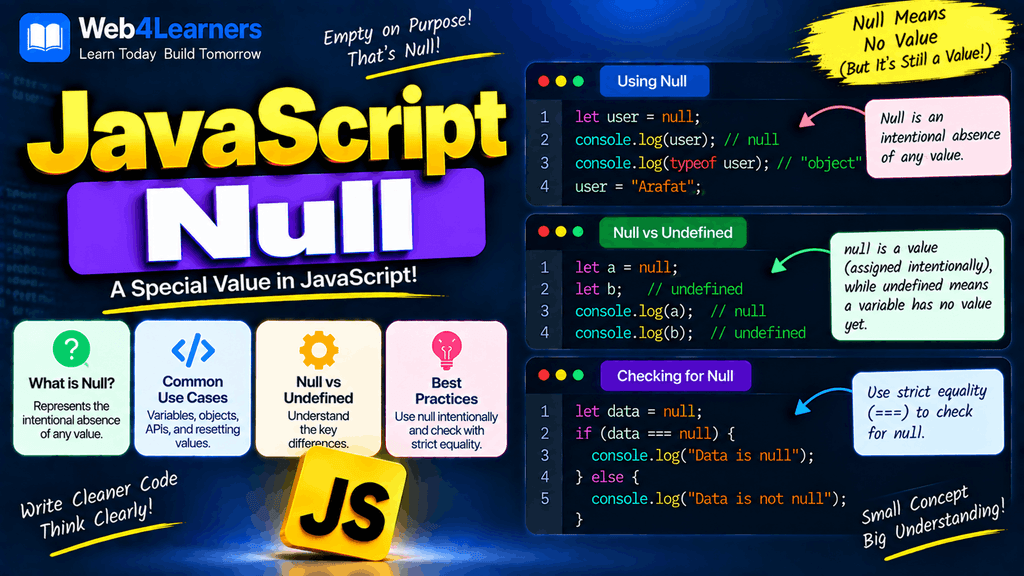
For example:
let userProfile = null;

console.log(userProfile);
Output:
nullIn this example, userProfile exists as a variable, but its value is intentionally set to null. This can communicate that a profile does not currently exist, has not been loaded yet, or has deliberately been cleared.
Understanding null is important because it behaves differently from undefined, even though both values are often associated with missing or unavailable data. You will encounter null when working with objects, APIs, databases, form data, application state, and conditional logic.
In this tutorial, you will learn what null means in JavaScript, how to create and use it, how it differs from undefined, how JavaScript treats null in comparisons, how to check for null values, how null works with logical operators and the nullish coalescing operator, and the common mistakes beginners should avoid.
What Is Null in JavaScript?
null is a primitive value that represents the intentional absence of an object or other value.
For example:
let selectedUser = null;

console.log(selectedUser);
Output:
nullThe important word here is intentional.
When you write:
let selectedUser;JavaScript automatically gives the variable the value undefined.
But when you write:
let selectedUser = null;you are explicitly telling JavaScript that the variable currently has no value.
This distinction becomes particularly useful when designing applications where you need to represent a known empty or unavailable state.
Creating a Null Value
You can assign null directly to a variable.
let value = null;

console.log(value);
Output:
nullYou can also assign null to an object property.
let user = {
    name: "John",
    profilePicture: null
};

console.log(user.profilePicture);
Output:
nullThis can mean that the user currently does not have a profile picture.
Checking the Type of Null
There is a famous JavaScript behavior that often confuses beginners.
Consider:
let value = null;

console.log(typeof value);
The output is:
objectAlthough null is a primitive value, typeof null returns "object".
This is a long-standing behavior in JavaScript and is generally considered a historical language quirk. It does not mean that null is actually an object.
Therefore, if you specifically want to check whether a value is null, do not rely on:
typeof value === "object"Instead, use a direct comparison:
value === nullChecking Whether a Value Is Null
The simplest way to check for null is strict equality.
let value = null;

if (value === null) {
    console.log("The value is null.");
}
Output:
The value is null.You can also use:
if (value !== null) {
    console.log("The value is not null.");
}
Strict equality is useful because it checks both the value and its type.
Null vs Undefined
One of the most important concepts to understand is the difference between null and undefined.
Consider:
let a;
let b = null;

console.log(a);
console.log(b);
Output:
undefined
null
The variable a was declared without a value, so JavaScript gives it undefined.
The variable b was deliberately assigned null.
Null vs Undefined comparison
| Feature | null | undefined |
|---|---|---|
| Meaning | Intentional absence of a value | Value has not been assigned or is unavailable |
Type with typeof | "object" | "undefined" |
| Automatically assigned? | Usually no | Yes, in several situations |
| Can be assigned manually? | Yes | Yes |
| Common use | Explicitly empty value | Missing or uninitialized value |
| Missing object property | Usually returns undefined | Commonly returned |
| Default parameter triggered? | No | Yes |
For example:
let username;
console.log(username);
produces:
undefinedWhile:
let username = null;
console.log(username);
produces:
nullWhy Use Null Instead of Undefined?
There is no universal rule that says null must always be used instead of undefined. The appropriate choice depends on the meaning you want your application to communicate.
For example, suppose an application loads a user’s profile from a server.
Before the data is loaded, you might use:
let userProfile = null;This can clearly communicate that the application currently has no profile object.
Similarly, when a user logs out, you might intentionally clear their session-related state:
let currentUser = {
    name: "John"
};

currentUser = null;
Now the variable explicitly represents the absence of a current user.
Null With Objects
null is commonly used when an object does not currently exist.
For example:
let currentUser = null;

if (currentUser === null) {
    console.log("No user is currently logged in.");
}
Output:
No user is currently logged in.After a user logs in, you could assign an object:
currentUser = {
    name: "John",
    email: "john@example.com"
};
The same variable has now moved from an intentional empty state to an object containing user information.
This pattern is common in web applications.
Null With Object Properties
An object property can intentionally contain null.
let user = {
    name: "John",
    phone: null
};
Here, the phone property exists, but its value is intentionally empty.
This is different from:
let user = {
    name: "John"
};
In the second example, the phone property does not exist at all.
console.log(user.phone);The result is:
undefinedSo there is an important difference:
Property does not exist → undefined
Property exists but is intentionally empty → null
This distinction can be particularly useful when working with APIs and databases.
Null in Conditional Statements
You can use null in conditions.
let user = null;

if (user === null) {
    console.log("User data is unavailable.");
}
Output:
User data is unavailable.You can also use the value directly in a condition:
if (user) {
    console.log("User exists.");
} else {
    console.log("User does not exist.");
}
Because null is a falsy value, the else block runs.
Null Is a Falsy Value
null is one of JavaScript’s falsy values.
For example:
console.log(Boolean(null));Output:
falseThis means that when null is evaluated in a Boolean context, JavaScript treats it as false.
let user = null;

if (user) {
    console.log("User exists.");
} else {
    console.log("No user.");
}
Output:
No user.Other common falsy values include:
false
0
-0
0n
""
null
undefined
NaN
Understanding falsy values is important when working with conditions and default values.
Null and the Boolean Function
You can explicitly convert null into a Boolean.
let value = null;

console.log(Boolean(value));
Output:
falseThe same behavior occurs when using the double NOT operator:
console.log(!!null);Output:
falseNull With Equality Operators
JavaScript has an interesting behavior when comparing null with undefined.
Using loose equality:
console.log(null == undefined);Output:
trueBut using strict equality:
console.log(null === undefined);Output:
falseThis happens because == performs type coercion according to JavaScript’s equality rules, while === requires the values and types to match.
In most modern JavaScript code, strict equality is preferred when you need a specific and predictable comparison.
value === nullis therefore a clear way to check specifically for null.
Null With Numbers
When null is used in certain numeric operations, JavaScript may convert it to 0.
For example:
console.log(null + 10);Output:
10Similarly:
console.log(null * 5);Output:
0This happens because JavaScript’s numeric conversion rules convert null to 0 in these arithmetic contexts.
However, you should not assume that every operation involving null behaves as if it were simply the number zero.
For example:
console.log(null + "10");Output:
null10The presence of a string changes the behavior of the + operator because + can perform string concatenation.
This is one reason why explicit type handling is preferable when writing code that processes different kinds of values.
Null and the Nullish Coalescing Operator
The nullish coalescing operator ?? is particularly useful when working with null and undefined.
It allows you to provide a fallback value when the left-hand side is either null or undefined.
For example:
let username = null;

let displayName = username ?? "Guest";

console.log(displayName);
Output:
GuestBecause username is null, JavaScript uses "Guest".
The same works with undefined:
let username;

let displayName = username ?? "Guest";

console.log(displayName);
Output:
GuestNullish Coalescing vs OR Operator
The difference between ?? and || is important.
The || operator uses the right-hand value whenever the left-hand value is falsy.
The ?? operator uses the right-hand value only when the left-hand value is null or undefined.
For example:
let score = 0;

console.log(score || 100);
Output:
100Because 0 is falsy, the OR operator chooses 100.
Now consider:
let score = 0;

console.log(score ?? 100);
Output:
0Because 0 is not null or undefined, the nullish coalescing operator keeps it.
This makes ?? useful when values such as 0, false, and "" are valid values that should not automatically be replaced.
Null and Optional Chaining
Optional chaining ?. is another useful feature when working with potentially null values.
Consider:
let user = null;Trying to access:
console.log(user.name);causes an error because you are trying to access a property on null.
Instead, you can use optional chaining:
console.log(user?.name);The result is:
undefinedOptional chaining prevents the property access from throwing an error when the value before ?. is null or undefined.
This is particularly useful when working with API data and nested objects.
Null in APIs
API responses often contain null when a particular piece of information is intentionally unavailable.
For example, an API might return data like:
let user = {
    name: "John",
    phone: null,
    website: null
};
The application can interpret these values as fields that exist but currently do not contain information.
You can provide a fallback:
let phone = user.phone ?? "Phone number not available";

console.log(phone);
Output:
Phone number not availableThis pattern is common when displaying data from APIs.
Null in Form Data
Suppose a website allows users to optionally provide a profile picture.
You might represent the initial state as:
let profilePicture = null;When the user uploads an image, the variable can hold the resulting value.
profilePicture = "profile.jpg";If the user removes the picture:
profilePicture = null;This makes null useful for representing an intentionally empty state.
Removing an Object Reference With Null
You can assign null to a variable that previously referenced an object.
let user = {
    name: "John",
    age: 25
};

console.log(user);

user = null;

console.log(user);
The second output is:
nullThe variable no longer references that object.
In JavaScript’s memory management model, objects that are no longer reachable can eventually become eligible for garbage collection. Assigning null can sometimes be part of explicitly clearing an application reference, although it is not generally necessary just to make memory available.
Null With Arrays
An array can contain null values.
let values = [10, null, 30];

console.log(values);
Output:
[10, null, 30]Here, the second element intentionally contains null.
This is different from an array position that has never been assigned an element.
let values = [];

values[2] = 30;

console.log(values);
This creates a sparse array where the missing position is a hole rather than an explicitly stored null value.
The distinction can matter when processing arrays.
Null and JSON
Unlike undefined, null has a direct representation in JSON.
For example:
let user = {
    name: "John",
    phone: null
};

console.log(JSON.stringify(user));
Output:
{"name":"John","phone":null}This makes null useful when communicating explicitly empty values through APIs.
Compare this with undefined:
let user = {
    name: "John",
    phone: undefined
};

console.log(JSON.stringify(user));
The phone property is omitted from the resulting JSON.
This difference is important when sending JavaScript objects to servers.
Practical Example Using Null
Consider a simple user authentication state:
let currentUser = null;

if (currentUser === null) {
    console.log("Please log in.");
}
Output:
Please log in.After login:
currentUser = {
    name: "John",
    email: "john@example.com"
};

if (currentUser !== null) {
    console.log(`Welcome, ${currentUser.name}!`);
}
Output:
Welcome, John!Here, null clearly represents the state where no user is currently available.
Practical Example With API Data
Suppose an application receives:
let product = {
    name: "Laptop",
    discount: null,
    stock: 20
};
You can use ?? to provide a fallback:
let discount = product.discount ?? 0;

console.log(`Discount: ${discount}%`);
Output:
Discount: 0%Because the API returned null, the application uses 0 as the fallback.
Common Mistakes With Null
Confusing Null With Undefined
These are different:
let a;
let b = null;

console.log(a); // undefined
console.log(b); // null
Do not assume that undefined and null always mean exactly the same thing.
Using typeof to Check for Null
This is not a reliable null check:
typeof value === "object"because arrays, objects, and null can all produce "object" in different contexts.
Use:
value === nullwhen you specifically want to check for null.
Trying to Access Properties on Null
This causes an error:
let user = null;

console.log(user.name);
Use optional chaining when appropriate:
console.log(user?.name);Using || When 0 or false Is Valid
Consider:
let quantity = 0;

let result = quantity || 10;

console.log(result);
The result is 10, even though 0 may be a valid value.
Use:
let result = quantity ?? 10;when you only want a fallback for null or undefined.
Assuming Null Is an Object
Although:
typeof nullreturns:
objectnull itself is a primitive value.
This is a historical behavior of JavaScript and should not be interpreted as proof that null is an object.
JavaScript Null Cheat Sheet
| Task | Example |
|---|---|
| Create null | let value = null; |
| Check for null | value === null |
| Check not null | value !== null |
| Boolean conversion | Boolean(null) |
| Truthiness | null is falsy |
| Typeof null | typeof null → "object" |
| Null + number | null + 10 → 10 |
| Null equality | null == undefined → true |
| Strict equality | null === undefined → false |
| Nullish fallback | value ?? "Default" |
| Optional chaining | value?.property |
| JSON representation | null |
Frequently Asked Questions About JavaScript Null
What is null in JavaScript?
null is a primitive value used to intentionally represent the absence of a value.
What is the difference between null and undefined?
undefined commonly indicates that a value has not been assigned or is unavailable, while null is generally assigned intentionally to represent an empty or absent value.
What is the type of null?
The expression:
typeof nullreturns:
objectThis is a historical JavaScript behavior. null is still considered a primitive value.
How do you check if a value is null?
Use strict equality:
if (value === null) {
    console.log("Value is null.");
}
Is null a falsy value?
Yes. null is one of JavaScript’s falsy values.
Boolean(null); // falseCan null be used inside an object?
Yes. It is common to use null for object properties that currently have no meaningful value.
let user = {
    phone: null
};
Can null be stored in an array?
Yes.
let values = [10, null, 30];Can you add null to a number?
JavaScript converts null to 0 in numeric arithmetic.
console.log(null + 10);Output:
10What is the difference between ?? and ||?
?? uses a fallback only for null or undefined, while || uses a fallback for any falsy value, including 0, false, and an empty string.
Why does typeof null return object?
This is a historical quirk in JavaScript that has been retained for compatibility with existing code. It does not mean that null is actually an object.