
HTML text formatting is used to change the appearance or meaning of text on a web page. HTML provides several elements for making text bold, italic, emphasized, highlighted, smaller, deleted, inserted, and subscripted or superscripted.
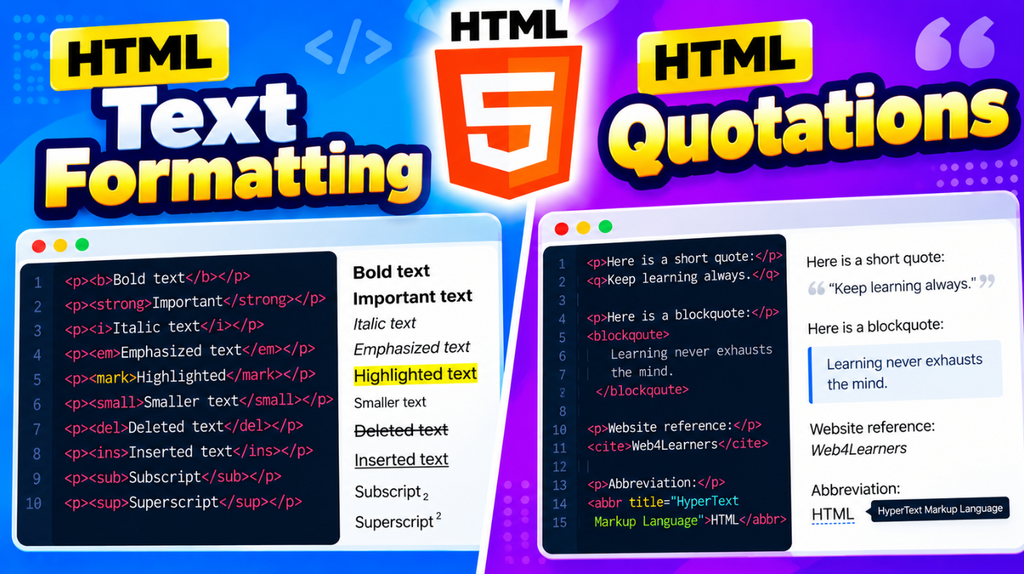
Text formatting can make content easier to read and can also provide semantic meaning to important parts of the content.
What Is HTML Text Formatting?
HTML text formatting elements are used to define how specific text should be displayed or understood.
For example:
<p>This is <strong>important</strong> information.</p>
The <strong> element indicates that the text has strong importance.
HTML provides several text formatting elements for different purposes.
Common HTML Text Formatting Elements
| Element | Purpose |
|---|---|
<b> | Displays text in bold |
<strong> | Indicates important text |
<i> | Displays text in an alternate voice or mood |
<em> | Emphasizes text |
<mark> | Highlights text |
<small> | Displays smaller text |
<del> | Represents deleted text |
<ins> | Represents inserted text |
<sub> | Displays subscript text |
<sup> | Displays superscript text |
HTML Bold Text
The <b> element is used to draw attention to text without adding special importance.
<p>This is <b>bold text</b>.</p>
For example:
<p>Learn <b>HTML</b> with practical examples.</p>
When the text has semantic importance, <strong> is generally more appropriate.
HTML Strong Text
The <strong> element indicates that the text is important.
<p>Please read the <strong>important instructions</strong>.</p>
Browsers usually display <strong> text in bold, but its main purpose is to communicate importance.
HTML Italic Text
The <i> element represents text in an alternate voice or mood.
<p>This word is <i>italic</i>.</p>
It can be useful for terms, technical names, or text that is conventionally displayed in italics.
HTML Emphasized Text
The <em> element is used to add emphasis to text.
<p>You <em>must</em> complete this step.</p>
Browsers normally display emphasized text in italics.
The difference between <i> and <em> is that <em> provides semantic emphasis, while <i> is used for text that is stylistically or conventionally offset from the surrounding content.
HTML Highlighted Text
The <mark> element is used to highlight text.
<p>HTML is a <mark>markup language</mark>.</p>
Browsers normally display marked text with a highlighted background.
HTML Smaller Text
The <small> element represents smaller text.
<p>This is normal text.</p>
<p><small>This is smaller text.</small></p>
It can be useful for notes, disclaimers, copyright information, or secondary details.
HTML Deleted Text
The <del> element represents text that has been deleted.
<p>Old price: <del>₹999</del></p>
It is commonly used to show an old price when displaying discounts.
HTML Inserted Text
The <ins> element represents text that has been inserted into a document.
<p>New price: <ins>₹799</ins></p>
Browsers commonly display inserted text with an underline.
HTML Subscript Text
The <sub> element displays text below the normal text line.
It is useful for chemical formulas.
<p>Water is H<sub>2</sub>O.</p>
The number 2 appears as a subscript.
HTML Superscript Text
The <sup> element displays text above the normal text line.
It is commonly used for mathematical expressions and references.
<p>10<sup>2</sup> = 100</p>
The 2 appears as superscript text.
Combining HTML Text Formatting Elements
You can combine multiple formatting elements when necessary.
<p>
    Learn <strong>HTML</strong> and <em>practice</em> every day to become a better <mark>web developer</mark>.
</p>
However, avoid adding formatting elements unnecessarily. Each element should have a clear purpose.
HTML Text Formatting Example
<!DOCTYPE html>
<html>
<head>
    <title>HTML Text Formatting</title>
</head>
<body>

    <h1>HTML Text Formatting</h1>

    <p>This is <b>bold text</b>.</p>

    <p>This is <strong>important text</strong>.</p>

    <p>This is <i>italic text</i>.</p>

    <p>This is <em>emphasized text</em>.</p>

    <p>This is <mark>highlighted text</mark>.</p>

    <p>This is <small>small text</small>.</p>

    <p><del>Old Price: ₹999</del></p>

    <p><ins>New Price: ₹799</ins></p>

    <p>H<sub>2</sub>O</p>

    <p>10<sup>2</sup> = 100</p>

</body>
</html>
HTML Quotations
HTML quotations are used to display quoted text from another person, source, book, website, or document. HTML provides different elements for short quotations, long quotations, citations, and contact information.
The main quotation-related elements are <q>, <blockquote>, <cite>, and <address>.
What Are HTML Quotations?
HTML quotation elements allow you to identify text as a quotation.
For example:
<p>He said, <q>HTML is easy to learn.</q></p>
The <q> element is designed for short inline quotations.
HTML <q> Element
The <q> element is used for a short quotation within a sentence.
- <p>My teacher said, <q>Practice HTML every day.</q></p>
- Browsers usually add quotation marks automatically around the content.
- The
<q>element is useful when the quotation is short and forms part of the surrounding paragraph.
HTML <blockquote> Element
The <blockquote> element is used for longer quotations that are displayed as a separate block.
<blockquote>
    HTML provides the structure of a web page, while CSS is used to control its presentation.
</blockquote>
It is suitable for longer quotations from another source.
<q> vs <blockquote>
| Element | Purpose |
|---|---|
<q> | Short inline quotation |
<blockquote> | Longer block quotation |
<cite> | Title or citation of a creative work or source |
<address> | Contact information for the relevant content |
For example:
<p>She said, <q>Learning HTML is important.</q></p>
For a longer quotation:
<blockquote>
    HTML is the standard markup language used to structure content on the web.
</blockquote>
HTML <blockquote> with Citation
You can use the cite attribute with <blockquote> to identify the source of a quotation.
<blockquote cite="https://example.com">
    HTML is used to structure content on web pages.
</blockquote>
The cite attribute identifies the source of the quotation.
It does not normally display the URL on the page.
HTML <cite> Element
The <cite> element is used to identify the title of a creative work, such as a book, movie, article, or other published work.
<p>I am reading <cite>HTML and CSS</cite>.</p>
The browser typically displays <cite> text in italics.
HTML Quotations Example
<!DOCTYPE html>
<html>
<head>
    <title>HTML Quotations</title>
</head>
<body>

    <h1>HTML Quotations</h1>

    <h2>Short Quotation</h2>

    <p>My teacher said, <q>Practice HTML every day.</q></p>

    <h2>Long Quotation</h2>

    <blockquote>
        HTML is the standard markup language used to create and structure
        content on web pages.
    </blockquote>

    <h2>Citation</h2>

    <p>Read more about HTML in <cite>HTML Documentation</cite>.</p>

</body>
</html>
1 thought on “HTML Text Formatting & Quotations”
Comments are closed.